
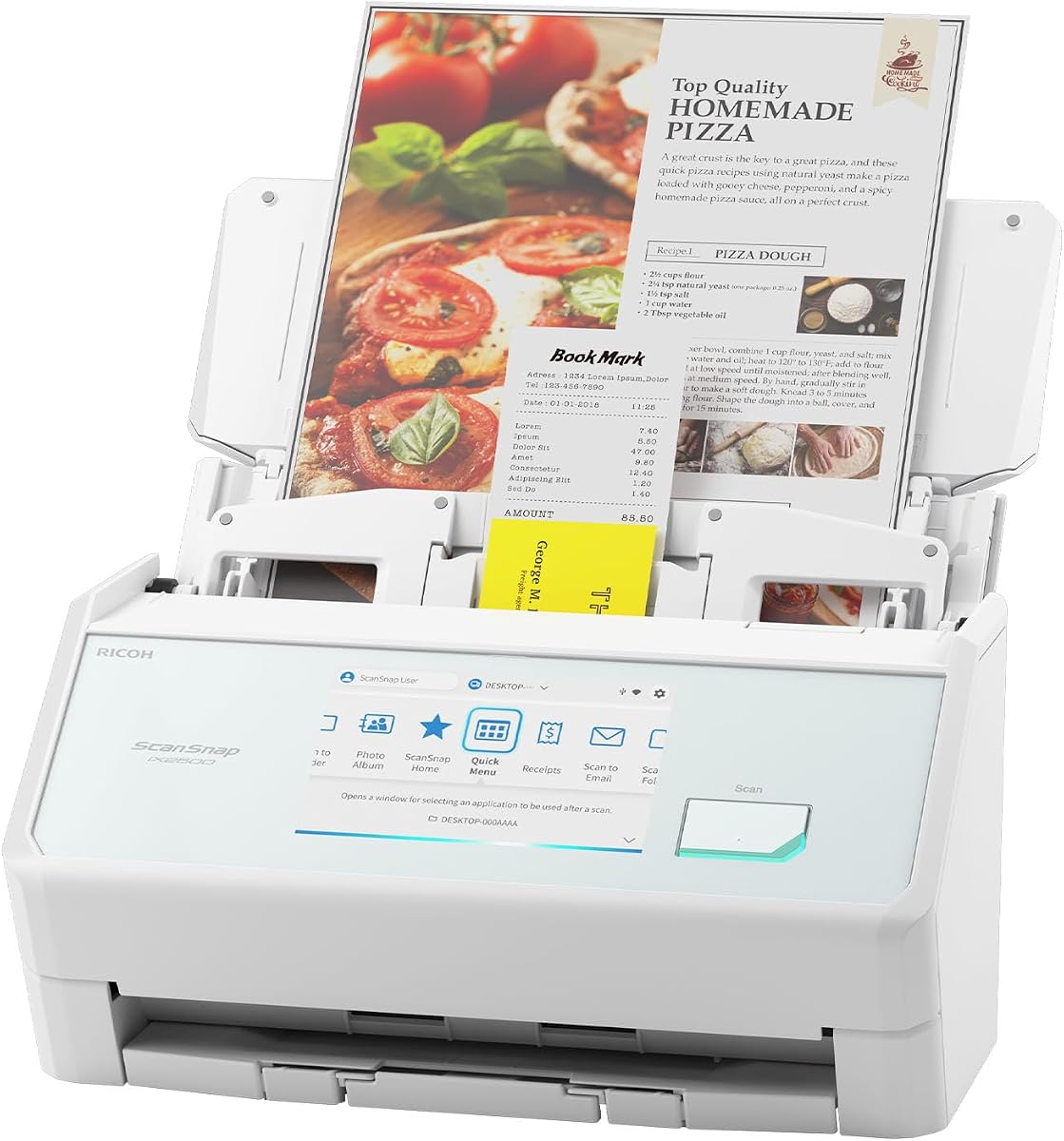
ScanSnap iX2500 Premium
4.5Editor score
Large customizable touchscreen
45 ppm duplex scanning
100-sheet document feeder
Wi-Fi 6 and USB-C
Our Scansnap Document Scanner guide compares ten models for speed, connectivity, feeder capacity, paper handling, software, and everyday usability at work.
A Scansnap document scanner can turn folders of receipts, contracts, records, photographs, and business cards into organized digital files. The right model balances speed, reliability, feeder capacity, wireless flexibility, software quality, and the size of your regular scanning workload.
This guide compares ten current and renewed ScanSnap and compatible document scanners across document handling, connectivity, automation, output destinations, and physical design. It includes premium touchscreen models, practical wireless scanners, an established renewed option, and alternatives for different document-management needs.
Each numbered review explains the stand-out features, limitations, and ideal buyer for every scanner. The top selections highlight the strongest premium, overall, and value-oriented choices, while the comparison table makes the differences easier to evaluate. Prices and availability can change.
4.5Editor score
4.4Editor score

3.9Editor score
The comparison below highlights the principal differences in speed, feeder capacity, connectivity, and scanning features across all ten models, helping you match a scanner to your documents and workflow.


The ScanSnap iX2500 is a fast, flexible scanner built for people who regularly digitize large document collections without wanting to intervene between pages. It carries a 4.3 rating and stands out through its large touchscreen, 45 pages-per-minute double-sided scanning, 100-sheet feeder, and support for both Wi-Fi and USB connections.
We may earn a commission when you buy through this link, at no additional cost to you.
Its greatest strength is the combination of speed and direct control. A touch-based interface lets users select personalized profiles, while Quick Menu supports a scan-drag-drop workflow into favorite computer applications. Scans can be sent to a PC, Mac, mobile device, or cloud service, and automatic optimization helps reduce manual cleanup of skewed, colored, or otherwise imperfect source pages.
Paper handling receives equal attention. A brake roller system is intended to feed pages smoothly, while a multi-feed sensor detects sheets stuck together and skew detection helps prevent damage or lost data. These safeguards are particularly relevant with receipts, mixed-weight forms, and long stacks that could trouble a simpler automatic document feeder.
This is the most complete general-purpose choice for a home office or a demanding shared workspace. The touchscreen makes routine routing understandable without navigating dense menus, and wireless operation reduces cable restrictions around the desk. Buyers who want the same core specification set but more peace of mind can also consider the premium iX2500 package, which includes a four-year protection plan.
Scanning at up to 45 pages per minute makes the iX2500 well suited to substantial archives, invoices, and multi-page contracts. Personalized touchscreen profiles reduce the steps needed to choose a destination, format, or recurring workflow.
The brake roller, multi-feed sensor, and skew detection work together to make unattended scanning more dependable. These features are especially helpful when a stack contains receipts, stapled pages, or differently textured media.
We may earn a commission when you buy through this link, at no additional cost to you.
The ScanSnap iX1300 is a compact, wireless-friendly scanner for users who want the recognizable ScanSnap experience without a large touchscreen or maximum-speed architecture. Its 4.1 rating reflects a practical balance of convenience, document versatility, and automatic image processing.
We may earn a commission when you buy through this link, at no additional cost to you.
The iX1300 scans double-sided color documents at up to 30 pages per minute and uses automatic de-skew, color optimization, and blank-page removal to improve output with minimal intervention. It can handle documents, photographs, cards, thicker items, and plastic cards, making it useful beyond conventional office files.
Its space-saving design is a meaningful benefit for home offices, reception desks, and shared workstations. USB and Wi-Fi connectivity allow flexible placement, and scans may be sent to a Mac, PC, mobile device, or cloud service. It can also be used without a computer and supports Chromebook workflows through the mobile app.
The iX1300 is a strong choice for moderate-volume scanning where compact dimensions and wireless flexibility matter more than maximum throughput. It is less appropriate for someone processing enormous stacks every day, as the newer iX2500 offers a larger touchscreen, a 100-sheet feeder, and a 45 pages-per-minute rate.
The vertical, space-conscious design preserves useful desk area while the scanner remains in operation. USB or wireless connections also make it easier to position the unit near shared storage or a frequently used work area.
De-skew, color optimization, and blank-page removal occur automatically. The result is a more consistent scan with less manual correction for common problems such as crooked placement and unwanted empty pages.
We may earn a commission when you buy through this link, at no additional cost to you.
The ScanSnap iX2400 is built around one clear purpose: performing fast, largely automatic document scans through a simple press-and-go workflow. With a 4.3 rating, 45 pages-per-minute processing, and a 100-sheet feeder, it offers substantial capacity without the touchscreen complexity of the iX2500.
We may earn a commission when you buy through this link, at no additional cost to you.
One touch starts the scan, after which the scanner cleans and organizes the resulting pages. It automatically detects document size and color depth, removes streaks and blank pages, corrects skew, and rotates images. Business cards, receipts, photographs, and envelopes are among the supported materials, so the device is not restricted to conventional text documents.
Its main limitation is also its clearest advantage: it depends on a stable wired USB connection. For a fixed desk with a reliable computer nearby, that can be preferable to wireless setup. It lacks the iX2500's large screen, personalized profiles, Wi-Fi 6, and direct mobile or cloud operation without a computer.
Choose the iX2400 for high-volume batch scanning, archiving, and office work where predictable wired performance and minimal interaction are priorities. It is particularly attractive for users who want much of the iX2500's speed and feeder capacity but do not need wireless flexibility or on-device workflow selection.
The one-button design removes friction from routine scanning. A 100-sheet feeder and a 45 pages-per-minute rate make it possible to work through substantial document batches without restarting for every small group.
Automatic size, color-depth, rotation, skew, streak, and blank-page detection reduces the need for repeated software corrections. That convenience makes the iX2400 well suited to records that arrive in inconsistent condition.
We may earn a commission when you buy through this link, at no additional cost to you.
The white ScanSnap iX1300 combines the useful features of a compact wireless scanner with a lighter visual finish suited to home offices and contemporary workspaces. It has a 4.1 rating and shares the iX1300's 30 pages-per-minute double-sided scanning capability and flexible USB or Wi-Fi connection.
We may earn a commission when you buy through this link, at no additional cost to you.
It supports documents, photographs, cards, thicker items, and plastic cards. Automatic de-skew, color optimization, and blank-page removal help produce cleaner results without requiring driver setup, while the dedicated one-touch approach keeps the physical interaction uncomplicated.
Scans can travel directly to a Mac, PC, mobile device, or cloud service, and the scanner may operate without a computer. The mobile-app support for Chromebook use extends the range of compatible setups, although the more advanced iX2500 adds a larger touchscreen and newer Wi-Fi standard.
This model is well suited to buyers who prioritize wireless freedom, compact design, and a clean-looking office. It is a less compelling option for very large archives, where the iX2400 or iX2500 provides a 100-sheet feeder and 45 pages-per-minute speed. For shoppers comparing visually identical black and white variants, finish is the clearest visible difference.
The white finish distinguishes the scanner from conventional dark office equipment. Because its core specifications match the black iX1300, buyers can make the aesthetic choice without sacrificing wireless or document-handling features.
A single touch initiates the workflow, while wireless routing allows direct delivery to mobile devices or cloud services. The scanner can also work without a connected computer, which is useful for shared spaces.
We may earn a commission when you buy through this link, at no additional cost to you.
The white ScanSnap iX2500 is a premium wireless scanner with a 4.4 rating, making it the highest-rated standard option in this comparison. It combines the iX2500 platform's advanced touchscreen workflow, 45 pages-per-minute double-sided speed, 100-sheet feeder, Wi-Fi 6, and USB-C connectivity.
We may earn a commission when you buy through this link, at no additional cost to you.
Personalized profiles can be selected directly from the large touchscreen, letting recurring scanning jobs move more efficiently to a PC, Mac, mobile device, or cloud destination. Quick Menu adds a convenient scan-drag-drop route into favorite applications, while automatic optimization, naming, and sorting reduce post-scan housekeeping.
The scanner is marketed as an upgraded replacement for the discontinued iX1600 and places significant emphasis on protection. A brake roller supports smooth feeding, a multi-feed sensor catches pages that arrive together, and skew detection helps avoid damage or missing information.
This version is especially attractive for a modern office where a high-capacity scanner should look less industrial and integrate neatly with a wireless workflow. It offers the same central hardware strengths as the black iX2500, so buyers should focus on the finish, included protection, and current availability when comparing the two.
The touchscreen allows users to define and select profiles for common destinations or jobs. That direct control is a major improvement over button-only operation when several people or document types share a scanner.
Wi-Fi 6 supports direct wireless scanning, while USB-C provides a dependable wired path. Together, they allow the scanner to fit different desk arrangements and output preferences.
We may earn a commission when you buy through this link, at no additional cost to you.
The IX500 Fujitsu ScanSnap is a desktop document and receipt scanner aimed at straightforward Mac or PC workflows. Its 4.2 rating and USB 3.0 positioning make it a practical wired option, while the listed wireless connectivity adds flexibility for users who want to route scans away from the connected computer.
We may earn a commission when you buy through this link, at no additional cost to you.
Its core proposition centers on high-speed document scanning, advanced technology for sharp results, and a user-friendly interface. The supplied information does not state an exact pages-per-minute figure, so its performance is better judged by the stated functions than by a direct speed comparison with the 30, 45, and 25 pages-per-minute models in this guide.
The IX500 is particularly relevant for receipts and general documents in a fixed workstation. Mac and PC compatibility broadens its audience, while USB 3.0 provides a familiar wired connection for users who want predictable performance without configuring a wireless network.
This scanner makes sense for buyers seeking a ScanSnap-style desktop unit with simple controls and broad platform support. Those wanting a touchscreen, 100-sheet feeder, and explicit 45 pages-per-minute specification should favor the iX2500, while buyers seeking a smaller financial commitment may also examine the renewed IX500.
The combination of document scanning, receipt handling, and an accessible interface keeps everyday administration uncomplicated. It is designed for users who value straightforward operation over a large set of on-device controls.
USB 3.0 is a suitable interface for fixed-desk workflows, especially when a stable connection is preferable to network setup. Wireless support remains available for more flexible scan destinations.
We may earn a commission when you buy through this link, at no additional cost to you.
The ScanSnap iX2500 Premium is the strongest high-end recommendation in this guide, earning a 4.5 rating. It combines the current iX2500 scanning platform with a four-year protection plan, adding coverage and peace of mind for an organization that depends on the device for continuous work.
We may earn a commission when you buy through this link, at no additional cost to you.
The underlying scanner delivers 45 pages-per-minute double-sided scanning through a 100-sheet feeder, with automatic optimization supporting consistent output. A large touchscreen provides direct access to personalized profiles and destination choices, while Quick Menu supports the familiar scan-drag-drop process for favorite computer applications.
Wi-Fi 6 and USB-C connectivity accommodate both flexible placement and dependable wired operation. Scans may be directed to a PC, Mac, mobile device, or cloud service, and automatic organization features help with naming and sorting documents, receipts, photographs, and business cards.
The four-year protection plan is the distinguishing bundle feature, making this a strong choice for a busy office, legal practice, accounting team, or records administrator. The extra protection does not change the core scanning experience, but it can make long-term ownership more reassuring when the scanner will be used intensively.
The included protection plan is the package's clearest advantage. It helps reduce the concern associated with placing a high-use office machine on a shared desk or depending on it for daily records processing.
The large touchscreen makes advanced routing visible and manageable. At the same time, one-touch and Quick Menu workflows preserve a fast path for routine scanning tasks.
We may earn a commission when you buy through this link, at no additional cost to you.
The renewed Fujitsu IX500 is the value-oriented selection, combining familiar ScanSnap features with a 3.9 rating. It scans double-sided pages in color, grayscale, or monochrome at up to 25 pages per minute and includes a 50-page automatic document feeder.
We may earn a commission when you buy through this link, at no additional cost to you.
One-button searchable PDF creation is a useful feature for building an organized digital archive. The scanner can send files wirelessly to a Mac, PC, iOS device, or Android device, connect by USB to a Mac or PC, and scan to cloud services without requiring a computer or mobile device.
The renewed designation is the central trade-off. A refurbished or returned unit may offer meaningful savings over a current model, but its condition, warranty terms, and included accessories should be checked carefully. Its 25 pages-per-minute rate is also below the speed of the iX2400, standard iX2500, and the non-renewed IX500's stated high-speed positioning.
This model makes sense for a home user, student, or small office that values wireless flexibility and searchable PDFs but does not need maximum throughput. It is best for buyers comfortable with renewed equipment and willing to accept a smaller feeder and lower overall rating in exchange for value.
Wireless scanning to Mac, PC, iOS, and Android destinations makes the renewed IX500 adaptable to different personal workflows. Direct cloud scanning without a computer is a particularly convenient feature for quick digitizing.
The dedicated one-button workflow simplifies the creation of searchable PDF files. This is valuable for maintaining records that users want to find later by their text content rather than only by a manually assigned file name.
We may earn a commission when you buy through this link, at no additional cost to you.
The Epson Workforce ES-400 II is a highly rated desktop scanner that stands out for document-management integration. Its 4.5 rating, 50-sheet automatic document feeder, color duplex capability, searchable PDF creation, and direct sharing features make it a strong alternative to the ScanSnap models in this guide.
We may earn a commission when you buy through this link, at no additional cost to you.
Epson ScanSmart supports previewing, emailing, cloud uploading, automatic file naming, and conversion of scans into editable Word or Excel files. Optical Character Recognition makes PDFs searchable, while the included TWAIN driver supports incorporation into document-management software and established business workflows.
Its ultrasonic double-feed detection and dynamic skew correction improve reliability when scanning stacks that might include two sheets at once or slightly misaligned pages. Automatic cropping, blank-page removal, and background removal further clean up output before the files reach shared storage or collaborators.
This scanner is an excellent match for a business that values direct email, cloud storage, OCR, and office-software integration more than a large touchscreen. It lacks a specified wireless workflow and physical control screen, so buyers focused on device-level destination selection should favor the iX2500 instead.
ScanSmart handles previews, file naming, email, cloud uploads, and editable document conversion. The TWAIN driver extends the scanner's usefulness within broader document-management environments.
Ultrasonic double-feed detection helps identify overlapping pages, while dynamic skew correction keeps pages aligned. These features protect throughput and data completeness when handling real-world paperwork.
We may earn a commission when you buy through this link, at no additional cost to you.
The Fujitsu ScanSnap S1500 Deluxe Bundle is a sheet-fed scanner with a 4.5 rating and a software-focused proposition. It offers one-button searchable PDF creation, intelligent paper-feed detection, color scanning at up to 20 pages per minute, and a 50-page automatic document feeder.
We may earn a commission when you buy through this link, at no additional cost to you.
Its bundle includes Adobe Acrobat X Standard, Rack2-Filer V5.0, CardMinder business-card software, ScanSnap Organizer, and ABBYY FineReader for ScanSnap. That collection gives users tools for PDF handling, filing, business-card management, and recognition-based workflows without sourcing each utility independently.
The main limitation is speed. At 20 pages per minute, the S1500 trails the iX1300, the renewed IX500, and all 45 pages-per-minute iX2400 and iX2500 models. It also belongs to an older generation whose bundled software may not reflect the most current cloud and mobile interfaces available on newer hardware.
This scanner is most attractive to users who value a broad collection of desktop utilities or need solid handling of a moderate personal document load. For a new high-volume office purchase, the iX2400 or iX2500 offers greater speed, wireless flexibility, and a more modern interface.
The included applications cover several parts of the document lifecycle, from recognition and editing to organization and business-card handling. This makes the bundle appealing for users who want dedicated software tools already available.
Intelligent paper-feed detection and one-button searchable PDF creation keep the process straightforward. The 50-page feeder is suitable for routine personal archiving, even though the speed is below that of newer models.
We may earn a commission when you buy through this link, at no additional cost to you.
The best ScanSnap document scanner is determined less by feature count than by how its speed, paper handling, connectivity, and software match your documents. Consider the volume, type, destination, and physical setup of your work before choosing.
Pages per minute indicate how quickly a scanner can process a conventional stack, and the difference becomes meaningful when documents are scanned every day. The iX2400 and both standard iX2500 options reach 45 pages per minute with double-sided scanning, while the iX1300 reaches 30 and the renewed IX500 reaches 25. The S1500 is listed at 20 pages per minute. For occasional receipt capture, speed may matter less than ease of use, but frequent archiving, legal discovery, and multi-page contracts reward a faster engine.
A larger feeder reduces interruptions, but capacity alone does not guarantee dependable handling. The iX2400 and iX2500 hold 100 sheets, while the iX1300, IX500, ES-400 II, S1500, and renewed IX500 use 50-sheet feeders. Consider the media you scan, including photographs, receipts, business cards, envelopes, plastic cards, and thicker items. A model with intelligent feed detection or multi-feed protection is valuable when pages vary in weight, size, or stiffness.
The most flexible models support both USB and Wi-Fi, letting users scan to a computer or route files directly to mobile devices and cloud services. The iX2500 adds Wi-Fi 6 and USB-C, while the iX1300 and renewed IX500 also support wireless operation. The iX2400 focuses on a stable wired connection, which can be preferable on a fixed desk. A non-computer workflow is valuable in shared offices because it removes the requirement to keep a host computer running.
A touchscreen can make frequent routing decisions easier by exposing profiles, destinations, and settings without navigating through a computer. The iX2500 provides a large screen and personalized profiles, while the iX2400 and iX1300 favor simpler one-touch workflows. For a single user with one preferred destination, a simpler interface may be sufficient. In a shared office, visible on-device controls can reduce uncertainty and prevent files from being sent to the wrong account or folder.
Scanners that automatically de-skew pages, optimize color, remove blank sheets, crop borders, and eliminate backgrounds save time after capture. These features are especially helpful for imperfect originals, receipts, and pages placed at slight angles. The iX1300 includes de-skew, color optimization, and blank-page removal. The iX2400 adds size and color-depth detection, streak removal, rotation, and skew correction. The Epson model adds cropping, background removal, blank-page removal, and dynamic skew correction.
Searchable PDFs use optical character recognition to turn visible text into machine-readable content, making files easier to find and reuse. The renewed IX500, Epson ES-400 II, and Fujitsu S1500 explicitly emphasize one-button searchable PDF creation or OCR. The Epson can also convert scans into editable Word or Excel files. Consider this feature essential for records that will be searched, quoted, or transferred into another application, rather than simply retained as visual images.
Damage to a source document is unacceptable, so paper-protection features deserve careful attention. The iX2500 includes a brake roller system, a multi-feed sensor, and skew detection. The Epson ES-400 II uses ultrasonic double-feed detection and dynamic skew correction. The S1500 and renewed IX500 use intelligent paper-feed detection. These systems cannot eliminate every source-paper problem, but they help reduce jams, missed pages, skewed output, and the need to rescan an entire batch.
A scanner's value depends on how easily files reach the tools and services you already use. ScanSnap models support computer, mobile-device, and cloud destinations, while the iX2500 can scan to PC, Mac, mobile devices, and cloud services without a computer. Epson ScanSmart emphasizes previewing, email, cloud uploads, automatic naming, and document-management integration. The S1500 includes a broad classic software bundle. Check your operating system, preferred cloud service, OCR needs, and file destinations before buying.
Before the first scan, remove packing material, place the scanner on a stable surface, connect the power supply, and install the appropriate ScanSnap or manufacturer software on the computer that will manage the files. Wireless models should be connected to the intended network, while wired models need a stable data cable. Update the software, review the default paper settings, and perform a short test with pages of different sizes before processing an important batch.
Arrange each stack neatly, remove large staples and paper clips, and avoid feeding damaged or torn pages without first flattening or separating them. Load pages according to the feeder guides and keep the stack within the stated capacity. Select the correct profile or one-touch workflow, confirm the destination, and start scanning. Review the preview for skewed pages, missing text, double feeds, rotated images, and unexpected blank sheets before organizing the completed files.
For maintenance, power off the unit and unplug it before opening any feeder component. Use a soft, lint-free cloth to clean the exterior and follow the manufacturer's directions for cleaning the feed rollers and image sensors. Remove dust and debris carefully, avoid spraying cleaner directly onto the machine, and schedule scans in manageable batches. Periodic cleaning and prompt removal of a detected multi-feed help maintain speed, image consistency, and document safety.
The ScanSnap iX2400 and iX2500 are the strongest choices for large stacks because both provide 45 pages-per-minute processing and a 100-sheet feeder. The iX2500 adds a large touchscreen, personalized profiles, and Wi-Fi 6, while the iX2400 is simpler and wired. Choose based on whether direct on-device workflow control matters more than a streamlined one-touch design.
A dedicated scanner makes searchable PDF creation much more convenient than photographing pages with a phone. The Epson ES-400 II, renewed Fujitsu IX500, and Fujitsu S1500 explicitly support searchable PDF creation, while ScanSnap software provides OCR-related organization tools. Confirm the exact OCR and output options in the software included with your chosen model.
Wireless scanning is more convenient when a scanner is shared, positioned away from a computer, or used to send files directly to mobile devices and cloud services. A wired scanner can be simpler and more predictable on a fixed desk. The iX1300, iX2500, and renewed IX500 support both approaches, while the iX2400 is designed around stable wired USB operation.
Double-sided scanning captures both sides of each sheet during one pass, reducing the number of pages that must be manually turned or fed. It is particularly useful for contracts, reports, receipts, and archived records. The iX1300, iX2400, iX2500, renewed IX500, and Epson ES-400 II all support double-sided color scanning.
A renewed scanner can be sensible for a home user with a modest budget who understands the condition and warranty terms. The renewed Fujitsu IX500 offers wireless scanning, a 50-page feeder, and one-button searchable PDF creation. Inspect the stated condition, confirm included accessories, and review the return and warranty policy before committing.
The iX1300 is more compact and simpler, offering 30 pages-per-minute duplex scanning and wireless or USB connections. The iX2500 is faster at 45 pages per minute, has a larger 100-sheet feeder, includes a large customizable touchscreen, and adds Wi-Fi 6 and USB-C. The iX2500 is the better fit for intensive workflows and shared use.
Several models support cloud destinations, and the iX2500 can also scan to cloud services without a computer. The renewed IX500 explicitly supports cloud scanning without a computer or mobile device. Compatibility and workflow behavior depend on the selected service and current software, so verify your preferred destination during setup.
Start by flattening the stack, removing clips and staples, and loading pages within the feeder's capacity. Models with multi-feed sensors, ultrasonic double-feed detection, intelligent paper feed, or skew correction can identify common feeding errors more effectively. The iX2500 and Epson ES-400 II are especially relevant when reliability is a priority, but the original documents should still be inspected before scanning.
The ScanSnap iX2500 Premium is the strongest premium pick because it combines 45 pages-per-minute duplex scanning, a 100-sheet feeder, a large touchscreen, flexible connectivity, and a four-year protection plan. The standard iX2500 offers the same core scanning platform and a 4.4 rating, while the renewed Fujitsu IX500 is the most value-focused option for buyers comfortable with refurbished equipment.
Prioritize the factors that affect your daily work rather than the longest specification list. High-volume users should look for a 100-sheet feeder and 45 pages-per-minute performance, while shared offices benefit from a large touchscreen, wireless routing, and visible profile controls. Home users should also check searchable PDF support, software compatibility, and whether their papers are mainly receipts, photographs, cards, or conventional documents.
Before ordering, review the current listing details, included software, connection requirements, warranty, and protection plan. Product prices and availability can change, so the best time to buy may depend on current offers, shipping, and the scanner features your workflow genuinely needs.