
HTDYOO S Video to HDMI Converter
4.2Editor score
Integrated input cables
720P and 480P output
USB-powered operation
Our S Video to HDMI Upscaler guide compares 10 converters for resolution, aspect ratio, audio, cable support, gaming compatibility, and ease of use in 2026.
An S Video to HDMI upscaler lets legacy video sources, including VHS decks, VCRs, camcorders, DVD players, and older game consoles, display on modern HDMI televisions and monitors. A worthwhile converter preserves usable image quality, provides the required audio connection, handles aspect-ratio adjustment, and makes setup straightforward without relying on computer software.
The ten products in this guide were compared using the information supplied for each model, focusing on input direction, supported standards, output resolution, aspect-ratio controls, audio options, included accessories, remote operation, recording functions, and compatibility with common retro devices. The list also identifies two HDMI-to-analog models so readers can distinguish them from true S-Video-to-HDMI upscalers.
Each review explains the strongest feature, practical limitations, and ideal buyer for every converter. The top selections are the ClearClick AV to HDMI Converter 3.0 for flexible image control, the HTDYOO S Video to HDMI Converter for straightforward value, and the SoundBeast AV to HDMI Converter & Recorder 2.0 for added capture functionality. Prices and availability can change.
4.2Editor score

4.2Editor score

4.4Editor score
The comparison below separates one-way S-Video or composite-to-HDMI upscalers from converters that work in the opposite direction, while highlighting differences in output resolution, aspect-ratio handling, audio, accessories, and special features.



The ClearClick AV to HDMI Converter 3.0 is the most complete option in this guide for someone who wants more than a basic signal adapter. It accepts RCA composite and S-Video video, sends the converted picture to an HDMI display, and supports 1080P or 720P output. Its 4.2 rating reflects a well-rounded feature set, particularly the included remote and unusually broad image controls for this product category.
We may earn a commission when you buy through this link, at no additional cost to you.
The biggest advantage is remote adjustment. Brightness, contrast, saturation, hue, output resolution, and aspect ratio can be changed without navigating menus on the television. Buyers can preserve the original 4:3 geometry with black bars or stretch the image to fill a 16:9 screen. The converter also handles PAL and NTSC sources, making it suitable for a broad mixture of VHS, VCR, camcorder, DVD, set-top-box, and gaming equipment.
There are some practical trade-offs. The S-Video cable is not included, although an RCA cable is supplied for the required audio path. A clearer HDMI cable may also need to be purchased if the television does not already have a suitable one. The feature set is deeper than that of simpler adapters, but buyers who rarely need to tune the image may not use every remote-control function. Upscaling also cannot manufacture detail that is absent from the original analog source.
This is the strongest general recommendation for a home media setup because it balances usability, compatibility, and adjustment options. It is especially suitable for someone restoring a VHS collection, connecting a camcorder, or placing an older console on a modern television. Choose the ClearClick when remote control and aspect-ratio flexibility matter more than having every necessary cable included in the box.
The included remote puts brightness, contrast, saturation, hue, resolution, and display format directly at the user's fingertips. This is especially useful with older analog sources, whose output can look different depending on the original equipment and television.
Keeping the source in 4:3 avoids horizontal stretching, while the 16:9 setting can fill a modern widescreen display. That choice gives users more control than converters with one fixed output format.
We may earn a commission when you buy through this link, at no additional cost to you.
The HTDYOO S Video to HDMI Converter is a budget-focused solution for connecting a single older source to a modern television. It accepts RCA composite or S-Video video, carries the associated right and left audio, and provides HDMI output at 720P or 480P. Its 4.2 rating indicates that buyers recognize it as a capable, uncomplicated adapter despite its modest specification level.
We may earn a commission when you buy through this link, at no additional cost to you.
The package is unusually convenient for a budget converter because it includes an RCA cable, an S-Video cable, and a USB power cable. Power can come from a suitable 5V USB port, eliminating the need for a separate power brick. The converter supports 16:9 and 4:3 screen ratios and works with a wide range of classic consoles, including PlayStation, Nintendo, Sega, and other systems with compatible outputs.
The main limitation is output resolution. While 720P is useful for presenting standard-definition video on a high-definition television, this model does not offer the 1080P option found in several competing products. It also lacks an included HDMI cable, so users may need to purchase one. Only one video input can be used at a time, and the stated 480I support does not extend to 480P input.
The HTDYOO is a sensible pick for a straightforward connection, particularly when the source is a VHS deck, VCR, DVD player, or older console and the goal is simply to make it visible on an HDMI screen. It is less appropriate for someone who wants detailed image correction, 1080P output, or a converter that can serve as a recording interface.
The included RCA, S-Video, and USB cables cover the main connection and power requirements. Only the final run from the converter to the television may require an additional HDMI cable.
The broad console list makes this converter practical for retro gaming. Users should still confirm that their specific console offers RCA composite or S-Video output and can supply the required video and audio connections.
We may earn a commission when you buy through this link, at no additional cost to you.
This RCA S-Video HDMI Converter combines 720P or 1080P output with four aspect-ratio modes, making it a versatile adapter for standard-definition media. It accepts 480i NTSC or 576i PAL video through RCA or S-Video, converts it to HDMI, and carries right and left audio. Its 4.0 rating places it slightly below the highest-rated products, although the supplied feature list covers several needs buyers often overlook.
We may earn a commission when you buy through this link, at no additional cost to you.
The aspect-ratio selection is the defining feature. Buyers can choose 4:3, 16:9, 16:10, or Full, allowing the converter to suit retro games, DVDs, and other media with different original framing. A physical output switch also allows selection between 720P and 1080P at 60Hz. The package includes the power adapter, RCA cable, S-Video cable, and HDMI cable, making it one of the more complete installations in the guide.
Its limitations concern flexibility and overall polish rather than basic functionality. The converter is designed around standard-definition input, so it does not add meaningful high-definition detail to an analog source. The four display modes should not be confused with four input types, and some users may still need to move between RCA and S-Video manually. The 4.0 rating also suggests that buyers may have encountered mixed experiences with the complete package or operation.
It remains a good fit for owners of VHS players, VCRs, DVD players, and classic Nintendo or PlayStation systems who want both resolution and geometry choices. The included HDMI cable adds practical value. This converter is most attractive when the television is large enough that a fixed 4:3 or widescreen presentation could otherwise create black borders or visible stretching.
Four available formats accommodate different source types and display sizes. This is useful for owners who alternate between 4:3 retro games, 16:9 movies, and sources that benefit from a full-screen presentation.
The supplied power adapter, analog video cables, and HDMI cable reduce the chance of discovering a missing essential after delivery. Buyers can focus on choosing the correct source input and display setting.
We may earn a commission when you buy through this link, at no additional cost to you.
The Tendak HDMI to Composite 3RCA AV S-Video Converter is included to clarify an important distinction in the market: it converts an HDMI source into analog RCA and S-Video outputs rather than converting S-Video into HDMI. It suits a modern game console, laptop, or media player that needs to feed an older television, projector, or capture-oriented display. Its 4.1 rating reflects solid format support for this opposite-direction use case.
We may earn a commission when you buy through this link, at no additional cost to you.
The converter accepts 480p, 576p, 720p, 1080i, and 1080p HDMI signals at the stated refresh rates. It can output S-Video or RCA composite video together with left and right analog audio, and a PAL or NTSC switch provides flexibility across regional standards. Compatibility is broad, covering devices such as Apple TV, Roku, Xbox, set-top boxes, VCRs, Blu-ray and DVD players, PS3, PS4, laptops, televisions, and projectors.
This device cannot be used in reverse, so it does not satisfy a shopper searching for an S-Video-to-HDMI upscaler. Its analog output is also limited to 576p or 480p in the stated video formats, even though the HDMI input can be 1080p. That distinction matters because accepting a high-definition signal does not mean the final analog display receives a high-definition signal.
The Tendak is a good choice for preserving an older display or linking an HDMI device to legacy video equipment. It is not a fit for a VHS deck that has only composite output and a new television with only HDMI. Buyers should select it only when the signal direction is HDMI to RCA or S-Video; otherwise, one of the dedicated one-way upscalers is the correct choice.
The adapter provides a practical path from HDMI devices to older RCA or S-Video displays. That is valuable for retro projectors, secondary monitors, and installations that cannot yet be replaced.
Support for common SD and HD HDMI formats, along with a PAL and NTSC switch, makes the converter adaptable to mixed equipment. Input and output resolution limits should still be checked before installation.
We may earn a commission when you buy through this link, at no additional cost to you.
The RCA Svideo to HDMI Converter is a strong general-purpose upscaler for standard-definition video and older game consoles. It accepts RCA composite or S-Video video, converts 480i NTSC or 576i PAL input, and upscales to a selectable 720P or 1080P HDMI output. Its 4.3 rating is among the strongest in the list, indicating good buyer satisfaction despite the absence of more elaborate controls.
We may earn a commission when you buy through this link, at no additional cost to you.
RCA and S-Video sources can be connected at the same time, then selected with the converter's input switch. Video exits through HDMI, while right and left analog audio is available through a 3.5mm jack. This makes the product useful for N64, PS2, Wii, DVD, camera, and VCR setups. The supplied composite cable, S-Video cable, and power adapter support a straightforward plug-and-play installation without software.
The converter offers fewer display refinements than the ClearClick. There is no listed remote control for changing brightness, color, resolution, or aspect ratio, and the image may need adjustment through the television itself. The product also has no USB capture function. As with every analog-to-HDMI converter, the 1080P label describes the output format rather than native high-definition detail originating from the source.
This is a compelling option for a straightforward retro gaming or analog-media setup because it combines a favorable rating with useful audio output and two selectable inputs. It suits buyers who want dependable conversion and manual source switching without paying for a more elaborate model. Choose it when simplicity and broad device compatibility matter more than remote image calibration or recording.
Keeping RCA and S-Video sources connected simultaneously allows the user to choose the desired source with a switch. This is convenient for setups containing more than one legacy console or media deck.
The 3.5mm audio output gives users another way to send sound to headphones, powered speakers, or another audio device. The HDMI connection provides the converted picture while the analog audio remains separately accessible.
We may earn a commission when you buy through this link, at no additional cost to you.
The RCA Svideo to HDMI Converter with HD Cable focuses on simple installation and broad retro-device compatibility. It accepts 480i NTSC or 576i PAL analog input, detects the standard, and upscales the image to either 720P or 1080P. With a 4.2 rating, it is a well-regarded mid-tier choice for connecting VHS, VCR, DVD, set-top-box, and classic gaming systems to an HDMI display.
We may earn a commission when you buy through this link, at no additional cost to you.
Its physical design is convenient because the RCA and S-Video cables are integrated into the unit and an HDMI cable is included. Power comes through a cable connected to a 5V USB port, so the setup can be compact and uncomplicated. The stated device list includes NES, SNES, N64, Wii, Wii U, Xbox, and PS2, along with standard analog video equipment.
The integrated approach reduces loose parts but limits flexibility if a cable becomes damaged or if a different connector is needed. The product also lacks the detailed brightness, color, and aspect-ratio controls offered by the ClearClick, as well as the capture feature of the SoundBeast. Users should not expect upscaling to generate high-definition source detail; the source remains standard definition.
This converter works well for a plug-and-play installation in a living room, game room, or media cabinet where convenience matters. It is a particularly good fit for owners who want a single compact adapter and an included HDMI lead. Those seeking remote tuning, independent audio routing, or a reversible installation should look to a more specialized model.
The integrated analog leads, supplied HDMI cable, and USB power connection cover the principal connection needs. This reduces setup time and makes the converter easy to move between displays.
Automatic handling of 480i and 576i input reduces the need to configure regional video standards. The output can still be selected at 720P or 1080P for the connected television.
We may earn a commission when you buy through this link, at no additional cost to you.
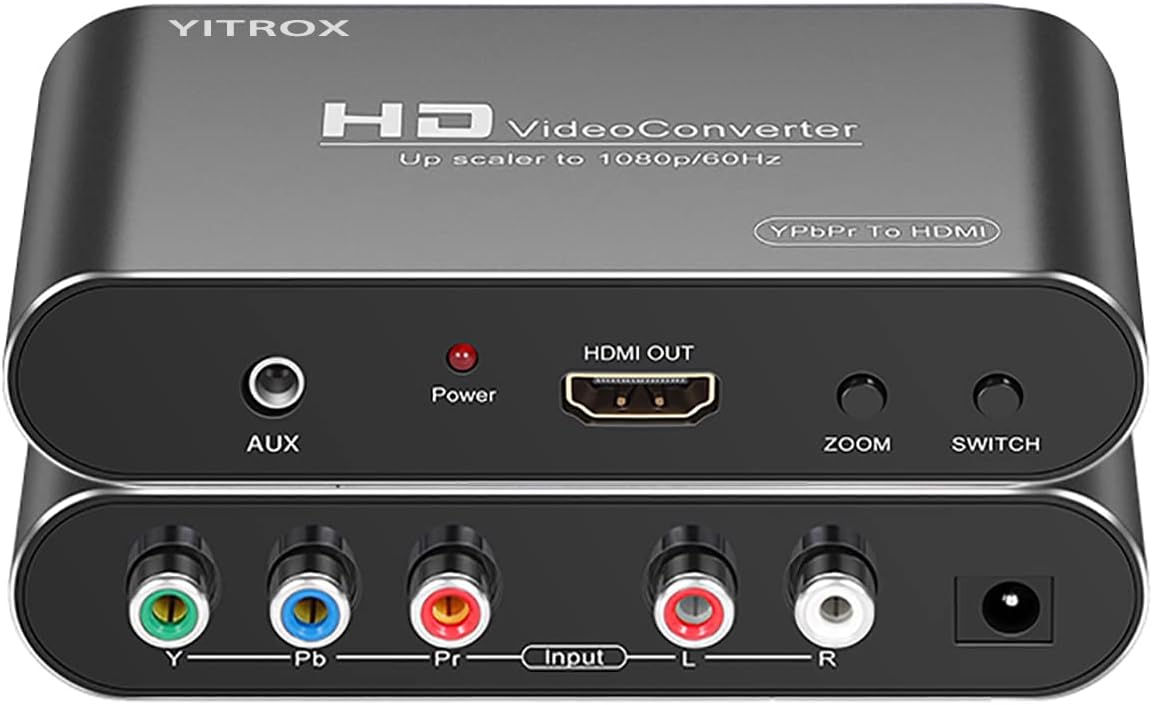
The Component to HDMI Converter is a specialized scaler for equipment with YPbPr component output rather than S-Video. It converts analog component video and right and left audio into HDMI for modern televisions, monitors, and projectors. Its 4.1 rating reflects a capable conversion system with detailed display controls, but it is only relevant to sources that can output component video.
We may earn a commission when you buy through this link, at no additional cost to you.
This converter supports 800×600, 1024×768, 1280×720, 1280×1024, and 1920×1080 output, along with seven zoom choices. Its processing is specifically optimized for Wii, Xbox, and PlayStation content, with listed improvements for motion, color, contrast, and digital noise. Input standards include 480i, 480p, 576i, 576p, 720p, 1080i, and 1080p, and the converter also includes an auxiliary audio port.
Its most important limitation is compatibility. An S-Video cable will not work with this model, and the listed guidance warns that doing so can produce a black-and-white image. A PS2 user may also need to change its output setting from AV to YPbPr. The converter cannot be used in reverse, and the numerous picture adjustments may take more setup knowledge than a simple plug-and-play adapter.
Choose this product for a PS2, PS3, Wii, Xbox 360, Blu-ray player, or DVD player that offers component output and a modern screen that accepts HDMI. It is not the right purchase for an S-Video-only camcorder or VCR. Within component-video conversions, however, its resolution selection, zoom controls, synchronization, and signal processing make it one of the most technically ambitious options here.
Five selectable resolutions and seven zoom modes provide more adjustment than a basic converter. These controls can help fit legacy output to different television sizes and viewing preferences.
The listed motion, color, contrast, and noise-reduction processing targets common weaknesses in analog game output. Buyers still need to use the correct component connection and configure the source correctly.
We may earn a commission when you buy through this link, at no additional cost to you.
The SoundBeast AV to HDMI Converter & Recorder 2.0 stands apart because it combines analog-to-HDMI conversion with USB video capture. It accepts RCA composite video and analog audio from VCRs, VHS players, camcorders, Hi8 equipment, and gaming systems, then provides 720P or 1080P HDMI output. Its 4.4 rating is the highest in this guide, reflecting the appeal of a device that can both display and record legacy video.
We may earn a commission when you buy through this link, at no additional cost to you.
The display side is designed for convenient viewing. A 4:3 control preserves the original proportions and adds black bars on the sides instead of stretching the image horizontally, while a 16:9 option fills a widescreen television. It works with PAL and NTSC, requires no drivers for normal display, and is supported by a one-year warranty from a United States-based small business.
The recording feature is the main premium distinction. A USB connection can capture video to a Windows PC or Mac at 640×480 pixels, and capture software is included. That resolution is modest compared with the converter's 1080P display output, so this is not an ideal path for producing high-resolution digitized video. The device also lacks a dedicated S-Video input, which makes it less versatile than several other products in the list.
This is the top choice for someone who wants to preserve VHS or camcorder footage while also viewing it on a modern television. It is also useful for sharing basic analog game or video output through a computer. Buyers whose priority is purer display quality, S-Video input, or higher-resolution capture should instead examine the ClearClick or another dedicated S-Video upscaler.
The same RCA source can feed the television through HDMI and the computer through USB. That dual role reduces the need for separate capture hardware when the objective includes both viewing and preserving analog footage.
The 4:3 mode avoids the horizontal distortion associated with stretching old material across a modern screen. The alternative 16:9 mode remains available for viewers who prefer a full-screen presentation.
We may earn a commission when you buy through this link, at no additional cost to you.
The RCA Svideo to HDMI Converter is a direct one-way adapter for standard-definition sources. It accepts 480i NTSC or 576i PAL video through RCA composite or S-Video, carries right and left audio, and upscales to 720P or 1080P HDMI. Its 4.2 rating places it among the better-received basic upscalers, particularly for cameras, VCRs, DVDs, and older game systems.
We may earn a commission when you buy through this link, at no additional cost to you.
The useful feature set is concise. RCA and S-Video can be connected simultaneously, and a switch selects the active source. The HDMI output carries video, while a 3.5mm jack provides an additional audio route. Compatibility includes NES, SNES, N64, PlayStation 1, PlayStation 2, and PlayStation 3 equipment when the console offers the required analog connections.
The supplied information is clearest about the included composite cable and broadly refers to AV and S-Video cables in the product title, so buyers should verify the box contents before planning a setup. Like most converters in the guide, it offers little control over brightness, color, or aspect ratio. The television may therefore need to be adjusted for correct geometry and picture settings. The converter also adds no recording capability.
This model is a good general recommendation for a household that has one or two older devices and wants them on an HDMI television without installing complicated software. Its switchable inputs, separate audio jack, and familiar plug-and-play operation make it approachable. More demanding users may prefer the ClearClick's remote settings or the SoundBeast's USB capture.
Supporting both RCA and S-Video broadens the range of cameras, DVD players, and consoles that can be used. Simultaneous connection further reduces the inconvenience of reconnecting cables.
The 3.5mm audio output provides access to analog sound even when the television's HDMI handling is inconvenient. It can suit a separate speaker or headphone setup when appropriate equipment is available.
We may earn a commission when you buy through this link, at no additional cost to you.
The HDMI to S-Video Converter is another reverse-direction product included for practical comparison. It accepts HDMI from a modern source and outputs analog S-Video or RCA composite video with right and left stereo audio. Its 4.4 rating matches the highest rating in the guide, making it a well-regarded option when an older display or analog capture system needs an HDMI feed.
We may earn a commission when you buy through this link, at no additional cost to you.
HDMI input support includes 480p at 60Hz, 576p at 50Hz, 720p at 50Hz or 60Hz, 1080i at 50Hz or 60Hz, and 1080p at 50Hz or 60Hz. The analog output section supports S-Video or composite at the stated 576p or 480p formats, accompanied by left and right audio. RCA and S-Video cables are included, and the stated compatibility list covers media players, televisions, set-top boxes, VCRs, Blu-ray and DVD players, PS3, PS4, laptops, and projectors.
It is important to recognize that accepting 1080p input does not mean the converter transmits 1080p through its S-Video or RCA output. The final analog signal is limited to the supplied standard-definition formats. The device also cannot reverse an S-Video source into HDMI, which directly excludes it from the core upscaling task most shoppers are trying to solve.
The product is a good fit for connecting a current console or laptop to a legacy television, projector, or analog video setup. It is not appropriate for a VCR or camcorder that needs to be upgraded for a new HDMI television. For a true S Video to HDMI Upscaler, use one of the dedicated one-way models listed earlier in the guide.
The adapter lets modern HDMI equipment feed displays that accept only S-Video or composite video. That makes it useful for older projectors and secondary analog screens.
RCA and S-Video leads are supplied, reducing the number of separate parts needed to connect the converter. The HDMI source cable and suitable power connection should still be checked against the chosen setup.
We may earn a commission when you buy through this link, at no additional cost to you.
Choosing an S Video to HDMI Upscaler involves matching the converter's signal direction, inputs, output resolution, audio routing, and physical connections to the source and display. The following factors help prevent an otherwise suitable adapter from becoming an inconvenient or incompatible part of a home media system.
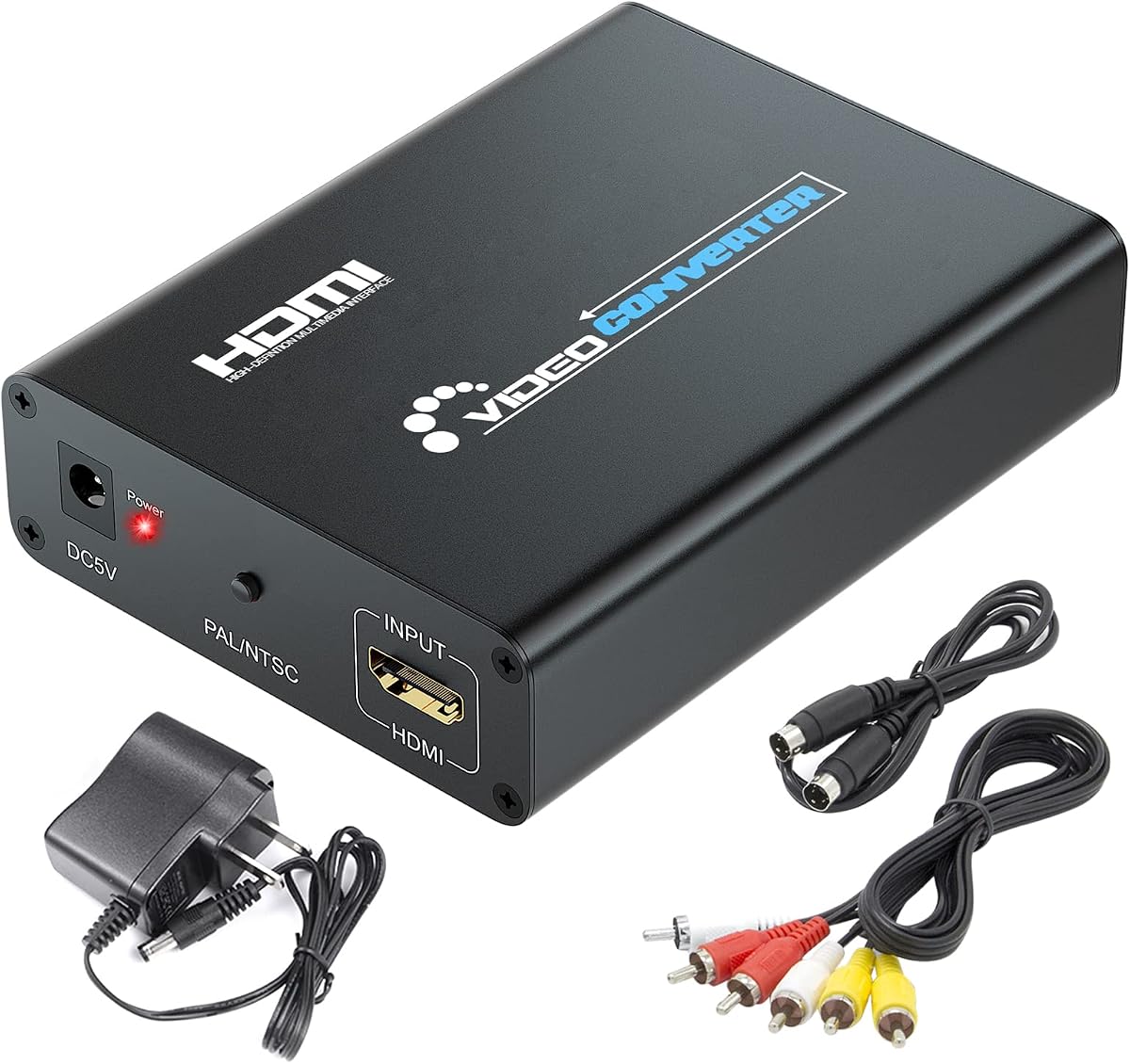
The most important step is confirming which way the signal must travel. An S-Video-to-HDMI converter takes a legacy analog video connector and produces HDMI for a modern television. An HDMI-to-S-Video converter does the opposite, accepting HDMI from a current console or media player and presenting analog video on an older television, projector, or capture device. Two products in this guide, the Tendak and the HDMI to S-Video Converter, are reverse-direction adapters rather than true upscalers for the requested task.
Check the connectors on the source before choosing a converter. S-Video generally offers better analog image quality than yellow RCA composite, but not every legacy device provides it. A model that accepts both RCA and S-Video gives users more flexibility, particularly when a household contains several consoles or media players. The SoundBeast is different because its stated video input is limited to RCA composite, despite its conversion and recording capabilities.
Dedicated upscalers in this guide offer 720P, 1080P, or a selectable combination of both. Higher output resolution can improve presentation on a modern television, but it does not create high-definition detail in a standard-definition source. Consider resolution alongside image controls and compatibility rather than treating the largest number as the only measure of quality. The HTDYOO offers 720P and 480P, while the ClearClick, RCA, and SoundBeast models support 720P and 1080P.
Legacy media was usually created in 4:3, whereas most current televisions are 16:9. A converter that stretches the image can make people look wide and can distort circles and scenery. Models with a 4:3 option may preserve the original geometry and add black bars, while a 16:9 or full-screen mode offers a more expansive picture. The ClearClick and SoundBeast provide explicit format choices, and the RCA S-Video HDMI Converter offers four modes.
An HDMI picture needs matching sound, and analog video sources commonly carry stereo audio on separate red and white RCA plugs. The converter must receive that audio if it is to pass sound through HDMI. Some models also offer a 3.5mm audio output, which is useful for headphones, powered speakers, or a separate sound system. The HTDYOO includes an RCA cable for audio, while the ClearClick notes that an RCA cable is required because its S-Video cable is not supplied.
Accessories vary considerably across the list. The RCA S-Video HDMI Converter, the RCA S-Video HDMI Converter with HD Cable, and the HDMI to S-Video Converter include useful cable combinations, whereas the HTDYOO does not include an HDMI cable and the ClearClick does not include an S-Video cable. Some models use an external power adapter, while the HTDYOO and integrated-cable RCA model draw power through USB. The buyer should inventory existing cables before ordering to avoid duplicate purchases.
Remote image adjustment can make a meaningful difference when analog sources vary in brightness, color, and framing. The ClearClick stands apart with controls for brightness, contrast, saturation, hue, resolution, and aspect ratio. If the purpose includes preserving footage, the SoundBeast adds USB capture at 640×480 with included software. These specialized features are useful but are not necessary for every display-only installation.
For retro gaming, verify the console's output type. The products in this guide list compatibility with systems such as N64, PS1, PS2, PS3, Wii, NES, SNES, Xbox, and Xbox 360, but a console may expose different outputs depending on its model and settings. For VHS, VCR, DVD, or camcorder use, check both video and audio connectors. A component-video source requires a YPbPr converter, not one designed for S-Video or RCA composite.
Begin by identifying the source's video output and the display's available input. Connect the source to the converter with the correct S-Video, RCA composite, or component cable, then connect the converter's HDMI output to the television or monitor. Attach red and white RCA plugs for stereo audio when the source provides separate audio. Finally, power the unit using its supplied adapter or its specified USB power connection.
Select the proper input mode on the converter, and choose a 720P or 1080P output that the television supports. Begin with a 4:3 or original aspect-ratio setting to avoid stretching the picture, then adjust brightness, contrast, color, or geometry if the converter provides those controls. If the image is black, confirm that the source is switched to the matching output and that the input selector is set correctly. For component sources, use a proper component cable rather than S-Video.
Keep the converter and cables supported, dry, and away from excessive heat. Avoid sharply bending the attached leads, especially on models with integrated cables, and disconnect power before rearranging the system. If the converter is used for recording, connect the USB port to the intended computer, install or launch the supplied capture software as directed, and test a short recording before capturing important footage. Periodically check connectors for looseness and clean the screen with a soft, dry cloth.
They primarily convert the signal and make it compatible with an HDMI display, rather than restore missing source detail. A better analog connection can produce a cleaner result, and S-Video is generally preferable to RCA composite when both are available. Upscaling to 1080P may make the image more suitable for a modern television, but it does not turn standard-definition material into true high-definition video.
No. The listed converters are one-way devices, and the signal direction cannot be reversed by changing switches or cables. The Tendak and the HDMI to S-Video Converter work from HDMI to analog output. The other dedicated models work from RCA or S-Video toward HDMI, although the Component to HDMI Converter uses YPbPr rather than S-Video.
The original image is usually 4:3, while the television displays a 16:9 frame. A converter that stretches the source to fill the screen can distort characters and objects. Select a 4:3 or aspect-ratio preservation mode when available, or adjust the television's picture settings to correct the geometry.
Many analog sources send video and stereo audio on separate connectors, so the converter needs both signals to deliver picture and sound over HDMI. The required audio cable may be included with some products, but the packaging descriptions differ. Check the box contents and the source's manual before ordering so that the converter receives the right and left audio channels.
An upscaler converts analog video into HDMI so it can be shown on a modern display. A capture device also transfers that video to a computer, usually through USB, where it can be recorded. The SoundBeast combines both functions, while the dedicated upscalers in the guide focus on display conversion.
Yes, provided the VHS player has RCA composite or S-Video output and the television has an HDMI input. A converter with RCA audio input can carry the sound into the HDMI output. The ClearClick, HTDYOO, and several RCA models are designed specifically for this common use case.
A YPbPr component converter expects the three separate component color and luminance signals carried by a component cable. Feeding it an S-Video signal does not provide the expected signal. The product data specifically warns against this mistake, so a proper component cable and matching source setting are necessary.
Choose the resolution supported by the television and offered by the converter, then compare the result at normal viewing size. A 1080P output can provide a cleaner presentation on a large modern display, but it cannot add source detail. Many viewers will find 720P sufficient for standard-definition VHS, DVD, camcorder, and retro-game material.
The ClearClick AV to HDMI Converter 3.0 is the strongest all-around choice because it combines RCA and S-Video input, 720P and 1080P output, aspect-ratio control, and a remote for detailed image adjustment. The HTDYOO is the best budget option for uncomplicated display-only use, while the SoundBeast AV to HDMI Converter & Recorder 2.0 earns the premium designation when USB capture and original-aspect viewing are the main goals.
Prioritize connector direction before considering any other feature. A true S-Video-to-HDMI model must have analog video inputs and an HDMI output, while the Tendak and HDMI to S-Video Converter are intended for the opposite direction. From there, match the source format, confirm how audio is carried, select an output resolution the display supports, and verify whether the supplied cables meet your installation needs.
Finally, compare the practical details: 4:3 preservation, remote color adjustment, separate audio routing, included cables, power method, and capture requirements. Product availability, included accessories, and prices can change, so check the current listing and accessories before purchasing. The right converter should make the source usable, preserve an acceptable picture, and integrate cleanly with the intended display and audio system.