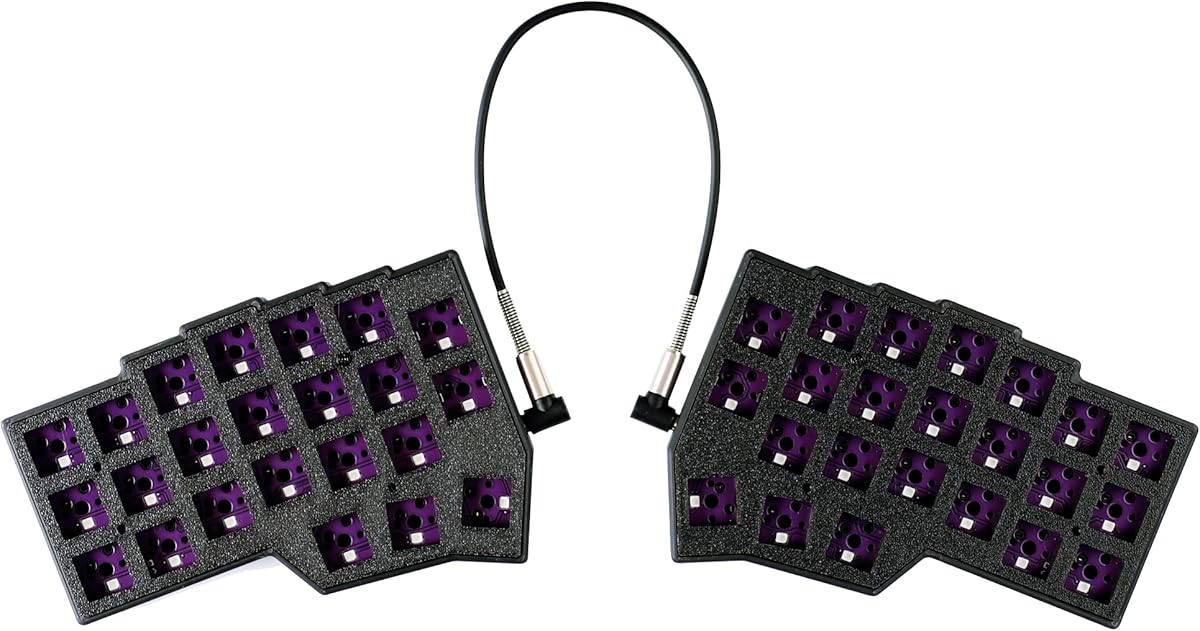
YMDK Split Keyboard Corne V4.1
4.2Editor score
Forty-six-key 40% ortholinear layout
Hot-swappable dual PCBs
QMK and Vial programmability
Explore the 10 best ortholinear keyboards, comparing split layouts, switches, programmability, portability, and comfort for typing, coding, gaming, and travel.
Ortholinear keyboards arrange their keys in straight vertical and horizontal columns instead of following the staggered pattern found on conventional boards. That structure can support a more neutral hand position, especially when paired with a split layout, while compact designs preserve valuable desk space. The best choice depends on layout preference, switch compatibility, firmware, connectivity, and tolerance for adaptation.
This guide compares all 10 featured models across ortholinear layout design, key count, split adjustability, switch support, programmability, lighting, and everyday practicality. It also distinguishes true columnar boards from conventional ergonomic and compact alternatives included for context, because not every keyboard marketed as ergonomic uses an ortholinear arrangement.
The recommendations reveal three especially useful starting points: a complete low-profile ortholinear system for everyday productivity, a compact build-it-yourself kit for enthusiasts, and a premium curved wireless board for users who value familiar full-size controls. Market conditions and availability change, so confirm current specifications and listing details before purchasing.
4.2Editor score

4.3Editor score

4.4Editor score
The table below compares layout, construction, connectivity, and programmability, while clearly identifying several featured ergonomic keyboards that use conventional rather than ortholinear key arrangements.


The KBDcraft 07Israfel 50% White combines a genuine 56-key ortholinear layout with one of the more unusual feature combinations in this guide: a low-profile chassis, adjustable hinge split, gasket mounting, hot-swappable switches, RGB lighting, and support for both QMK and Vial. Its 4.3 rating reflects a strong overall package, although users coming from a standard staggered board should expect a learning period.
We may earn a commission when you buy through this link, at no additional cost to you.
The Core56 platform is central to its appeal. Its three-pin low-profile switches and matching hot-swap sockets were developed with Kailh, while the custom low-profile MX-style keycaps were produced by KeyTok. Unlike a typical enthusiast kit that requires assembly and separate component purchases, this listing is presented as a full kit. The result is a board that offers custom-keyboard features without requiring the buyer to source the fundamental switch-and-keycap system independently.
The hinge-split design allows seven tilt positions, giving users more freedom to adjust each side than a fixed split keyboard provides. Its adaptive gasket mount adds flexibility and helps moderate vibration and noise. For productivity, Vial support covers remapping, macros, and lighting effects, while QMK compatibility broadens the firmware options available to experienced users. These are meaningful advantages for programmers, writers, and anyone who intends to personalize a daily driver.
The principal compromises are its wired-only connection and the learning curve associated with a compact columnar layout. It also lacks some of the visual separation offered by a physically separated two-piece board because the hinge keeps the halves connected. Those limitations are acceptable for buyers who prioritize low height, genuine ortholinear geometry, and extensive programmability. For most dedicated users seeking a complete everyday ortholinear setup, it is the strongest all-around recommendation in this list.
The bundled low-profile switch, keycap, case, PCB, lighting, and firmware ecosystem makes the Israfel less intimidating than a barebones custom board. It is particularly useful for users who want the geometry and programmability without completing a first mechanical-keyboard build.
Seven hinge settings let users alter the angle without immediately reaching for a wrist rest or external prop. Combined with the low-profile keys, the adjustment options make the board easier to approach gradually while the body adapts to columnar typing.
We may earn a commission when you buy through this link, at no additional cost to you.
This 4×6 Corne variant stands out because it combines the familiar split ortholinear concept with eight thumb keys and two rotary knobs. Its 4.2 rating reflects a capable, highly adjustable design, but the product information explicitly warns that it requires an adaptation period and is aimed at experienced users rather than people seeking plug-and-play simplicity.
We may earn a commission when you buy through this link, at no additional cost to you.
The 4×6 column-staggered split layout places four thumb keys on each side. That creates a generous command surface for navigation, layers, modifiers, and shortcuts. Two knobs provide dedicated control for actions such as volume, scrolling, or application-specific functions, although their exact behavior depends on the programmed mapping. Every key is remappable through Vial, which lets users create layers and shortcuts around the hardware rather than accepting a fixed layout.
The included pre-lubed linear switches have a stated trigger pressure of 40 grams. Their light actuation and silent designation may reduce finger effort during long sessions. The keyboard supports hot-swappable three- and five-pin mechanical switches, including Cherry MX-compatible options, and includes a two-in-one shaft puller for easier switch changes. RGB lighting offers approximately 16.8 million colors and 45 preset modes.
The trade-off is its learning burden. Moving from a staggered keyboard to two separated halves, eight thumb keys, and a columnar matrix requires deliberate practice. Its wired design also lacks the portability of wireless models. Even so, it is a strong recommendation for an enthusiast who wants more thumb capacity and physical knobs than a basic three-thumb Corne arrangement provides.
The 58-key format omits a traditional function row while compensating with programmable layers, eight thumb keys, and dual knobs. That creates a compact command center for users who want extensive control without a full-size board.
A long USB-C cable and a shorter inter-keyboard cable allow the halves to be used together or independently. This flexibility makes it easier to test a split arrangement before committing to a permanently wide desk position.
We may earn a commission when you buy through this link, at no additional cost to you.
The YIVU Corne V4.1 is a 46-key, 40% split mechanical keyboard built around the widely recognized Corne-style three-by-six arrangement. With a 3.8 rating, it trails several close alternatives, but its specification set remains focused: hot-swappable switches, pre-lubed linear switches, per-key RGB, and programming through both Vial and QMK.
We may earn a commission when you buy through this link, at no additional cost to you.
Three thumb keys per hand provide a practical set of frequently used actions while preserving a smaller footprint than boards with larger clusters. Users can adjust spacing, tilt, and rotation to find a more natural position. Every key can be remapped through Vial, and the QMK support provides an established route to deeper firmware customization. The included switches have a stated 40-gram trigger pressure, supporting quick, relatively light input.
The hot-swap system accepts three- and five-pin mechanical switches, and the included two-in-one shaft puller simplifies maintenance. Lighting can be adjusted by color, brightness, speed, and 45 built-in modes. These features make the board suitable for programmers and gaming users who value immediate response and extensive configuration.
There are important handling caveats. The product documentation says the two halves should not have both USB ports connected to the computer simultaneously. It also states that the TRS cable joining the halves does not support hot-swapping and should not be disconnected while powered. These conditions make setup less forgiving than a completely self-contained keyboard. For buyers comfortable with the Corne format and precise cable management, the YIVU remains a capable and compact option.
The 46-key format removes unnecessary surface area and centers attention on navigation, modifiers, and programmable layers. It suits users who work primarily with one application at a time and already understand compact keyboard conventions.
Supporting both Vial and QMK means the board can serve users who prefer graphical configuration as well as those who want deeper control. The result is a compact board with unusually broad customization potential.
We may earn a commission when you buy through this link, at no additional cost to you.
The black KBDcraft 07Israfel 50% is functionally similar to the white model, combining a true 56-key ortholinear layout with a low-profile mechanical system and a connected hinge-split frame. It carries the same 4.3 rating and is particularly attractive for buyers who prefer a dark, understated case that blends into a workstation.
We may earn a commission when you buy through this link, at no additional cost to you.
Its defining strength is the combination of compact height and full ortholinear geometry. The Core56 low-profile platform uses three-pin switches with hot-swap sockets developed in collaboration with Kailh, paired with custom low-profile MX-style keycaps from KeyTok. Because the product is sold as a full kit, buyers do not need to choose the basic switch and keycap ecosystem themselves.
Seven hinge tilt options allow users to adjust the angle of the connected halves, while the adaptive gasket mount adds flex and helps soften the feel and sound of each press. Vial supports key mappings, macros, and lighting effects, while QMK adds another established firmware option. This is a practical daily-use platform for programmers and writers who want customization without assembling every component.
The same limitations that affect the white version remain: it is wired, and a 50% columnar layout demands practice. Some buyers may also prefer a physically separated design for a greater sense of left-right hand independence. Even so, the black finish, low profile, seven-position hinge, and complete feature set make it one of the most balanced ortholinear choices available.
The connected hinge retains the visual impression of a unified keyboard while allowing individual sides to change angle. It offers a middle ground between a standard compact board and a widely separated two-piece ergonomic system.
The gasket mount introduces controlled flex beneath the switches, reducing harshness and vibration. Combined with the low-profile switches and keycaps, it creates a board that feels and looks distinctly different from a standard full-height custom.
We may earn a commission when you buy through this link, at no additional cost to you.
The YMDK Split Keyboard Corne V4.1 is the most approachable build-your-own entry in this guide. It provides the essential components of a 46-key, 40% ortholinear split system, but switches and keycaps must be supplied separately. Its 4.2 rating makes it a compelling budget-oriented option for hobbyists who already understand basic keyboard assembly.
We may earn a commission when you buy through this link, at no additional cost to you.
The package includes two bottom PLA cases, two top PLA plates, two hot-swap PCBs, a USB-A-to-C cable, and a PCB connection data cable. With those parts in hand, the kit supplies the structural and electronic core of the keyboard. The PLA components are described as nontoxic and environmentally friendly, while the split construction produces two compact independent halves suited to programming, gaming, and other focused tasks.
The kit supports full-key programmability through QMK and Vial. It uses a wired Type-C single-mode design and offers south-facing RGB across all keys. That combination makes it straightforward to map layers, shortcuts, and lighting once the switches and keycaps have been installed and the halves assembled.
Its important limitation is obvious but easy to underestimate: the kit is not complete out of the box. Buyers must source compatible switches and keycaps, and they should be comfortable with assembly and cable connection. In return, they gain control over the switch feel, keycap profile, and final appearance. For a first compact split project, it provides an engaging and focused way to build a highly personalized ortholinear tool.
Leaving switches and keycaps to the buyer makes the final feel and appearance highly personal. It also means the kit can suit different preferences, from linear to tactile choices and low-profile to more substantial keycap profiles.
The split construction frees desk space and allows the hands to adopt more natural angles. Once assembled, the board provides a compact 40% workspace for users who favor layers and shortcuts over dedicated navigation clusters.
We may earn a commission when you buy through this link, at no additional cost to you.
The Maketheone M Ergonomic is not a true ortholinear keyboard. Its keys follow the butterfly-inspired X-Bows arrangement rather than a strict columnar matrix, placing it in this guide as a visually distinctive ergonomic alternative. The 3.4 rating is the lowest among the featured products, so buyers should treat it as a design-led option rather than a direct match for the true split ortholinear models.
We may earn a commission when you buy through this link, at no additional cost to you.
Its butterfly layout is the central appeal. The keys form a symmetrical, tent-like visual structure that differs substantially from both a conventional staggered board and a columnar split. A Lite configuration with Gateron Brown switches provides tactile feedback, while white backlighting supports visibility in dim settings. Hotkeys add practical access to common functions without making the board feel entirely bare.
The wired USB-C connection keeps the setup uncomplicated and removes concerns about battery management or wireless pairing. The product is positioned as a premium build with a retro appearance, making it more of a conversation piece or enthusiast workspace centerpiece than a portable productivity tool.
Buyers looking for a conventional ergonomic board may appreciate its distinctive symmetry, but those specifically seeking columnar alignment, split halves, deep firmware customization, or modern wireless connectivity should choose one of the true ortholinear entries. Within its own category, the Maketheone M is most convincing for someone who values industrial design and tactile switches over strict layout purity.
The butterfly-inspired arrangement creates visual balance around the center of the keyboard. It is an alternative way to reduce the visual imbalance of a standard staggered layout, even though it does not provide the exact columnar geometry of a true ortholinear board.
Gateron Brown switches offer a tactile bump rather than the completely smooth action of a linear switch. Wired USB-C operation keeps the experience predictable and suitable for a fixed desktop setup.
We may earn a commission when you buy through this link, at no additional cost to you.
The Keychron K2 HE is a conventional 75% magnetic-switch keyboard rather than an ortholinear model. Its 4.4 rating nevertheless makes it one of the strongest compact alternatives here for users whose main priorities are wireless freedom, adjustable actuation, and cross-device operation rather than columnar key alignment.
We may earn a commission when you buy through this link, at no additional cost to you.
Magnetic sensors allow the activation point of each key to be customized. The included pre-lubed Gateron Double-Rail magnetic switches offer 0.1 millimeter sensitivity and an adjustable actuation range of 0.2 to 3.8 millimeters. Rapid trigger changes activation and reset based on real-time key travel, a feature particularly relevant to fast gameplay. The switches are hot-swappable, but only Gateron Double-Rail magnetic switches are compatible.
The K2 HE supports 2.4 GHz wireless, Bluetooth 5.2, and Type-C wired modes. It can connect with up to three devices and offers a 1000 Hz polling rate. A browser-based Launcher handles remapping, macros, actuation adjustments, and rapid-trigger configuration, removing the need for a dedicated desktop configuration program.
It is not an ortholinear board, so it does not directly address the columnar-layout preference central to this guide. It also uses double-shot PBT keycaps whose legends are not shine-through and may be difficult to see in low light. Nevertheless, for a user comparing compact custom keyboards without a strict columnar requirement, the K2 HE offers an unusually advanced feature set and strong wireless flexibility.
Adjustable magnetic sensing lets users choose how early each key registers. This can support faster response or a more deliberate feel, making the board adaptable to different gaming styles and general typing preferences.
Bluetooth, 2.4 GHz, and wired modes support different environments, while three-device connectivity simplifies movement between a computer, phone, or tablet. Included Mac and Windows keycaps improve the transition between operating systems.
We may earn a commission when you buy through this link, at no additional cost to you.
The Logitech K835 TKL is a conventional tenkeyless mechanical keyboard, not an ortholinear design. It earns inclusion because it represents the familiar alternative many buyers compare against a columnar board. Its 4.6 rating is the highest in the featured group, reflecting a refined and dependable everyday option for users who do not want to relearn key placement.
We may earn a commission when you buy through this link, at no additional cost to you.
Its staggered layout preserves familiar finger travel while eliminating the number pad to save desk space. Linear Red switches deliver a smooth, light action, and the aluminum frame gives the keyboard a substantial appearance. Logitech states that the switches have been tested for up to 50 million clicks, supporting the board's positioning as a durable daily driver.
Twelve dual-function keys provide access to media controls and shortcuts. A curved profile, slim front edge, and adjustable tilt brackets work together to create a more comfortable typing position. The wired design is straightforward, although it cannot match the desk flexibility offered by the wireless models in this guide.
The K835 does not satisfy the core need for straight vertical and horizontal key columns, and its customization options are comparatively modest. Its strength is continuity: a user can gain mechanical key quality and a compact tenkeyless footprint without abandoning a familiar layout. For typists who value simplicity and build quality over experimental geometry, it is a strong alternative.
Removing the numeric keypad produces a tenkeyless format that fits better on compact desks while retaining conventional staggering. It is especially approachable for laptop users who want dedicated mechanical keys without an oversized desktop model.
The aluminum frame, tested switch longevity, and adjustable positioning establish the K835 as a practical long-term keyboard. Linear Red switches offer a familiar mechanical feel for users who do not require tactile or clicky feedback.
We may earn a commission when you buy through this link, at no additional cost to you.
The nuphy Air60 V2 is a 64-key, 60% low-profile mechanical keyboard rather than an ortholinear model. With a 4.2 rating, it offers a more portable and wireless-oriented alternative. It is especially relevant for users who want compact dimensions and broad operating-system support but do not need a split or columnar arrangement.
We may earn a commission when you buy through this link, at no additional cost to you.
The Air60 V2 supports Bluetooth 5.1, 2.4 GHz wireless, and wired USB-C connectivity. It can pair with up to four devices, allowing quick movement between work and entertainment setups. QMK and VIA support let users redefine keys and create personalized lighting effects on macOS, Windows, and Linux. The listed configuration uses Gateron Aloe switches.
Its aluminum frame surrounds two RGB light bars. The left side displays Caps Lock and connection-mode status, while the right indicates battery level and system mode. A 2500 mAh battery provides a listed working time of 30 to 90 hours with all lights on and up to 150 hours with all lights off, based on laboratory results.
Wireless mode offers a 1000 Hz return rate for lower-latency gaming. However, the keyboard is not ortholinear, and removing the function area means some users will need layers or alternate mappings to access less common commands. For travel and mixed-device work, it remains a compelling compact mechanical keyboard, but buyers focused on true columnar ergonomics should favor the Corne-style choices.
The 64-key format omits the separate function area, although those commands remain available through the keyboard's functions. That design reduces footprint and makes the board easier to carry between locations.
Separate side light bars communicate connection mode, Caps Lock state, battery level, and operating-system mode. These indicators reduce guesswork when switching among multiple paired devices in a busy workspace.
We may earn a commission when you buy through this link, at no additional cost to you.
The Logitech ERGO K860 is a premium wireless ergonomic keyboard with a curved, split full-size frame. It does not use a true ortholinear layout, but it is included because it offers one of the most developed conventional approaches to posture and wrist support. Its 4.4 rating and extensive comfort-oriented design make it a strong premium alternative.
We may earn a commission when you buy through this link, at no additional cost to you.
The sloping, split keyframe is intended to support more natural typing, while the integrated wrist rest uses a curved memory-foam layer. Logitech states that it provides 54 percent more wrist support and reduces wrist bending by 25 percent compared with a standard keyboard without a palm rest. Adjustable tilt legs offer positions of zero, minus four, and minus seven degrees for seated or standing use.
Scooped keycaps are shaped to follow the fingertips, and the keyboard is certified by United States Ergonomics. It connects through a USB receiver or Bluetooth and retains a full-size layout, including a Caps Lock indicator. Logitech Options allows Fn-key customization, shortcut creation, and battery-life notifications.
Its major drawback is that the familiar curved arrangement does not deliver the finger-by-finger column alignment of a true ortholinear board. The full-size footprint is also less compact than the split models. Even so, buyers seeking a wireless, immediately approachable ergonomic keyboard with integrated wrist support will find the K860 difficult to overlook.
The memory-foam wrist rest follows the curved keyframe rather than behaving as a separate flat pad. This integrated approach keeps the hands supported while the user works with the keyboard at an adjustable angle.
The full-size layout and familiar key shapes allow users to adopt the ERGO K860 more easily than a compact columnar or separated board. Wireless connectivity then removes cable constraints from the desktop.
We may earn a commission when you buy through this link, at no additional cost to you.
The most important decision is whether true columnar alignment suits your workflow, followed by the form of separation, key count, firmware, connection method, and switch support. A well-chosen ortholinear keyboard can reduce unnecessary finger movement, but only when its size, layout, and controls match the way you work.
An ortholinear keyboard places keys in straight vertical and horizontal columns rather than offsetting each row. This can make movement between columns more consistent, but it changes muscle memory significantly. New users should practice with an on-screen layout guide and begin with familiar words rather than trying to achieve maximum speed immediately.
A fully split keyboard gives the greatest freedom in spacing, rotation, and tenting. A hinge-split design keeps the halves connected while allowing independent tilt angles. The connected format uses less desk width and can feel more approachable, but it does not provide the same degree of shoulder and wrist positioning freedom.
Compact boards reduce desk use but shift navigation, symbols, and function commands into layers. The 46-key Corne arrangement uses three thumb keys on each side, while the 4×6 version uses four and adds two knobs. Determine which commands you need immediately and whether you are comfortable reaching a secondary layer before selecting a key count.
Hot-swappable sockets simplify switch changes, but the supported pin count and switch type still matter. The featured Corne-style boards accept three- and five-pin mechanical switches, including Cherry MX-compatible models, while the Israfel uses a dedicated three-pin low-profile system. The YMDK kit requires switches and keycaps to be added separately.
Vial and QMK are common options across the true ortholinear models in this guide. Vial offers a graphical interface for layers, shortcuts, and lighting, while QMK supports deeper configuration and community-developed layouts. Programmable keys are valuable for compact boards because they allow one physical key to perform different actions by context.
Wired keyboards provide a simple, consistent connection and are common among compact custom boards. Wireless models add flexibility for travel and multi-device work, but they introduce charging and pairing considerations. The K860 and K2 HE support wireless operation, while every true ortholinear model featured here is described as wired.
Ortholinear geometry does not automatically create a comfortable position if the keyboard sits too flat or too wide. Adjustable tilt, rotation, spacing, and tenting let each user align the hands more naturally. The Israfel offers seven hinge tilts, while fully split models allow the halves to be positioned independently.
Complete kits provide the switches, keycaps, case, PCB, and firmware in one package, reducing assembly work. Barebones or partial kits can be more rewarding for experienced builders but require additional planning. Before buying a partial kit, confirm that the included plate, PCB, case, and planned switches and keycaps form a compatible system.
Begin with the manufacturer’s key-position guide and set the keyboard at a neutral angle before remapping anything. For a split model, bring the halves close enough that the inner columns are comfortable, then adjust spacing gradually. Fully detached halves allow each wrist to follow a more natural path, while a hinge-split model requires less desk width and can be easier to reposition.
Program layers for the commands you use most often instead of relying on every function. In Vial or QMK, assign modifiers, navigation, macros, and application controls to stable thumb or finger positions. Save a backup of the firmware configuration, especially if the layout contains custom layers or lighting rules. Keep the inter-half cable properly seated, and observe the stated warnings for powered hot-swapping or TRS connections.
For long sessions, alternate between a flat, lightly tilted, and tented position if the keyboard allows it. Keep the board clean with a soft brush or compressed air, and follow the case material’s cleaning guidance rather than applying liquid directly to switches or electronics. Replace worn keycaps, stabilize loose connections, and revisit the layout as your shortcuts and working habits change.
They can be better for some users because straight columns create more consistent finger travel and allow the hands to be positioned more independently. However, they are not universally superior and require noticeable practice. A conventional keyboard may be more appropriate for casual use, shared computers, or anyone who relies heavily on existing muscle memory.
Ortholinear describes the key arrangement: keys align in straight columns rather than the rows being staggered. Ergonomic is broader and can include curved frames, split layouts, tenting, wrist support, or alternative switch positions. A keyboard can therefore be ergonomic without being ortholinear, as illustrated by the Logitech ERGO K860 and other conventional alternatives in this guide.
Basic text entry may become manageable within a few days, while efficient touch typing and layer use can take several weeks. The split Corne models listed here specifically mention that adaptation is required. Starting with a printed or on-screen guide and practicing common words is more effective than repeatedly chasing speed during the first days.
They can be highly practical for programmers and power users because layers provide access to functions that are absent from the physical layout. They may be less convenient for users who depend on visible function keys, dedicated navigation clusters, or a number pad. The 46-key models are best suited to people who already understand compact keyboards.
Their columnar arrangement and split construction can reduce awkward finger reach and encourage a more neutral hand position, but they do not guarantee pain relief. Desk height, chair support, posture, typing technique, and session length also matter. If pain persists, users should adjust the setup and seek guidance from an appropriate medical or ergonomic professional.
Hot-swappable sockets make switch changes faster and easier, particularly while testing tactile, linear, or lighter alternatives. Compatibility still matters: the featured Corne-style boards accept three- and five-pin mechanical switches, while the Israfel requires its dedicated low-profile system. Confirm switch dimensions and pin compatibility before ordering replacements.
Wireless is valuable for portability and flexible desk arrangements, while wired operation can be simpler and consistently low latency. All of the true ortholinear models featured in this guide are described as wired. The conventional Keychron K2 HE and Logitech ERGO K860 demonstrate the wireless options available in the broader ergonomic keyboard market.
Smaller ortholinear layouts free desk space and keep the hands closer to a compact central area, but they place more commands behind layers. A 50% board such as the Israfel provides more physical keys than a 46-key Corne, while a full-size conventional keyboard is easier for new users. The best format depends on screen space, shortcut habits, and willingness to use layers.
The KBDcraft 07Israfel 50% is the strongest overall recommendation because it combines genuine ortholinear geometry with a low-profile complete system, seven tilt positions, hot-swappable sockets, gasket mounting, RGB, and both QMK and Vial support. The white version offers the same core feature set, while the black version provides a more understated visual option for darker workspaces.
For buyers building a compact split board themselves, the YMDK Corne V4.1 kit offers an accessible entry point, provided they source switches and keycaps and are ready for assembly. For a premium conventional alternative, the Logitech ERGO K860 delivers the most developed wrist support, wireless convenience, and familiar full-size controls, although it does not use true ortholinear columns.
Before purchasing, confirm the exact layout, connection method, firmware support, switch compatibility, and whether the listing includes a complete set of components. Current listing details and availability can change, so check the latest product information and customer feedback before placing an order.