
MSI B850 GAMING PLUS WIFI
4.6Editor score
Includes 16GB DDR5 memory
Supports DDR5 up to 8200+
WiFi 7 and 5G LAN
This Motherboard for CAD Workstation guide compares 10 models for expandability, memory, networking, graphics support, and reliable professional workflows.
A motherboard for a CAD workstation must balance processor support, memory capacity, expansion options, and dependable connectivity. Applications such as CAD, BIM, rendering, simulation, and visualization can place sustained demands on a system, making the board’s power delivery and thermal design as important as its headline specifications.
This guide compares ten motherboards using the supplied platform details, expansion capabilities, connectivity, memory support, remote-management features, and customer ratings. It covers mainstream ATX models, compact workstation-oriented boards, and enthusiast platforms designed for processors with as many as 96 cores.
Each review explains which builders the board suits, from users creating a practical CAD system to teams operating demanding multi-GPU workstations. The three leading picks are highlighted separately, while the complete comparison helps readers match platform, form factor, storage, and networking priorities to their particular workload.
4.6Editor score

4.4Editor score

5.0Editor score
The comparison below places all ten boards side by side, emphasizing processor platform, graphics expansion, storage, networking, and management features that can affect a CAD workstation’s usefulness and long-term flexibility.



The MSI PRO B760-P WiFi DDR4 is a conventional ATX Intel platform for CAD workstations that need practical connectivity without moving into enterprise workstation hardware. Its listed customer rating is 4.6, placing it among the strongest-rated products in this guide. Compatibility extends across 12th, 13th, and 14th Gen Intel Core processors, plus Pentium Gold and Celeron parts supported by LGA 1700.
We may earn a commission when you buy through this link, at no additional cost to you.
Power delivery is handled by a 12+1 Duet Rail system with P-PAK, eight-pin and four-pin CPU connectors, Core Boost, and Memory Boost. A six-layer PCB uses two-ounce thickened copper and server-grade material, while an extended heatsink, MOSFET thermal pads, choke thermal pads, and M.2 Shield Frozr address the heat generated by sustained compute and storage workloads.
The main compromise is the memory platform. DDR4 is proven and often easier for builders to source, but it is less forward-looking than the DDR5 options in this roundup. The board also provides PCIe 4.0 rather than PCIe 5.0 expansion, which could limit future accelerator or high-speed storage configurations even though it remains suitable for many current CAD cards.
This is a sensible choice for an individual designer, architect, or engineering consultant who values familiar Intel compatibility, integrated wireless networking, and practical expansion. It is especially attractive when the rest of the build uses mainstream DDR4 memory. For projects requiring ECC RAM, many high-speed PCIe 5.0 devices, or several workstation GPUs, a specialized board should take priority.
Overall, the MSI PRO B760-P balances cost-conscious construction with the core features expected in a modern CAD system. Its 4.6 rating strengthens that recommendation, although buyers should confirm memory type and accelerator requirements before treating it as a universal workstation platform.
The 12+1 Duet Rail design, paired 8-pin and 4-pin CPU power connections, and substantial thermal components provide a reassuring foundation for long rendering and modeling sessions. Server-grade PCB materials and thickened copper further support electrical robustness.
A 2.5Gbps LAN connection supports large project transfers and network-heavy collaboration, while WiFi 6E and Bluetooth 5.3 provide flexible wireless access. Multiple display outputs help support a multi-monitor CAD workspace.
We may earn a commission when you buy through this link, at no additional cost to you.
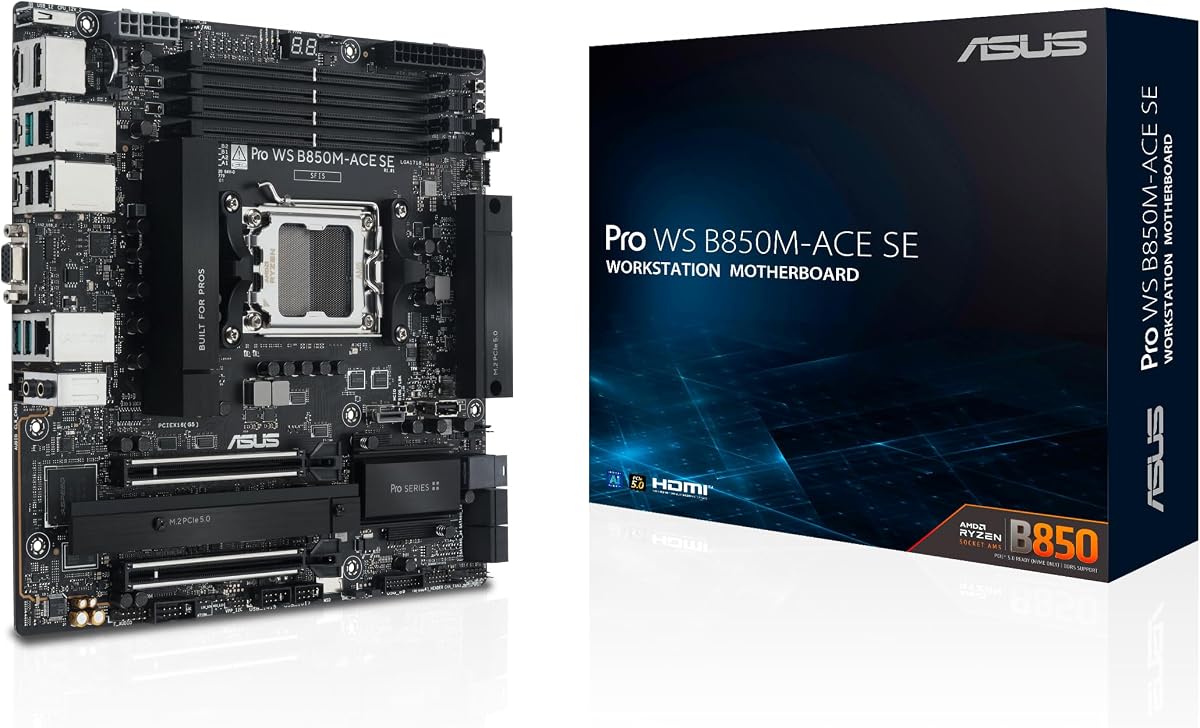
The ASUS Pro WS B850M-ACE SE combines a compact MicroATX footprint with workstation-oriented management and modern AMD platform support. It carries a 4.3 customer rating and is built around AM5 for Ryzen 9000, 8000, and 7000 series desktop processors, as well as AMD EPYC 4005 Series processors. That broad range makes it a versatile basis for different CAD configurations.
We may earn a commission when you buy through this link, at no additional cost to you.
Its standout feature is the onboard AST2600 BMC, which enables ASUS Control Center Express for real-time remote monitoring and management. This is more relevant to studios, engineering departments, and managed build environments than ordinary desktop boards. The product is also validated for 24/7 operation and supported by a broad compatibility list and QVL.
Connectivity is unusually strong for a compact board. It offers 10Gb and 2.5Gb LAN, two PCIe 5.0/4.0 x16 slots with one operating at x4, two PCIe 5.0 x4 M.2 slots, MCIO NVMe support, U.2, and a front USB 20Gbps Type-C connector. The storage and networking provisions are particularly helpful when project archives and virtualized environments are part of the workflow.
The tradeoff is physical expansion. Two full-length graphics slots are less generous than the seven-slot designs offered by the W890 and TRX50 platforms, and one is limited to x4 bandwidth. Its MicroATX dimensions can simplify a compact workstation, but buyers should verify case clearance and the dimensions of any professional graphics card before committing.
This board best suits users who want AMD AM5 performance, modern PCIe 5.0 storage, enterprise-style management, and strong networking without building a large multi-GPU system. It is a compelling value-oriented workstation foundation for CAD, virtualization, and centralized administration.
The AST2600 BMC and Control Center Express provide hardware-level remote monitoring that can help administrators maintain fleet consistency. This is especially useful where CAD workstations operate across multiple locations or need out-of-band visibility.
Two PCIe 5.0 x4 M.2 connectors, MCIO support, and U.2 connectivity give this MicroATX board more storage flexibility than its size suggests. These options suit builders creating high-speed scratch volumes for modeling and rendering.
We may earn a commission when you buy through this link, at no additional cost to you.
The ASUS Pro WS W680-ACE is an ATX Intel workstation board designed for CAD users who need server-class memory and management without moving to the largest multi-slot platforms. Its 4.4 rating reflects a generally favorable customer response. It supports 13th Gen Intel Core processors along with 12th Gen Core, Pentium Gold, and Celeron processors.
We may earn a commission when you buy through this link, at no additional cost to you.
ECC memory support is the feature that most clearly separates this board from consumer-oriented alternatives. Error-correcting memory can be valuable in systems expected to maintain long uptime, run computationally intensive applications, or operate as shared design resources. Two PCIe 5.0 Safeslots, dual PCIe 3.0 slots, and three PCIe 4.0 M.2 connectors provide a balanced expansion layout.
The board also includes an IPMI expansion card, while a BMC header and ASUS Control Center Express add a route toward remote administration. Dual Intel 2.5Gb Ethernet, front-panel USB 3.2 Gen2x2 Type-C, Thunderbolt 4 header support, TPM and LPT headers, and SlimSAS broaden the range of peripherals and storage devices a workstation can use.
Its main limitation is platform age. LGA 1700 supports a broad installed processor pool, but it is not the newest Intel platform in this guide, and the two-gigabit networking specification may be modest for some studios. Buyers who need many PCIe 5.0 graphics slots should examine the W890 alternatives instead.
For a professional build that emphasizes ECC memory, remote-management expansion, and practical ATX workstation layout, the W680-ACE remains a strong option. It offers many of the desired enterprise features while using a more conventional board size and expansion count than the largest platforms in the roundup.
ECC support gives this platform an advantage for sustained computing and systems where data integrity matters. It is especially relevant to engineers and studios planning to operate the workstation as a shared or long-lived resource.
The bundled IPMI expansion card and BMC header offer a path to remote monitoring. Combined with ASUS Control Center Express, this makes the board more suitable for organized IT environments than a typical desktop model.
We may earn a commission when you buy through this link, at no additional cost to you.
The ASUS ProArt Z890-CREATOR WIFI is the most creator-focused board in the roundup, making it a strong all-around choice for CAD users who also handle video, rendering, photography, and color-managed workflows. Its customer rating is 4.4. The board uses LGA 1851 and is ready for Intel Core Ultra Series 2 9, 7, and 5 desktop processors.
We may earn a commission when you buy through this link, at no additional cost to you.
Its 16+2+1+2 teamed power stages, ProCool II connectors, alloy chokes, and durable capacitors support demanding mixed workloads. The board provides dual PCIe 5.0 slots with full GPU support, one additional PCIe 5.0 slot, four PCIe 4.0 M.2 connectors, and five M.2 positions overall. That storage capacity gives a CAD creator room for operating systems, applications, scratch files, and project archives.
External connectivity is particularly impressive. Dual Thunderbolt 5 ports, a Thunderbolt 4 port, 10Gb and 2.5Gb Ethernet, WiFi 7, and a USB 20Gbps front-panel header cover everything from high-resolution displays to fast external storage and large project transfers. AI Overclocking, AI Cooling II, AI Networking II, AI Advisor, and NPU Boost add platform-specific tools, although their usefulness depends on the selected processor and software.
ProArt Creator Hub and Pantone-oriented color-management support make more sense for visualization and content creation than a conventional engineering board. DIY features such as Q-Release, Q-Slide, Q-Latch, BIOS FlashBack, and Q-Connector also simplify assembly and maintenance, reducing the risk of mistakes during installation.
This board earns the Editor's Choice position because it balances modern CPU support, fast networking, tremendous storage flexibility, creator utilities, and thoughtful DIY design without requiring a specialized enterprise form factor. It is best for a high-end, single-workstation CAD build whose owner values both professional design work and broader content-creation capabilities.
Color-management support and the ProArt Creator Hub make this more than a generic expansion board. Designers who move between CAD, rendering, and visual media can manage related creative settings from one interface.
Five M.2 positions, multiple PCIe 5.0 connections, Thunderbolt 5, and dual high-speed Ethernet ports create room for fast scratch storage, external media, and advanced displays. These features make it adaptable to evolving production pipelines.
We may earn a commission when you buy through this link, at no additional cost to you.
The ASUS ROG Strix B550-F remains a practical AMD option for CAD users who want an established platform without moving to the newest sockets. It has a 4.6 customer rating, tied for the strongest shown in this guide, and supports Ryzen 3000 and 5000 desktop processors, along with Ryzen 5000 and 4000 G-series desktop processors.
We may earn a commission when you buy through this link, at no additional cost to you.
The board uses dual-channel DDR4 and PCIe 4.0 rather than DDR5 and PCIe 5.0. That makes it less suitable for a new build that prioritizes future bandwidth, but it can still provide the graphics, storage, and networking needed by mainstream CAD applications. Two M.2 connectors support PCIe 4.0 NVMe storage, while USB 3.2 Gen 2 Type-C, HDMI 2.1, and DisplayPort 1.2 provide useful peripheral and display options.
Its 12+2 teamed power stages, ProCool connector, alloy chokes, and durable capacitors form a solid foundation for supported Ryzen processors. The UEFI BIOS dashboard is designed to make configuration approachable, and BIOS Flashback allows firmware updating without a fully installed operating system. Intel 2.5Gb Ethernet and WiFi 6E cover both wired and wireless project transfers.
The main weaknesses concern professional and future-facing features. There is no listed ECC support, which matters for shared or long-running compute systems, and PCIe 4.0 expansion may eventually constrain accelerator choices. Its gaming-oriented styling also offers little functional value for a design office even though the underlying platform remains capable.
This board is best for a cost-conscious builder using an existing or readily available AM4 processor and DDR4 memory. For general single-GPU CAD, rendering, and visualization, it offers proven connectivity and strong customer feedback. New systems needing ECC, PCIe 5.0, or extensive remote management should move to one of the workstation models.
Broad Ryzen 3000 and 5000 support gives the board an established ecosystem. It can be an efficient route into a capable workstation when compatible components are already available or easier to source.
Intel 2.5Gb Ethernet is useful for large files and shared project libraries, while WiFi 6E adds placement flexibility. BIOS Flashback simplifies firmware maintenance when the operating system is unavailable.
We may earn a commission when you buy through this link, at no additional cost to you.
The ASUS Pro WS W890E-SAGE SE is the premier expansion platform in this guide and the clearest choice for an institutional workstation built around multiple accelerators. Its listed customer rating is 5.0. It supports Intel Xeon 600 processors for workstation use on the LGA 4710-2 socket and uses the large EEB form factor required by the platform.
We may earn a commission when you buy through this link, at no additional cost to you.
Seven PCIe 5.0 x16 slots create exceptional graphics and accelerator flexibility. That matters for users combining professional visualization cards, compute GPUs, or specialized training and inference hardware. Four M.2 connectors, MCIO, and two SlimSAS connectors provide extensive NVMe and high-bandwidth storage paths, while USB4 and USB 20Gbps Type-C support modern peripherals.
Memory is handled through ECC R-DIMM DDR5 in a one-DIMM-per-channel configuration, with NitroPath DRAM technology. Two Intel E610-XAT2 10Gb LAN ports support fast transfers and redundant network paths. A dedicated BMC connection provides server-grade remote management through the AST2600 controller and ASUS Control Center Express, allowing monitoring and control beyond the normal desktop interface.
The board’s 16+(2+2)+1+2 power stages, multiple eight-pin CPU and PCIe connectors, dual-PSU support, and active cooling for the VRM, chipset, M.2, and memory suit sustained, high-load operation. The product is backed by a QVL, extensive compatibility validation, and 24/7 operation testing, all important considerations for a professional workstation.
This board is intended for users whose graphics, compute, or storage requirements exceed the capabilities of a consumer ATX model. Studios running parallel rendering, simulation, large model processing, or multi-GPU development will appreciate the expansion and management features. Those building a simpler workstation should consider whether this level of complexity is necessary.
Seven PCIe 5.0 x16 slots allow a workstation to be configured around multiple professional graphics or compute cards. This is valuable for large-scale visualization, GPU rendering, and parallel processing rather than ordinary office CAD.
The dedicated AST2600 BMC and ASUS Control Center Express support out-of-band monitoring. Dual 10Gb LAN ports provide high-bandwidth project access and another connection option for managed environments.
We may earn a commission when you buy through this link, at no additional cost to you.
The ASUS Pro WS TRX50-SAGE WiFi is tailored to high-core-count AMD workstation processors and workloads that can consume large amounts of memory. Its 4.0 rating is the lowest numeric customer score among the rated products, so buyers should investigate recent feedback carefully. The board supports AMD Ryzen Threadripper PRO 9000 and 7000 WX-Series processors and Ryzen Threadripper 9000 and 7000 series processors.
We may earn a commission when you buy through this link, at no additional cost to you.
The sTR5 platform is built around processors with up to 96 cores, making the board much more ambitious than a mainstream desktop design. It supports up to 1TB of ECC R-DIMM DDR5 modules in a one-DIM-per-channel arrangement. For simulation, engineering analysis, large assemblies, and rendering, that memory capacity can be more consequential than additional consumer-style board features.
Three PCIe 5.0 x16 slots and one PCIe 4.0 x16 slot provide multi-GPU capability. Storage includes four M.2 connectors and SlimSAS NVMe support, while two USB4 ports, a front USB 20Gbps Type-C connection, and 10Gb and 2.5Gb LAN ports cover high-speed peripherals and networking. A 20-stage power design with two eight-pin CPU connectors is backed by extensive VRM, chipset, and M.2 cooling.
ASUS IPMI expansion-card support and Control Center Express add remote monitoring capabilities. The board is validated for 24/7 operation, includes a broad QVL, and is positioned for reliable continuous use. The large CEB format, however, requires careful case and cooler compatibility planning, and the specialized platform is more complex than a standard ATX build.
Choose this motherboard when software actually benefits from many processor cores and very large ECC memory. It is a strong platform for heavy simulation, parallel rendering, and workstation-class multi-GPU workloads. A standard Ryzen system is easier to justify for ordinary CAD modeling and smaller design offices.
Processor support for up to 96 cores allows engineering tools and renderers to take advantage of wide thread counts. This makes the platform relevant for simulation and computationally intensive design tasks.
Up to 1TB of ECC R-DIMM DDR5 and three PCIe 5.0 x16 slots provide substantial capacity for large projects and parallel accelerators. The board prioritizes memory density and compute throughput rather than compactness.
We may earn a commission when you buy through this link, at no additional cost to you.
The MSI B850 GAMING PLUS WIFI bundle is an accessible way to begin a modern AMD workstation because it pairs the motherboard with a 16GB TEAMGROUP T-Force Delta DDR5 module. Its 4.6 customer rating is among the best in the guide. The included module is rated at 6000MHz with CL38 timings, giving new builders one populated memory slot and another available for expansion.
We may earn a commission when you buy through this link, at no additional cost to you.
The board supports AMD Ryzen 9000 and 7000 processors through AM5. Its listed memory capability reaches 8200+ MT/s with overclocking, while the included 6000MHz module can use Intel XMP 3.0 or AMD EXPO through one-click BIOS settings. A single 16GB module is not ideal for maximum memory bandwidth, so buyers planning heavy CAD work should add a matching module soon after the system is assembled.
Graphics and storage connectivity are modern. The specifications list PCIe 5.0 x16 and PCIe 4.0 x16 support, along with M.2 Gen5 storage. WiFi 7 and 5G LAN deliver fast network options for project synchronization, cloud storage, and collaboration. Together, these features make the board more future-conscious than many DDR4 alternatives.
The main limitation is that the bundle does not provide a complete workstation configuration. One memory module can reduce performance in bandwidth-sensitive applications compared with a matched pair, and the board is not described as an ECC or remote-management workstation platform. The gaming branding likewise does not add professional functionality by itself.
This is a strong budget recommendation for a builder who wants a modern AM5 foundation, fast memory, current wireless networking, and PCIe 5.0 support. It works particularly well for mainstream CAD, visualization, and content creation. Users needing ECC memory, many accelerators, or formal remote administration should choose a Pro WS board instead.
The included 16GB DDR5 module lets the system begin with a working memory configuration while leaving a slot open for expansion. It reduces the number of separate purchases required for a first build.
WiFi 7, 5G LAN, PCIe 5.0, and M.2 Gen5 support create a current foundation for fast storage and connected workflows. These features are useful even when the board is used for professional design rather than gaming.
We may earn a commission when you buy through this link, at no additional cost to you.
The ASUS Pro WS W890-SAGE is a high-end Xeon workstation platform offering broad expansion and server-oriented memory support. No customer rating is supplied, so it offers less visible feedback than the other products in this comparison. It uses LGA 4710-2 and is ready for Intel Xeon 600 workstation processors.
We may earn a commission when you buy through this link, at no additional cost to you.
Seven PCIe 5.0 x16 slots create the same broad accelerator capacity as the W890E-SAGE SE. Four M.2 connectors and two SlimSAS connections support fast NVMe storage, while USB4 and USB 20Gbps Type-C handle modern external devices. The board therefore accommodates demanding CAD models, large simulation datasets, and specialized compute cards without relying on a single graphics slot.
Its memory configuration is a notable distinction. The platform supports ECC R-DIMM DDR5 in a two-DIMMs-per-channel arrangement and uses NitroPath DRAM technology. This configuration is intended to provide substantial bandwidth and capacity for workstations processing large models and running demanding parallel workloads. The board also supports CPU and memory overclocking.
Networking includes a Realtek 10Gb LAN and Intel 2.5Gb LAN. ASUS IPMI expansion-card readiness and Control Center Express provide a route to out-of-band management, although the required expansion card is not listed as bundled. The 12+(2+2)+1+2 power stages, multiple eight-pin CPU and PCIe connectors, dual-PSU support, and dedicated cooling reinforce its workstation positioning.
Compared with the W890E-SAGE SE, this board has a lower listed power-stage count and requires an external IPMI option. In exchange, it still offers seven PCIe 5.0 slots, ECC RDIMM memory, fast networking, and a specialized platform for high-end builds. It is suitable for architects, engineers, and visualization teams planning substantial accelerator and memory configurations.
Two-DIMMs-per-channel ECC RDIMM support is designed for capacity and sustained workstation throughput. It suits heavy modeling, rendering, and simulation environments that benefit from large memory pools.
The board is ready for an ASUS IPMI expansion card and works with Control Center Express. Buyers intending to deploy centrally managed workstations should include the appropriate expansion hardware in their plan.
We may earn a commission when you buy through this link, at no additional cost to you.
The ASUS Pro WS TRX50-SAGE WIFI is a high-capacity AMD workstation board aimed at users who need Threadripper-class processing and extensive multi-GPU support. Its 3.6 customer rating is the lowest among the ten products, which makes careful attention to current customer feedback especially important. It supports AMD Ryzen Threadripper PRO 7000 WX-Series and Ryzen Threadripper 7000 series processors.
We may earn a commission when you buy through this link, at no additional cost to you.
The board’s defining feature is its 36-stage power design, supported by two eight-pin CPU connectors and substantial VRM cooling. Additional chipset and M.2 heatsinks and an M.2 thermal pad support sustained operation. This thermal and electrical foundation is appropriate for a workstation expected to drive multiple high-power graphics cards while processor workloads remain active.
Three PCIe 5.0 x16 slots provide ample room for professional visualization, compute, or rendering GPUs. Three M.2 positions support PCIe 5.0 storage, and SlimSAS expands high-bandwidth storage options. Front and rear USB 20Gbps Type-C ports, WiFi 7, and 10Gb and 2.5Gb LAN connections provide modern peripheral and network support.
Up to 1TB of ECC R-DIMM DDR5 in a one-DIM-per-channel configuration enables very large memory pools. ASUS IPMI expansion-card support and Control Center Express add management options for professional fleets. Compatibility validation and 24/7 operation testing strengthen the board’s positioning for continuous workloads.
The board remains a credible choice for teams that specifically value the 36-stage design, Threadripper PRO support, or multi-GPU capacity on an AMD platform. However, the lower rating and older processor generation warrant comparison with the newer TRX50-SAGE WiFi option. Buyers should prioritize current model availability, case compatibility, and validated component combinations.
Thirty-six power stages and two eight-pin CPU connectors create a robust platform for high-power processors and multiple accelerators. Large VRM cooling helps maintain performance under extended professional workloads.
ECC R-DIMM support reaches 1TB, while three M.2 connectors and SlimSAS provide serious storage flexibility. Together, these features support large projects and demanding parallel applications.
We may earn a commission when you buy through this link, at no additional cost to you.
Choosing a CAD workstation motherboard means matching the board to the CPU, memory, graphics hardware, case, and operating demands of the design team. Expansion, sustained power delivery, storage paths, network speed, and management features are more useful indicators than gaming-oriented labels alone.
Begin with the processor platform because it determines which CPUs, memory, and firmware ecosystem the workstation can use. The reviewed boards span Intel LGA 1700, LGA 1851, and LGA 4710-2 alongside AMD AM4, AM5, and sTR5. Mainstream CAD modeling may run well on a standard desktop processor, while large simulations, rendering farms, and engineering analysis can benefit from workstation CPUs with high core counts and platform-provided memory support.
Choose a mainstream platform for general design work and a Threadripper or Xeon platform when software regularly consumes many CPU threads. Always confirm processor support from the manufacturer and verify whether the board includes the required headers and connections.
Memory needs depend on project size, open assemblies, rendering engines, and the number of applications running simultaneously. Consumer boards generally use DDR4 or DDR5, while the most demanding workstation boards support ECC R-DIMM modules in one- or two-DIMMs-per-channel configurations. ECC can improve reliability in systems handling long-running or business-critical calculations.
Pay attention to slot layout as well as maximum capacity. A bundled single 16GB module may be convenient initially, but matched memory in all available channels can improve bandwidth. For sustained professional use, favor enough DIMM slots, large validated module capacities, and the memory arrangement recommended for the processor.
CAD users often need more display outputs than ordinary office systems, and some workflows add one or more professional GPUs for rendering, compute, or visualization. The number and electrical configuration of PCIe slots therefore matter. Boards in this guide range from two full-length slots to seven, with some secondary slots limited to x4 connectivity and others supporting the full PCIe 5.0 x16 standard.
Match the board to both the current GPU and likely upgrade path. Check physical slot spacing, case clearance, cooling requirements, and supported power delivery. Multi-GPU builds should also verify that the selected processor, operating system, application, and board all support the intended configuration.
Sustained CAD and rendering workloads can keep processors and accelerators under load for long periods. Robust power stages, high-quality chokes and capacitors, reinforced PCB materials, and substantial VRM cooling provide a more dependable foundation than headline wattage alone. Boards aimed at 24/7 operation also emphasize active cooling around the power circuitry, chipset, memory, and M.2 storage.
Do not overlook the CPU cooler and case airflow. A powerful board cannot compensate for inadequate processor cooling or a chassis that traps heat around dense expansion hardware. Review the thermal design together with the workstation’s expected operating schedule and ambient conditions.
CAD projects combine source files, cached assets, textures, simulation results, and application libraries, so fast storage can improve loading and scratch-file performance. Look for multiple M.2 connectors, PCIe 5.0 or 4.0 support, and additional paths such as MCIO, U.2, or SlimSAS when the motherboard offers them. Five M.2 slots on the ProArt board provide especially broad internal storage flexibility.
Use high-speed NVMe drives for active projects and scratch space, while larger or conventional storage can hold archives and completed files. Ensure the selected drives use a supported interface, consider add-in cards for additional storage, and leave thermal management in place for high-speed M.2 devices.
Network performance matters when teams transfer large assemblies, use centralized project libraries, or rely on cloud services. The reviewed products range from 2.5Gb Ethernet and WiFi 6E to 10Gb LAN, dual 10Gb LAN, WiFi 7, and 5G LAN. Wired connections are generally preferable for sustained large-file transfers and workstations used as shared rendering resources.
Remote management is a separate consideration from network speed. Boards with AST2600 BMC support, IPMI expansion, or ASUS Control Center Express allow out-of-band monitoring and control, which is useful for studios and enterprise fleets. Confirm whether the required IPMI card is bundled or must be purchased separately.
ATX boards offer a broad balance of expansion and availability, while MicroATX can reduce the footprint of a workstation and leave more room for airflow or denser deployments. EEB and CEB platforms support many slots and power connections but demand compatible large cases and careful attention to cooler clearance. Multi-GPU configurations add another layer because card thickness and slot spacing can limit available space.
Use exact case dimensions and component measurements rather than relying on the motherboard form factor alone. Check CPU-cooler height, GPU length and thickness, rear-panel clearance, and the position of power and data connectors before purchasing.
Professional features can reduce maintenance and administration time. ECC memory supports data integrity, IPMI enables remote oversight, creator-oriented color tools aid visualization, and Q-Latch or BIOS Flashback simplify assembly and firmware updates. Validation lists and 24/7 testing are especially relevant to teams that cannot afford unexpected downtime or prolonged troubleshooting.
Balance these features against your actual usage. A single designer may gain more from adequate memory, fast storage, and a compatible graphics card than from remote management that will never be configured. An engineering team operating many systems may place a much higher value on BMC support, validated compatibility, and consistent management software.
Install the processor, memory, storage, and graphics hardware according to the motherboard manual, paying close attention to CPU socket alignment, DIMM population order, and the correct PCIe slot for the primary graphics card. Connect the specified CPU power cables, storage power, SATA data cables, front-panel wiring, and any fan or temperature sensors before applying power.
Update the firmware early and save the board’s stable settings. Enable only the memory profile or overclocking options that the installed processor and memory kit are designed to support. After installation, verify temperatures, fan curves, storage detection, network speed, display outputs, and accelerator links in the system information screens. For workstation deployments, configure IPMI or Control Center Express before the machine is moved or used remotely.
Keep the workstation in a clean, ventilated environment and inspect filters, connectors, and cooling hardware on a regular schedule. Back up project files and validate the chosen memory and component combinations against the board’s compatibility lists. When adding storage or graphics hardware, update firmware if needed, follow the correct slot and lane configuration, and retest stability under representative CAD and rendering workloads.
Not always. A mainstream ATX or MicroATX board can support normal CAD modeling, visualization, and rendering when its processor, memory, graphics, storage, and connectivity match the workload. Workstation boards become more valuable when a system needs ECC memory, many accelerators, out-of-band management, high memory capacity, validated 24/7 operation, or specialized enterprise networking.
ECC is particularly useful for long-running simulations, shared compute resources, and machines handling critical project data. It detects and corrects certain memory errors, improving reliability when the platform and operating system support it correctly. For occasional modeling on a single workstation, non-ECC memory may be sufficient, but builders should prioritize capacity and a balanced channel configuration.
One full-length slot is enough for a typical single-GPU CAD system, but additional slots provide room for compute accelerators, extra displays, capture devices, and future upgrades. Boards with three to seven full-length slots suit visualization and rendering teams that operate multiple GPUs. Always verify the slot’s electrical width, physical clearance, and compatibility with the selected processor.
DDR5 provides higher potential bandwidth and greater capacity than DDR4, which can help large assemblies and memory-intensive applications. It is not automatically faster in every workload, since processor performance, software behavior, and capacity also matter. DDR4 boards remain practical for conventional CAD systems, while DDR5 and ECC RDIMM platforms suit newer or heavier workflows.
The better choice depends on your applications, preferred processor pricing, accelerator support, and memory requirements. AMD AM5 and current mainstream Intel platforms can handle standard design work, while Threadripper and Xeon boards support high core counts, ECC RDIMM memory, and very large multi-GPU configurations. Check application and driver support before finalizing the CPU platform.
10Gb Ethernet is beneficial when transferring very large CAD files, using shared storage, or operating as a rendering server. A 2.5Gb or 5Gb connection may be enough for individual designers with ordinary project sizes and local backups. Network speed also depends on switches, storage, network adapters, and the other machines involved in the workflow.
Yes. Gaming branding does not prevent a board from running CAD software, and features such as fast PCIe expansion, M.2 storage, strong power delivery, and high-speed networking can all be useful. Professional requirements such as ECC memory, IPMI, validated compatibility, and specialized display support should take priority when those capabilities are necessary.
Confirm CPU support, memory type and maximum capacity, full-length slot configuration, case dimensions, cooler clearance, storage interfaces, networking, and operating-system features. For managed systems, verify BMC or IPMI requirements and whether the expansion card is included. Also review current customer feedback, manufacturer compatibility lists, BIOS behavior, and the warranty terms.
The MSI B850 GAMING PLUS WIFI is the most approachable modern AMD starting point because it includes a 16GB DDR5 module and provides WiFi 7, 5G LAN, and PCIe 5.0 support. The ASUS ProArt Z890-CREATOR WIFI is the strongest creator-focused all-rounder, combining a current Intel platform, excellent storage and display connectivity, and useful color-management tools. The ASUS Pro WS W890E-SAGE SE is the premium choice for teams that need seven PCIe 5.0 slots, ECC RDIMM memory, dual 10Gb networking, and dedicated remote management.
For most individual CAD users, prioritize the processor, balanced memory capacity, adequate graphics support, fast storage, and a case that fits the complete system. For studios and engineering departments, add ECC memory, out-of-band management, multiple accelerator support, validated compatibility, and 10Gb networking to the decision. A specialized Threadripper or Xeon board is justified by parallel compute and large memory workloads rather than by CAD branding alone.
Before purchasing, verify the exact processor list, memory rules, slot configuration, connector positions, and system dimensions against the motherboard manual. Compare current product availability and customer feedback, and check the latest retailer pricing, since it can change over time. The right workstation motherboard is the one that supports the present project and leaves practical room for the next one.