
RF Demodulator Coax to HDMI UHF Modulator VHF Adapter Coaxial Converter
3.4Editor score
Coax F-type to HDMI
NTSC and PAL support
VHF and UHF reception
Remote control included
Legacy console compatibility
Our Coax to HDMI Converter guide compares ten analog-to-HDMI options for legacy consoles, VCRs, and security cameras by compatibility, signal quality, and
A coax to HDMI converter gives older consoles, VCRs, security cameras, and other analog equipment a path to a modern television or monitor. The right model must match the connector, video standard, resolution, and audio requirements of your source rather than merely include the word coax on the package.
This guide compares all ten products by conversion direction, supported standards, input interface, output resolution, included accessories, and practical installation needs. It separates true RF or BNC-to-HDMI devices from HDMI-to-RF modulators, because those two conversion directions solve fundamentally different problems and are frequently confused in product listings.
The selections reveal three practical routes: a general RF demodulator for older consumer equipment, a BNC converter for analog CCTV, and a surveillance-focused converter supporting several camera formats. Each review explains where that model fits, while the buying guide highlights the compatibility details to verify. Prices and availability can change, so confirm the current listing before ordering.
3.4Editor score

4.7Editor score

4.4Editor score
The comparison below highlights three genuinely different converter categories: RF-to-HDMI adapters for legacy consumer electronics, BNC-to-HDMI units for analog video, and HDMI-to-RF modulators that work in the opposite direction.

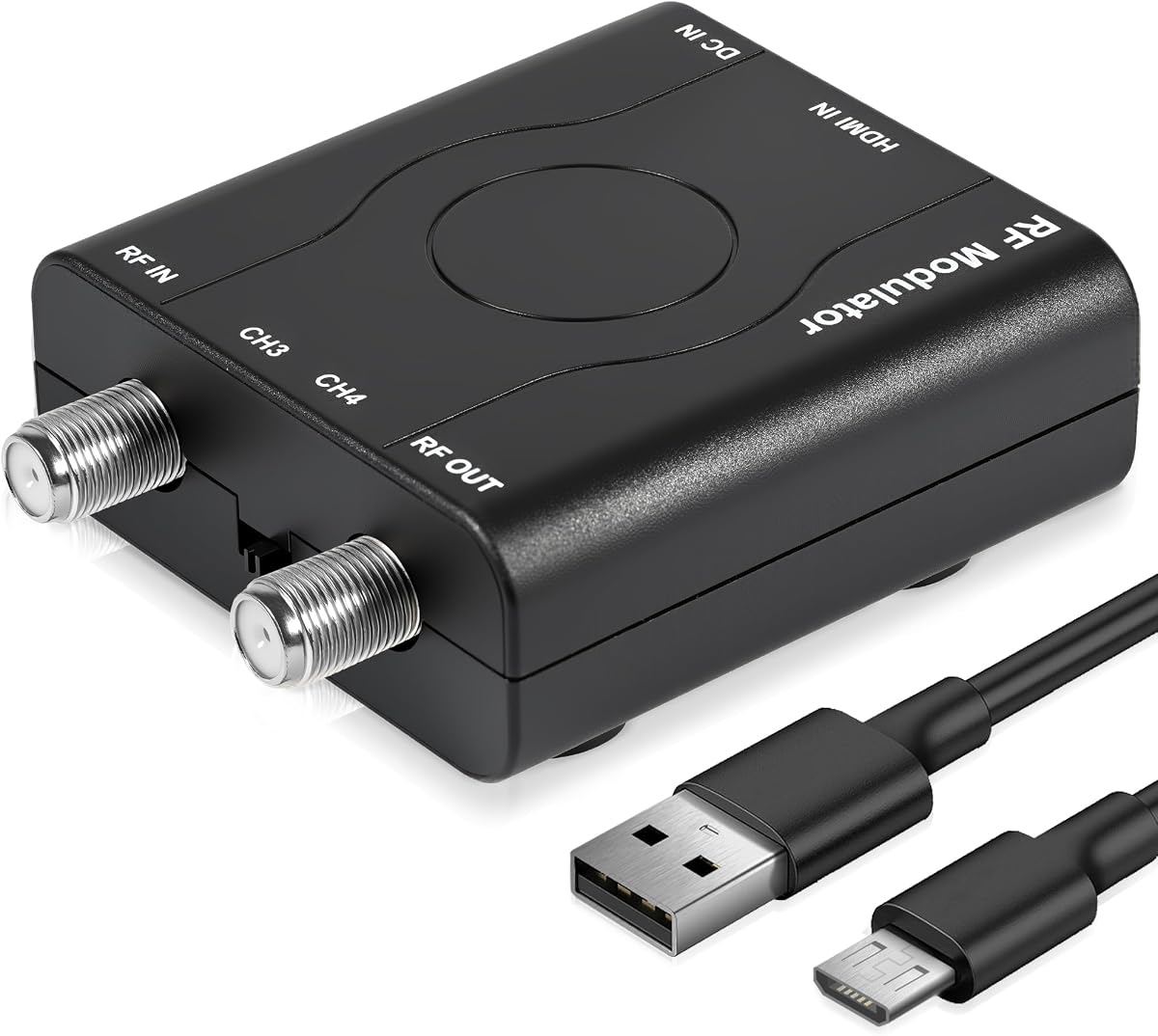


This HDMI to RF modulator has a 4.3 rating and distinguishes itself with a particularly complete package. It includes the modulator, a 1.2-meter HDMI cable, a power adapter, a power cable, and a user manual, making it more convenient for a first-time installation than a converter sold as a bare box.
We may earn a commission when you buy through this link, at no additional cost to you.
Its strongest feature is stable NTSC RF output at CH3 or CH4, with the listed output level of 80 ± 5 dBµV. The PLL control is intended to keep the VHF frequency stable, while the HDMI side accepts 1080P, 1080i, 720P, 576P, and 480P input. The stated 1080P capability refers to the HDMI input rather than the analog RF output, an important distinction for modern displays.
The product is designed for HDMI sources such as Fire TV Stick, Roku, current game consoles, Blu-ray players, and other HDMI equipment. Its limitations are equally clear: it converts HDMI to RF, not coax to HDMI, and its NTSC output may not suit a PAL-only television. Some source devices and systems may also impose HDCP or region restrictions.
Choose this model when your goal is to feed a modern streaming device or game console into an older television with an antenna-style coax input. It is not the right choice for a vintage VCR that needs to send coax to HDMI, but for the direction it supports, the included accessories and clearly specified RF output make it a strong all-around option.
The supplied HDMI lead and complete power set remove the most common source of setup friction. You still need a suitable coaxial cable and an NTSC television or RF display, but the core connections are already accounted for.
PLL frequency control and the stated RF output level support predictable reception on CH3 or CH4. Adjust the television's channel tuning exactly as required by its tuner rather than expecting automatic channel discovery.
We may earn a commission when you buy through this link, at no additional cost to you.
This RF demodulator is the most directly relevant option in the list for coax-to-HDMI conversion. Its 3.4 rating is the lowest among the selected products, but its compatibility story is unusually broad for a consumer converter, covering classic game systems, VCRs, videodisc players, and older camcorder formats.
We may earn a commission when you buy through this link, at no additional cost to you.
The device accepts an analog VHF or UHF signal through a coaxial F-type female antenna input and provides HDMI output for a modern television, monitor, or projector. It supports NTSC and PAL and is described as compatible with HDMI 1.3, making it a practical bridge for retro gaming and analog video collections.
The included remote adds functions such as power controls, timers, reminders, reservations, a calendar, and a child lock. These conveniences are useful, but the lower rating suggests buyers should examine the current customer feedback carefully. Also note that coax is a broad category: a composite video cable or a BNC surveillance output is not automatically the same as an RF-modulated television signal.
This is the pick for a classic Atari, Magnavox Odyssey, Intellivision, VCR, Betamax, or similar system that offers an RF output. Confirm that your device is NTSC or PAL as expected and that the display accepts the resulting HDMI signal. For those who want to preserve or reconnect older media hardware, it is considerably more relevant than the HDMI-to-RF modulators that dominate the ranking.
Modern displays often lack the RF input found on classic consoles and VCRs. This demodulator translates that older antenna-style output into HDMI, preserving the original console without requiring a separate RF-to-video cable chain.
The remote makes power, timer, and channel-related operations easier, while support for both NTSC and PAL broadens the pool of compatible vintage sources. The display still needs a suitable HDMI input and a correctly tuned source channel.
We may earn a commission when you buy through this link, at no additional cost to you.
This BNC to HDMI converter earns a 4.7 rating, the highest among the ten products, and it is the most versatile option for a standard analog surveillance camera. Unlike an RF demodulator, it is designed around a BNC video connector and the lower-resolution composite signals commonly used by older CCTV systems.
We may earn a commission when you buy through this link, at no additional cost to you.
It automatically detects PAL or NTSC and provides HDMI output at 720P or 1080P with 50Hz and 60Hz options. The aspect ratio can be switched between 4:3 and 16:9, while the listed processing includes 3D motion compensation, color optimization, and digital noise reduction. A separate audio port allows audible input when the camera or source provides compatible audio.
The product supports analog cameras, not digital, AHD, TVI, or CVI models. Its package contains the converter and a 27.5-inch cable, and the listed package note says the adapter is not included in that cable reference. The BNC port also is not a general-purpose coax RF interface, so this should not be selected for an old game console's antenna output.
Buy it to connect an analog BNC camera or video recorder to a modern HDMI television or monitor without replacing the camera system. It is also a sensible way to create a dedicated test display during installation. Among the products that genuinely convert coax-sourced video to HDMI, its rating, automatic format detection, output flexibility, and continuous-operation design make it the leading general-purpose BNC choice.
The converter identifies PAL or NTSC input automatically, reducing the need to guess a menu setting. Once connected, select the matching output resolution and refresh rate on the television or monitor.
Motion, color, and noise processing are intended to improve the presentation of older analog footage on a digital display. Actual results depend on the original camera quality, cable condition, and the selected aspect ratio.
We may earn a commission when you buy through this link, at no additional cost to you.
The HDM61 is an HDMI-to-RF converter rather than a coax-to-HDMI device, but it remains useful for connecting current consoles to an old television. Its 4.3 rating reflects a straightforward product designed to output NTSC RF on CH3 or CH4.
We may earn a commission when you buy through this link, at no additional cost to you.
The HDMI input can accept 1080P, 1080i, 720P, 576P, 576i, and 480p signals, all processed through 1080P PLL frequency control. The listed compatibility includes PCs, laptops, game consoles, Nintendo Switch, cameras, television boxes, DVD players, and CCTV or DVR equipment. HDMI 1.4 and HDCP 1.4 support provide useful baseline compatibility.
Its main limitation is categorical rather than a minor specification issue: it cannot receive an RF signal and produce HDMI. That means it cannot connect a legacy VCR or console's coax output to a modern screen. The product is also limited to NTSC output, so a PAL-only display or installation may not suit it.
Choose the HDM61 when a modern HDMI game console needs to feed an RF television, especially if you want a portable one-way setup without drivers. It is less compelling for the keyword's literal purpose, but it is a sensible solution for preserving access to older RF displays and coax-based video distribution.
HDMI 1.4 and HDCP 1.4 support cover a broad range of game consoles, media players, and computers. The converter preserves a familiar way to use an RF-equipped television without replacing the display.
The ABS housing and driver-free design make the unit easy to place near an existing television. Channel selection remains manual through CH3 or CH4 on the receiving display.
We may earn a commission when you buy through this link, at no additional cost to you.
This RF modulator has a 5.0 rating and focuses on distributing HDMI content over an existing coaxial infrastructure. That makes it relevant in homes, classrooms, hotels, and businesses where multiple RF displays may be more convenient to connect than individual HDMI cables.
We may earn a commission when you buy through this link, at no additional cost to you.
The product turns HDMI video and audio into a coaxial television signal for older sets and displays. Its stated source compatibility includes streaming players, consoles, Blu-ray and DVD players, cable and satellite receivers, computers, laptops, and cameras. The package includes a four-foot HDMI cable, power cable, power adapter, and a user manual with illustrated setup instructions.
As with the other RF modulators in the roundup, the signal path is strictly one way. It does not make a coax-fed VCR usable with a modern HDMI television. Distribution may also depend on the electrical properties of the coax network, splitter quality, and television tuning, none of which the converter alone can guarantee.
Select it when modern HDMI content must reach RF televisions in multiple rooms or locations. The strong listed rating, complete kit, and distribution focus make it appealing for installers and households with several legacy displays, provided you understand that it sends content toward the televisions rather than receiving coax from legacy equipment.
An RF modulator can reuse coax wiring in places where pulling new HDMI runs would be inconvenient. The same signal can feed an RF display or a compatible splitter, depending on the installation.
The included HDMI and power leads simplify the first installation, while the step-by-step guide helps with connection order. A coax lead and suitable display connection may still need to be supplied separately.
We may earn a commission when you buy through this link, at no additional cost to you.
The HDM61 HDMI to Coax Adapter combines a 5.0 rating with a compact, one-way design. It accepts HDMI audio and video, then produces an NTSC-M analog RF signal on CH3 at 61.25MHz or CH4 at 67.25MHz for a television with a coax input.
We may earn a commission when you buy through this link, at no additional cost to you.
The HDMI side supports HDMI 1.4 and HDCP 1.4, and the product uses PLL frequency control. Although the description refers to 1080P converter processing, the resulting RF output is stated as 480P. That is the normal type of limitation for an analog television-grade output, but buyers should understand that the final picture is not full HD.
The molded ABS shell supports steady transmission, and no driver or software is required. The product cannot convert RF back into HDMI or AV, and it is designed specifically for NTSC-M systems. A PAL-only television would therefore need a compatible alternative.
This model is most appropriate for a simple setup involving one HDMI source and one older NTSC television. Its compact housing, straightforward operation, and strong listed rating make it convenient, although it offers fewer features than the multi-output and multi-format modulators elsewhere in the roundup.
The adapter removes the need for a separate RF modulator in a basic one-source, one-display arrangement. Connect HDMI, power, and coax, then tune the television to the selected channel.
Modern HDMI input capabilities should not be confused with the analog result. The listed RF output is 480P, which is suitable for older televisions but will not reproduce a native 1080P image.
We may earn a commission when you buy through this link, at no additional cost to you.
This modulator has a 4.5 rating and supports many current HDMI sources, making it a good option for mixed home or commercial equipment. It outputs NTSC RF on CH3 or CH4, with PLL control intended to provide a stable VHF signal.
We may earn a commission when you buy through this link, at no additional cost to you.
Accepted HDMI resolutions include 1080P, 1080i, 720P, 576P, and 480P. The listed device compatibility covers personal computers, laptops, game consoles, Nintendo Switch, cameras, television boxes, DVD players, and CCTV or DVR systems. HDMI 1.4 and HDCP 1.4 support help ensure that many mainstream sources can negotiate a usable signal.
Despite the product title mentioning a coax to HDMI adapter, the detailed description makes the direction clear: HDMI to RF only. It is not a solution for a VCR, Atari console, or other device that needs to send an antenna-style RF signal to an HDMI television. It also lacks the RCA output and channel-switch features found in the more versatile unit later in the list.
Buy it to connect an HDMI-equipped computer, console, player, or box to an older NTSC television or RF display. Its broad source support and 4.5 rating make it a dependable general-purpose modulator, but buyers seeking literal coax-to-HDMI conversion should choose a BNC or RF demodulator instead.
The supported device list covers entertainment and computing categories that commonly include HDMI. It is particularly handy for a mixed setup in which several source types may be connected over time.
CH3 and CH4 are fixed output options rather than a broad tuner. The television must support the selected NTSC-M channel and be tuned accordingly for a clean picture.
We may earn a commission when you buy through this link, at no additional cost to you.
This converter is the most functionally expansive HDMI-to-RF model in the roundup. Its 4.2 rating reflects a design that provides both RCA CVBS and VHF television outputs, giving users more ways to connect an HDMI source to older equipment.
We may earn a commission when you buy through this link, at no additional cost to you.
The RF output can feed a television with a coax input, while the RCA output can connect to a capture card or older analog display. Coaxial transmission also allows the signal to travel farther than a typical HDMI cable, making the product suitable for sharing video between rooms or across an existing distribution system.
The listed coaxial connectivity includes an F-type female antenna input and a separate RF coax output, along with a channel switch. That arrangement may be useful when connecting antenna, tuner, satellite, or cable equipment, although the product's primary role remains converting HDMI into legacy outputs.
Choose it if you need both coax and RCA destinations from one HDMI source, especially when recording through a capture card or sharing content with another RF television. It does not convert coax into HDMI, but its dual-output design and long-distance distribution option distinguish it from the simpler modulators in this list.
Simultaneous RCA and VHF RF outputs allow a single HDMI source to feed different types of equipment. That flexibility is useful when one display accepts coax while another or a capture device uses RCA.
Coax can carry the converted signal farther than the short physical reach normally associated with HDMI. Installation quality still matters, especially when adding splitters or long cable runs.
We may earn a commission when you buy through this link, at no additional cost to you.
The Eyoyo converter is a specialized BNC-to-HDMI solution for security camera systems. Its 4.4 rating and broad format support make it a strong choice for users who need to connect existing CCTV equipment to modern displays without replacing every camera.
We may earn a commission when you buy through this link, at no additional cost to you.
The converter supports TVI, CVI, AHD, and CVBS, automatically detecting the video format. It accepts camera input resolutions from 720P through 8MP and outputs a stated 1080P signal at 60 frames per second. Both PAL and NTSC are recognized, which is helpful for mixed or international installations.
A major practical benefit is the HDMI and BNC loop output. The user can view the feed on an HDMI monitor while continuing to send the BNC signal toward a DVR. The metal housing is designed for heat dissipation and continuous operation, and the listed coax range of 500–700 meters is well suited to warehouses, farms, parking areas, and multi-building properties.
This is the pick for installers or homeowners who want to retain older and mixed-format surveillance cameras. It is not intended for RF-modulated game consoles or VCR antenna outputs, and the image and actual cable performance will depend on source quality. For a dedicated CCTV bridge, however, its feature set is more complete than that of a basic analog BNC converter.
Supporting several camera formats makes the unit useful when a property has a mixed camera system. Existing cabling can remain in place while a modern television, projector, or control-room display receives an HDMI signal.
The BNC loop output allows the source signal to continue toward a recording device while an HDMI screen presents a live view. That makes the converter useful for setup checks, maintenance, and surveillance rooms.
We may earn a commission when you buy through this link, at no additional cost to you.
The HDMI61 Coax Adapter has a 5.0 rating and is a clean one-way solution for sending an HDMI source to an NTSC RF television. It provides CH3 and CH4 output at 61.25MHz and 67.25MHz, giving the display a standard analog television channel to tune.
We may earn a commission when you buy through this link, at no additional cost to you.
Its HDMI input supports 1080P, 1080i, 720P, 576P, 576i, and 480p. The 1080P PLL control and HDMI 1.4 compatibility cover common source equipment, while HDCP 1.4 support can help with protected content when the source and converter negotiate it correctly.
The product is portable, requires no driver installation, and uses an ABS housing intended for consistent everyday operation. It cannot receive an RF signal and send it to HDMI, so it does not help a VCR or classic game console connect to a modern television. Its output is also specified as NTSC, not PAL.
Choose it for a straightforward console, computer, disc player, or streaming device connected to an older NTSC television. The 5.0 rating, broad input support, and uncomplicated installation make it appealing for this specific direction, while users searching for literal coax-to-HDMI conversion should focus on the BNC and RF demodulator options.
The two fixed channel options are widely supported by older television tuners. Select one channel on the converter and tune the television to the matching frequency.
Modern HDMI devices ranging from computers to game consoles can use the adapter. Its driver-free design avoids software complications, leaving channel selection and coax connection as the main setup tasks.
We may earn a commission when you buy through this link, at no additional cost to you.
The most important decision is identifying the exact signal your source produces and the direction it must travel. Connector shape, video standard, resolution, audio, and installation environment matter more than broad compatibility claims.
Match the direction to your equipment: choose RF-to-HDMI for a vintage console or VCR, BNC-to-HDMI for an analog camera, and HDMI-to-RF for a modern console feeding an antenna-style television.
Verify the source connector exactly: F-type for many legacy consoles, BNC for most analog CCTV cameras, and the connector named in the product specifications for any other installation.
Confirm that both the converter and the source use the same regional standard. Automatic detection is helpful, but it cannot compensate for a converter that only supports the wrong system.
Separate source resolution from delivered resolution. A higher output label is not useful if the device does not accept your camera format or source signal.
Check for a dedicated audio path whenever sound matters. Confirm that the output connector and television can carry it, rather than assuming video conversion includes every audio feature.
Choose remote controls and timers for a legacy entertainment center, but prioritize standards, connectors, and resolution for a fixed CCTV or distribution installation.
Use quality coax for long or shared runs, minimize unnecessary splitters, and test the complete chain. Longer reach does not guarantee a flawless image in every installation.
For continuous surveillance duty, favor a metal, heat-conscious design and leave ventilation around it. For occasional use, a compact ABS unit is generally easier to place.
Begin by identifying the source output and the intended display input. Disconnect all equipment from power, then connect the converter according to the required direction. For RF-to-HDMI, run the source's coax output to the converter's antenna input and connect the converter's HDMI output to the television. For BNC-to-HDMI, attach the camera or recorder to the BNC port and add audio if required. For HDMI-to-RF, connect the modern source to HDMI, the modulator to power, and its coax output to the television or splitter.
Power on the converter and source, then configure the display. An RF-to-HDMI unit may require a remote-based channel selection and source tuning, while a BNC converter may automatically detect PAL or NTSC and provide a selectable output resolution. For an HDMI-to-RF modulator, set the television to the matching NTSC channel, usually CH3 or CH4, and adjust the television's fine tuning if necessary. Keep the source and television on the same input mode so the display does not keep switching between HDMI and antenna sources.
For the best result, use properly shielded coax, secure every connector, and avoid running signal cables beside noisy power lines when practical. Test with a short cable before completing a long run or hidden installation. Clean exterior surfaces with a dry or lightly damp cloth, keep moisture away from ports, and do not open the housing while connected to power. If a picture becomes unstable, check the connector seating, source format, television system setting, and channel selection before changing equipment.
No. Coax can mean an F-type RF television signal, a BNC analog camera signal, or another coax-family connection. These signals use different electrical characteristics, so a converter designed for a BNC camera will not necessarily work with a VCR or game console's RF output.
No. An HDMI-to-RF modulator performs the opposite conversion, sending an HDMI source to an older television with a coax input. You need a true RF demodulator or a compatible BNC-to-HDMI converter when the starting device produces coax and the destination accepts HDMI.
Check the PAL or NTSC standard, selected channel, and coax connector first. Also confirm that the source is actually producing an RF-modulated television signal rather than composite video, and make sure the television or monitor is set to the correct HDMI input.
It depends on the converter's supported formats. A basic analog model may handle only CVBS, while the Eyoyo option supports TVI, CVI, AHD, and CVBS. Verify the camera format, resolution, connector, and whether the converter supplies an audio path.
It depends on the specific model, but most convert HDMI into an analog NTSC television signal with a lower output resolution than the input. Some products advertise 1080P input while outputting 480P RF, so always distinguish the input capability from the delivered picture.
Coax generally supports much longer runs than HDMI, and the Eyoyo surveillance converter lists a 500–700 meter range. Actual performance depends on cable quality, interference, connectors, splitters, and the output strength of the source. A conservative installation and appropriate cable are essential for long distances.
That depends on the product and the source. Some BNC converters include a separate audio input, while RF demodulators may carry audio within the television signal. Check the listed ports and the source's audio output before installation so you know whether another cable is needed.
Some HDMI-to-RF modulators can feed an RF splitter, allowing a compatible signal to reach multiple televisions. A basic RF-to-HDMI converter usually has one HDMI output, while a BNC converter may include a BNC loop output. Connection count, splitter quality, and signal strength all affect whether distributed images remain stable.
The most relevant shortlist depends on the equipment in your possession. The BNC to HDMI Converter is the strongest general pick for analog CCTV because it automatically detects PAL and NTSC, offers 720P and 1080P output, and provides an audio input. The RF Demodulator Coax to HDMI stands out for classic consoles, VCRs, and videodisc equipment, while the Eyoyo model is the feature-rich surveillance option for TVI, CVI, AHD, CVBS, and higher-resolution camera signals.
Before buying, prioritize the connector and conversion direction over every other feature. Confirm whether the source is F-type RF, BNC analog video, or HDMI; verify PAL or NTSC support; and determine whether audio, aspect-ratio controls, remote functions, or loop output are required. Those checks will prevent a technically capable converter from becoming an unusable purchase.
Once the correct model is selected, read the current listing and product instructions to confirm included cables, power requirements, output resolution, and regional television standard. Prices, availability, and listing details can change, so check the current product page before making a final purchasing decision.
