
ASRock DeskMeet X300
4.8Editor score
Broad AM4 processor support
Four DDR4 memory slots
PCIe 3.0 x16 expansion
500W Bronze power supply
Our guide compares the best Barebone Pcs with Amd across processors, memory, storage, displays, networking, expansion, and value for work or gaming at home.
Barebone PCs with AMD processors offer a flexible way to build a compact desktop around the components you actually need. Unlike a fully equipped system, a barebone package normally includes the chassis, processor, and power delivery while leaving memory, storage, and the operating system for the buyer. A good model balances expandability, connectivity, thermals, and processor capability.
The systems in this guide cover a broad range of AMD platforms, including Ryzen 7 PRO 8845HS, Ryzen 7 255, Ryzen 7 5825U, and compatible AM4 processors. We compared their processor performance, memory options, storage capacity, display support, networking, external graphics readiness, cooling design, and intended uses. The list includes gaming-oriented models, everyday mini desktops, and expandable NAS systems.
Each review explains the features that distinguish its barebone PC from the alternatives and identifies the trade-offs that matter when completing the system. The top picks emphasize strong overall capability, useful connectivity, and flexible configuration. Current prices and availability can change, so readers should verify component compatibility and the latest listing details before purchasing.
4.8Editor score

4.0Editor score

3.1Editor score
The comparison below highlights the processor, memory, storage, display, and networking capabilities of each AMD barebone PC, making it easier to identify the right platform for gaming, productivity, or home-server use.





The AOOSTAR MACO pairs the Ryzen 7 PRO 8845HS with Radeon 780M graphics inside a compact gaming-oriented barebone platform. Its 4.0 rating reflects a capable foundation, particularly for users who want a small desktop with unusually strong connectivity. Eight CPU cores, sixteen threads, and boost speeds up to 5.1GHz make it suitable for demanding multitasking, content creation, and gaming when paired with suitable memory and storage.
We may earn a commission when you buy through this link, at no additional cost to you.
The standout feature is its broad selection of high-speed interfaces. OCuLink provides a dedicated PCIe pathway for an external graphics card, while two USB4 ports support demanding peripherals, data transfer, and display arrangements. Dual Intel I226-V 2.5G LAN ports, Wi-Fi 6, Bluetooth 5.2, HDMI 2.1, and DisplayPort 1.4 create a flexible platform for gaming, work, and networking. The dedicated fingerprint reader adds a convenient security feature that is not universal in this category.
Memory and storage are entirely at the buyer's discretion. Two DDR5 SO-DIMM slots support up to 128GB, and two M.2 2280 PCIe 4.0 slots allow substantial internal storage. The trade-offs are the normal ones associated with barebone systems: the operating system, RAM, and SSD must be obtained separately. Buyers also need to power down the system before changing an OCuLink-connected accessory because that interface does not support hot-swapping.
This is a strong recommendation for a compact workstation or enthusiast gaming build, especially when external graphics and abundant ports matter. It may be excessive for basic office use, but its processor, display support, networking, and eGPU readiness create a well-rounded platform for users who intend to configure the system to their own needs.
OCuLink gives the MACO a more direct route to an external GPU than a general-purpose USB connection. That makes it appealing for graphics-intensive work and gaming, provided the buyer uses an appropriate enclosure and powers the system down before connecting or disconnecting the adapter.
Dual 2.5G Ethernet, Wi-Fi 6, Bluetooth 5.2, dual USB4, and legacy USB ports make the system practical for demanding desks, high-resolution workflows, and peripherals that still rely on older connections.
We may earn a commission when you buy through this link, at no additional cost to you.
The AOOSTAR GEM12+ is a particularly compelling barebone mini PC because it combines a strong 4.5 rating with the Ryzen 7 PRO 8845HS and Radeon 780M. It targets buyers seeking a compact system for home, business, content work, and gaming without paying for a fixed set of memory and storage. The result is a flexible base for a capable AMD-powered desktop.
We may earn a commission when you buy through this link, at no additional cost to you.
Two DDR5 SO-DIMM slots support up to 128GB, while dual M.2 2280 PCIe slots support up to 8TB. Its 64Gbps OCuLink connection operates independently of the M.2 slots, allowing an external GPU to be connected without sacrificing internal SSD bandwidth. Display and networking options are equally strong, with support for four simultaneous 4K screens, dual 2.5G LAN, Wi-Fi 6, and Bluetooth 5.2.
BIOS-level performance modes let users balance quiet operation against higher sustained output. Silent, balanced, and performance settings adjust the available power range, making the system adaptable to office use, compilation, video work, or gaming. The vapor chamber and CPU fan help manage heat during extended loads, although a barebone system still needs suitable memory and cooling-aware component choices to perform consistently.
The GEM12+ is best for buyers who want strong 8845HS performance and eGPU flexibility at a more budget-conscious entry point. It is less suitable for someone wanting a turnkey system because RAM, an SSD, and the operating system must be purchased and installed separately. For a knowledgeable builder, it offers an excellent balance of performance, expandability, and connectivity.
Silent, balanced, and performance BIOS profiles make it possible to tune the same barebone system for quiet productivity or more demanding sustained workloads. This flexibility is especially useful for owners whose computing needs change over time.
The combination of four-display support and a dedicated 64Gbps OCuLink port makes the GEM12+ useful for creative desks, compact gaming setups, and workstations where conventional internal graphics expansion is unavailable.
We may earn a commission when you buy through this link, at no additional cost to you.
The AOOSTAR GEM12+ PRO builds on the 8845HS platform with a more refined feature set. Its 4.1 rating reflects a capable and distinctive design, centered on a Ryzen 7 PRO 8845HS, Radeon 780M graphics, and a built-in display. The display can show real-time processor, graphics, and memory information while also allowing users to personalize its background.
We may earn a commission when you buy through this link, at no additional cost to you.
Fingerprint recognition provides quick, convenient system access without repeatedly entering a password. Internally, the system supports up to 128GB of DDR5 memory and 8TB across dual PCIe M.2 slots. A dedicated 64Gbps OCuLink interface allows external graphics connectivity without consuming an M.2 slot, while the full port selection supports four simultaneous 4K displays and includes dual 2.5G LAN.
As a barebone model, it requires compatible memory, storage, and operating system components. The OCuLink port must also be treated as a cold-connect interface rather than a hot-pluggable one. These are important considerations for buyers accustomed to prebuilt systems, but the DIY approach gives experienced users control over nearly every major performance component.
The GEM12+ PRO is a strong premium recommendation for users who value thoughtful touches alongside raw capability. Its status display, fingerprint reader, networking, and eGPU readiness distinguish it from more conventional office mini PCs. It is best suited to enthusiasts, content professionals, and gamers who can confidently select compatible components and install them.
The integrated display can present real-time CPU, GPU, and memory information as well as a personalized background. It adds visible status feedback without taking space away from the user's normal monitor.
Built-in fingerprint recognition provides a quick route into the system while reducing repetitive password entry. It is a convenient feature in a workstation that may be shared by more than one user.
We may earn a commission when you buy through this link, at no additional cost to you.
The ASRock DeskMeet X300 stands apart with a 4.8 rating, the highest among the products in this guide. It uses a conventional AMD AM4 platform rather than a soldered mobile processor, giving buyers access to Ryzen 2000, 3000, 4000 G-Series, 5000, and 5000 G-Series desktop processors. It is the most conventional DIY mini PC of the group and offers unusually broad internal expansion.
We may earn a commission when you buy through this link, at no additional cost to you.
Four DDR4-3200 slots can hold up to 128GB, a useful advantage over systems limited to two SO-DIMMs. The PCIe 3.0 x16 slot can accept a full-size graphics card, while two SATA connectors and an Ultra M.2 slot cover conventional and fast storage. A 500W 80 Plus Bronze power supply is included, reducing one potentially expensive part of the build.
The trade-off is the age of the platform. DDR4 memory and AM4 processors differ from newer DDR5 and Ryzen AI systems, and the CPU must be sourced separately. A compatible CPU cooler up to 54mm in height is also required. Buyers should confirm the official processor list and consider the cost of the processor, memory, storage, operating system, and cooling before committing.
For a knowledgeable builder, the DeskMeet X300 is an excellent value-oriented choice. It is particularly attractive for gamers or creative users who want a full PCIe graphics card in a compact eight-liter chassis. It is less attractive for buyers seeking the newest CPU architecture or the simplest possible installation, but it offers strong physical expandability rarely matched in this size class.
The PCIe 3.0 x16 slot is one of the major reasons to choose the DeskMeet. It allows a suitably sized desktop graphics card to be installed, offering a clear advantage for gaming and GPU-accelerated workloads over systems limited to integrated graphics.
Supporting several generations of Ryzen desktop processors gives owners freedom to choose a CPU based on capability and budget. The platform is established and practical, although newer buyers should account for future upgrade limitations.
We may earn a commission when you buy through this link, at no additional cost to you.
The MINISFORUM X1 Lite-255 is a modern barebone mini PC built around the Ryzen 7 255 and Radeon 780M. Its eight cores, sixteen threads, 16MB L3 cache, and boost speed up to 4.9GHz make it well suited to image editing, browsing, media playback, everyday productivity, and lighter gaming. The 3.9 rating suggests a broadly capable platform with some limitations compared with the more specialized 8845HS systems.
We may earn a commission when you buy through this link, at no additional cost to you.
Dual DDR5 SO-DIMM slots support up to 128GB, and two M.2 2280 PCIe 4.0 slots provide room for fast storage. The rear and side connectivity is modern, with HDMI 2.1, DisplayPort 1.4, USB4, 2.5G Ethernet, Wi-Fi 6e, and Bluetooth 5.2. Display outputs can drive three independent monitors, including very high refresh-rate configurations supported by the listed interfaces.
Its OCuLink port is useful for external graphics but requires an included adapter plate and one M.2 2280 PCIe 4.0 slot, unlike dedicated implementations that use an independent lane. It also is not hot-swappable. Buyers considering an eGPU should therefore treat the storage trade-off carefully and verify the dock and enclosure requirements before completing the system.
The X1 Lite-255 is a good general-purpose recommendation for users who want modern processing, fast networking, and a compact system without paying for enterprise-oriented extras. It suits homes, offices, and creative desks that need strong everyday performance and multi-monitor capability. The warranty and support period add reassurance, although the absence of included components keeps the final configuration entirely in the buyer's hands.
USB4, dual 2.5G Ethernet, Wi-Fi 6e, and Bluetooth 5.2 provide a contemporary foundation for fast networks, external storage, and peripherals. The three display outputs also make the system useful for collaborative work and monitoring setups.
Large side and bottom ventilation openings create a three-dimensional airflow path, while dedicated cooling for memory and storage helps maintain consistent performance. This is especially relevant when the compact chassis is fully populated with memory modules and fast SSDs.
We may earn a commission when you buy through this link, at no additional cost to you.
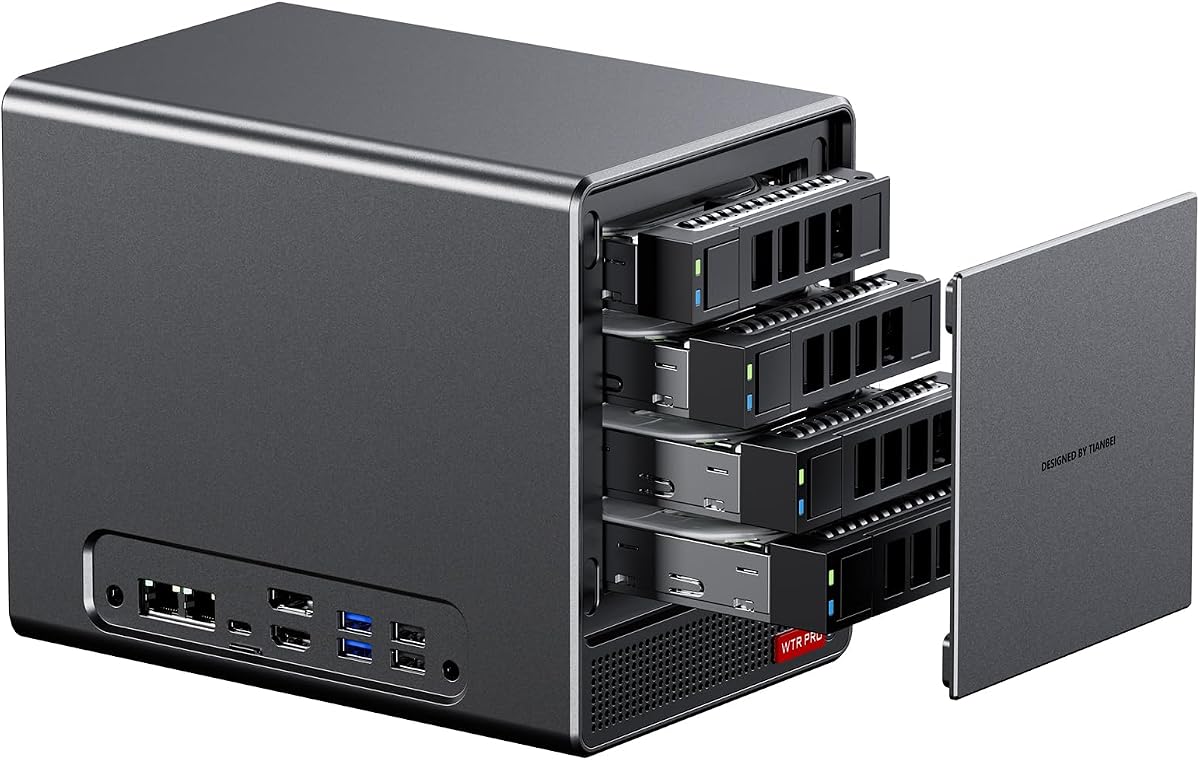
The AOOSTAR WTR PRO is a four-bay NAS barebone for buyers who need local storage and flexible networking more than gaming performance. It uses the eight-core, sixteen-thread Ryzen 7 5825U with Radeon Vega graphics, a capable platform for file services, soft routing, media, backups, and general office tasks. No customer rating is currently supplied, so the available specifications are the main basis for comparison.
We may earn a commission when you buy through this link, at no additional cost to you.
Its defining feature is the storage layout. Four 3.5-inch SATA bays can hold drives of up to 22TB each, while two M.2 2280 NVMe positions provide high-speed cache or active storage. Dual DDR4 SO-DIMM slots support up to 64GB. The product is therefore a hybrid NAS foundation rather than a general-purpose gaming mini PC, with physical storage taking priority over exotic expansion.
Dual 2.5G LAN ports can support more demanding network arrangements, including aggregation, gateway use, or separating traffic. DisplayPort, HDMI, and USB Type-C enable up to three 4K screens, which is useful for local administration. Wake-on-LAN and Wake on LAN call startup functions are also listed, supporting unattended operation and network access.
This WTR PRO is recommended for home-server builders, small offices, and users building a dedicated storage or routing system. It is less suitable as a gaming desktop because its storage-oriented chassis and Zen 3 processor serve a different purpose. Buyers should plan their operating system, memory, drives, and networking software before purchasing.
Four full-size SATA bays distinguish this model from compact desktop barebones that offer only M.2 storage. The additional NVMe slots make it possible to combine large-capacity backups with fast-access data.
Two 2.5G Ethernet ports provide more flexibility than a single wired connection. They can be useful for high-speed transfers, network segmentation, gateway functions, or redundant arrangements when supported by the selected software and network configuration.
We may earn a commission when you buy through this link, at no additional cost to you.
The ASRock DeskMini X300 is built for buyers who want a particularly small conventional desktop with a replaceable AMD processor. Its 1.92-liter chassis supports AM4 Ryzen processors from the 2000, 3000, 4000, and 5000 families, subject to compatibility and the 65W processor limit. The 4.2 rating indicates a well-regarded platform with broad usefulness for home and office builds.
We may earn a commission when you buy through this link, at no additional cost to you.
Two DDR4 SO-DIMM slots support up to 128GB at speeds up to 3200MHz when paired with a compatible Ryzen processor. Storage is flexible: two Ultra M.2 positions support NVMe SSDs, while two 2.5-inch bays accept HDDs or SATA SSDs and can be configured for RAID 0 or RAID 1. This makes the DeskMini unusually adaptable for compact storage-focused systems.
Display support includes HDMI, DisplayPort, and D-Sub, allowing up to three simultaneous displays. A Dragon RTL8125BG 2.5G LAN controller provides fast wired networking, while a dedicated M.2 Key-E position allows a Wi-Fi and Bluetooth module to be installed. A 120W power adapter is included, but the processor, memory, drives, and operating system are not.
The DeskMini X300 is recommended for space-conscious office users, homelab enthusiasts, and builders who value a tiny footprint with real storage flexibility. It is less attractive for major future upgrades because the AM4 and DDR4 platforms are established rather than current-generation. Used alongside a suitable processor and SSD, however, it can deliver a capable, quiet, and expandable desktop.
The 1.92-liter enclosure is tiny, yet it supports two NVMe slots and two 2.5-inch drive positions. This combination is useful for owners who want fast system storage alongside larger-capacity or redundant data drives.
HDMI, DisplayPort, and legacy D-Sub provide broad monitor compatibility, including useful support for professional or legacy equipment. The platform is particularly attractive for compact multi-screen workstations.
We may earn a commission when you buy through this link, at no additional cost to you.
The ASUS ExpertCenter PN54 is the guide's most forward-looking mini PC, built around AMD Ryzen AI 300 Series processors with six cores and Radeon 800M graphics. The XDNA2 NPU delivers up to 50 TOPS of AI performance, a notable distinction for software that can use specialized AI acceleration. Its 3.1 rating is the lowest in the list, making independent feature evaluation especially important.
We may earn a commission when you buy through this link, at no additional cost to you.
The 0.6-liter chassis is exceptionally compact and uses a tool-free design intended to make customization and component access easier. It can drive up to four 4K displays and includes six USB ports, dual 2.5G LAN, Wi-Fi 7, and Bluetooth 5.4. These specifications make it a natural fit for modern offices, AI experimentation, compact creative systems, and multi-monitor workspaces.
The AMD platform is attractive for users interested in local AI features, efficient multitasking, and current integrated graphics. The six-core configuration may be less attractive than eight-core competitors for heavily threaded workloads, though specialized AI hardware can provide value in supported applications. As with all barebone PCs, the exact processor, memory, storage, and operating system configuration must be confirmed from the listing.
The PN54 is recommended for buyers who prioritize cutting-edge connectivity, compact industrial design, and dedicated AI hardware over maximum CPU core count. It is a premium platform, and its modest rating may reflect early listing sentiment rather than a lack of features. Prospective buyers should carefully verify component choices and how their intended applications use the NPU.
The XDNA2 NPU can handle AI workloads independently of some conventional CPU and GPU tasks. Its usefulness depends on software support, so buyers should confirm that the applications they intend to run are optimized for the platform.
The extremely small chassis can still be serviced without tools according to the listed design. That makes ongoing component access more convenient than many compact barebone systems, although internal connector and cooler limits should still be checked.
We may earn a commission when you buy through this link, at no additional cost to you.
The AOOSTAR WTR PRO 4+2 combines the Ryzen 7 5825U with a storage layout designed for advanced home servers. It supports four SATA drives and two M.2 NVMe SSDs, creating a maximum listed capacity of 96TB. The 3.7 rating reflects a capable specialized system, while the absence of included memory and drives gives buyers complete control over their server configuration.
We may earn a commission when you buy through this link, at no additional cost to you.
Dual DDR4 slots support up to 64GB, and the Ryzen 7 5825U provides eight cores and sixteen threads for file services, routing, virtualization, and everyday administration. Operating system support includes Windows 10, Windows 11, Ubuntu, OpenWrt, and OPNsense, while VT-x and VT-d virtualization capabilities suit home labs and multi-service setups.
One technical caveat deserves attention. Under sustained heavy Linux loads, SATA link power management may reduce speed or produce CRC errors on certain drive bays. The product information states that a udev-rule configuration can lock SATA links to full 6Gbps performance, so Linux administrators should follow the provided setup guidance and verify drive behavior.
This model is a strong recommendation for a home NAS, soft router, or general-purpose home server where storage capacity and dual networking matter. It is not the right choice for a gaming-focused compact desktop, but its efficient processor, flexible operating system support, and six-position storage design serve server roles exceptionally well.
The four SATA bays are joined by two M.2 NVMe positions, allowing large-capacity drives to coexist with fast flash storage. The layout is well suited to combining archival data, active applications, caches, and high-speed working sets.
Support for mainstream desktop and network-focused operating systems gives the system flexibility as a router, NAS, or virtualization host. Users should still confirm driver, application, and storage-controller behavior for their chosen platform.
We may earn a commission when you buy through this link, at no additional cost to you.
The ASUS ExpertCenter PN54-S1 is a compact business-oriented barebone built around AMD Ryzen 200 Series processors and Radeon 740M graphics. It supports up to four 4K displays and is designed for efficient multitasking in a slim 34mm chassis. No customer rating is listed, so its feature set and intended business use should be evaluated directly rather than through a numerical customer feedback signal.
We may earn a commission when you buy through this link, at no additional cost to you.
The system's connectivity includes six USB ports, dual 2.5G LAN, dual DisplayPort, Wi-Fi 7, and Bluetooth 5.4. A tool-free design provides quick access for component customization, making the barebone easier to service and adapt. Its ultra-thin enclosure is well suited to office desks, reception areas, compact workspaces, and display-heavy installations.
As a DIY kit, it requires the buyer to select and install a compatible processor, memory, storage, and operating system. The exact internal configuration and processor options should be checked against ASUS support information. The system's main appeal is its combination of modern wireless connectivity, wired networking, multi-display capability, and a slim, serviceable design.
The PN54-S1 is a solid recommendation for office users and integrators who need a small, professional-looking barebone with current connectivity. It may not offer the same processor core count or specialized AI hardware as some competitors, but it balances practical business functions in a compact form. Verify processor compatibility and internal limits before completing the purchase.
Wi-Fi 7, Bluetooth 5.4, dual 2.5G LAN, and multiple DisplayPort outputs provide the networking and display foundation expected from a contemporary compact office system.
The tool-free design is especially useful in a barebone product because owners must access the interior to install essential components. A 34mm profile can simplify deployment where conventional towers would be impractical.
We may earn a commission when you buy through this link, at no additional cost to you.
Choosing an AMD barebone PC means balancing processor performance, component standards, physical expansion, cooling, connectivity, and intended use. The most attractive chassis is only a good purchase if its motherboard supports the memory, storage, processor, and accessories you actually need.
The processor sets the platform's performance ceiling. The Ryzen 7 PRO 8845HS models provide eight cores and sixteen threads, with boost speeds up to 5.1GHz, making them strong choices for gaming, content creation, and heavy multitasking. The Ryzen 7 255 also offers eight cores and sixteen threads, while the Ryzen 7 5825U uses an older Zen 3 design optimized more toward efficiency, storage serving, and general network tasks. The ASRock models use socketed AM4 processors, allowing compatibility with several Ryzen desktop generations but limiting future upgrades to that established platform.
Choose a processor platform according to workload and upgrade plans, not core count alone. Eight cores offer comfortable multitasking headroom, while special features such as the PN54's XDNA2 NPU can matter for supported AI applications.
Memory compatibility is one of the most important checks. Modern 8845HS, 255, and AI 300 Series systems use DDR5 SO-DIMMs, often in two slots supporting up to 128GB. The ASRock AM4 systems use DDR4, with the DeskMeet offering four slots and the DeskMini offering two. The NAS models use two DDR4 slots with a listed maximum of 64GB. Mixing platforms is not an option, so the processor family and motherboard determine the required memory type.
Check both capacity and slot count. More slots can make it easier to add memory gradually, while dual-slot designs are often sufficient for typical workstation loads. Match installed modules to the listed speed and confirm operating system support for the full memory capacity.
Storage needs vary more widely than processor requirements. Most mini desktop barebones provide two M.2 2280 positions for NVMe SSDs, which is ideal for a fast operating system drive and active data. The AOOSTAR WTR PRO 4+2 is different: it combines four SATA drive bays with two M.2 NVMe positions, while the standard WTR PRO provides four 3.5-inch SATA bays and two M.2 slots. The ASRock DeskMini adds two 2.5-inch drive bays and RAID 0/1 support.
Match the layout to your data rather than choosing only by drive count. NVMe improves responsiveness, SATA bays support larger-capacity drives, and RAID can provide redundancy or performance. Remember that a barebone listing does not include the actual SSDs or hard drives.
Display requirements should be checked at the output level rather than by monitor count alone. HDMI 2.1, DisplayPort 1.4, and USB4 can support demanding high-resolution and high-refresh-rate arrangements, while D-Sub offers useful legacy compatibility. Several AOOSTAR 8845HS systems advertise four simultaneous 4K displays, the MINISFORUM supports three independent displays, and the ASUS ExpertCenter models support up to four 4K displays.
Confirm the exact resolutions and refresh rates stated for each output, then ensure the included or selected graphics can drive them. A multi-screen workspace may also require a suitable adapter, and some USB4 display functions depend on the selected display, dock, and operating system.
OCuLink is a major advantage for compact gaming and workstation builds because it provides a dedicated high-bandwidth PCIe connection for an external GPU. The AOOSTAR MACO, GEM12+, and GEM12+ PRO use an independent 64Gbps implementation, while the MINISFORUM X1 Lite-255 requires an adapter and occupies an M.2 slot. The ASRock DeskMeet includes a conventional PCIe 3.0 x16 slot, which offers direct full-size graphics-card expansion. None of the OCuLink systems listed supports hot-swapping, so devices should be powered down before changing connections.
Choose OCuLink when enclosure space is the primary constraint, and choose a full PCIe slot when an appropriate graphics card and case clearance are available. Also consider enclosure power delivery, thermal clearance, and the bandwidth requirements of the intended GPU.
Networking can be a decisive feature in a small-form-factor PC. The 8845HS AOOSTAR systems and the ASUS ExpertCenter models provide dual 2.5G Ethernet, while the WTR PRO and WTR PRO 4+2 offer dual 2.5G ports for server and routing roles. Wi-Fi 6, Wi-Fi 6e, and Wi-Fi 7 are available across several systems, with Bluetooth 5.2 or 5.4 for peripherals. The WTR PRO also supports Wake-on-LAN and Wake on LAN call startup, useful for unattended operation.
Select networking based on how the computer will be used. Wired 2.5G is valuable for large transfers and busy networks, while modern Wi-Fi reduces cable clutter. For a home server, remote startup and dual LAN can offer more practical value than a faster wireless standard.
Compact systems generate concentrated heat, so cooling should match the processor and workload. The AOOSTAR 8845HS systems use vapor chambers and adjustable BIOS power modes, allowing a compromise between quiet operation and sustained performance. The MINISFORUM employs side and bottom ventilation plus dedicated memory and storage cooling. The WTR PRO models use a large 12-centimeter fan and a dust-resistant metal chassis designed for continuous operation. The ASRock DeskMeet includes a 500W 80 Plus Bronze power supply, while the smaller ASUS and ASRock systems rely on external adapters.
Do not assume a barebone's included accessories cover every thermal requirement. Some socketed systems need a separate CPU cooler within the stated height limit. For always-on use, prioritize sustained thermal control, airflow, dust management, and acoustic behavior over short burst performance.
A barebone computer is not ready for immediate use. These systems exclude memory, SSDs or hard drives, and the operating system, and the ASRock AM4 models also exclude the processor and compatible CPU cooler. Some listings include a power supply, VESA mount, mounting screws, HDMI cable, or SSD cooling pad, but the exact package should be checked on the current listing. The operating system itself may require a separate license and installation.
Budget for the complete configuration rather than comparing chassis listings in isolation. Include the processor, memory, storage, cooling, operating system, peripherals, and any necessary dock or adapter. This prevents a seemingly capable barebone system from becoming more expensive or less balanced than a simpler alternative.
Before assembling the system, verify every component against the manufacturer's compatibility list. Install the processor or confirm that the included processor is properly seated, apply an appropriate thermal solution, and populate the supported DDR4 or DDR5 memory slots according to the manual. Install at least one compatible NVMe SSD or SATA drive, connect the storage cables where required, and fit the operating system using a prepared installation medium.
Connect the display, keyboard, mouse, and networking equipment before finalizing the operating system. Enter the firmware setup to confirm that memory, drives, and processors are recognized, then update the firmware and operating system if appropriate. For systems with OCuLink, power the computer down before attaching or removing an external GPU enclosure. Do not change M.2, memory, or storage hardware while the machine is running.
Leave adequate space around the chassis, keep intake and exhaust openings unobstructed, and periodically clean dust from vents and fans. For an always-on NAS or soft router, use a surge-protected outlet, enable automatic system updates cautiously, and monitor drive temperatures and operating-system alerts. Back up important data, especially when using RAID, and test recovery procedures rather than assuming redundancy alone is sufficient.
A barebone mini PC usually includes the chassis, processor, power delivery, and basic accessories, but it normally excludes RAM, storage, and the operating system. Some socketed models also exclude the CPU and CPU cooler. The exact package varies by product, so buyers should read the current listing carefully and add every missing component to their budget.
Support depends on the specific platform and graphics configuration. Systems with Radeon 780M can handle many mainstream games and light content-creation workloads, while OCuLink or full-size PCIe expansion can accommodate a more powerful discrete GPU. Cooling, memory configuration, power limits, display settings, and game requirements also determine the real gaming experience.
OCuLink is generally better suited to graphics workloads because it provides a dedicated PCIe connection and more predictable bandwidth than a general-purpose USB4 link. Some implementations, however, may occupy an M.2 slot, and the listed OCuLink ports do not support hot-swapping. The external enclosure, adapter, power supply, and thermal limits also need to be considered.
Only if the chassis and motherboard provide a suitable full-length PCIe slot and enough power and clearance. The ASRock DeskMeet X300 includes a PCIe 3.0 x16 slot for this type of expansion. Most Ryzen 7 255 and 8845HS mini PCs rely on integrated Radeon graphics or an external GPU connected through OCuLink or a compatible USB4 dock.
For general office work and browsing, a modest memory capacity and a single fast NVMe SSD are usually sufficient. Content creation, heavy multitasking, virtual machines, and local storage tasks benefit from more memory and additional drives. Match the modules to the required DDR4 or DDR5 standard, and confirm that the operating system supports the total memory capacity.
The AOOSTAR WTR PRO and WTR PRO 4+2 are specifically oriented toward NAS, soft-router, and home-server use. Their four SATA bays, optional NVMe positions, dual 2.5G LAN, low-power processors, and remote startup features make them better server foundations than the gaming-oriented models. Operating system, drive compatibility, backup strategy, and any platform-specific SATA behavior still require careful planning.
Windows 10 or 11 is generally suitable for the mainstream desktop models, while Linux can be appropriate for server, router, and development use. The WTR PRO 4+2 specifically lists Ubuntu, OpenWrt, and OPNsense among compatible systems. Drivers, firmware, storage support, and application requirements should be checked for the exact processor and barebone model before installation.
Some assembly is normally required, although the difficulty depends on the design. Systems using preinstalled mobile processors generally require only memory, storage, and operating-system installation. Socketed AM4 models also require CPU and cooler installation, and compact cases can be less forgiving during assembly. Anyone unfamiliar with PC hardware should follow the manual carefully or seek local assistance.
The AOOSTAR MACO 8845HS is the strongest all-around recommendation because it combines a capable Ryzen 7 PRO processor, Radeon 780M graphics, OCuLink, dual USB4, dual 2.5G networking, fingerprint security, and expandable memory and storage. The ASRock DeskMeet X300 stands out for flexible socketed AM4 processing and a full-size PCIe graphics slot, while the ASUS ExpertCenter PN54 is the leading option for buyers who prioritize AI hardware and future-facing connectivity.
Prioritize the platform that matches the completed system rather than the smallest chassis or newest label. Check processor generation, memory type, storage layout, display outputs, networking, cooling, and power delivery. Gamers should consider OCuLink or full PCIe expansion, NAS builders should focus on drive bays and dual networking, and office users should weigh multi-monitor support, wireless standards, warranty, and serviceability.
Current prices, stock levels, component bundles, and software details can change, so verify the latest listing before purchasing. Confirm that every required component is included or budgeted for, check CPU and memory compatibility, and make sure the selected operating system and peripherals support the system's features.