
Power Strips with Surge Protection
4.8Editor score
Twelve AC outlets
Four smart USB ports
Flat braided extension cord
Explore the best desk mounted outlet towers, comparing capacity, charging speed, surge protection, mounting options, safety features, and desk fit.
Desk mounted outlet towers bring multiple AC connections and USB charging ports together in a compact, vertically oriented station. The best models reduce adapter clutter, improve cable access, and make frequently used outlets easier to reach while keeping desks, nightstands, dorm rooms, and shared workspaces tidy.
We compared all ten products by examining outlet quantity, USB-C and USB-A charging capability, surge protection, cord length, mounting design, safety features, and physical footprint. The list covers freestanding towers, flat-plug models, retractable-cord designs, and clamp-mounted options for different desk arrangements.
Each review explains the product’s most useful qualities, practical limitations, and ideal environment. The awards identify the strongest choices for value, overall versatility, and premium desk integration, while current ratings, specifications, and availability should be confirmed before purchase because market conditions and product details can change.
4.8Editor score

4.5Editor score

4.8Editor score
This side-by-side comparison highlights the major differences among freestanding, clamp-mounted, flat-plug, and retractable outlet towers, with particular attention to connectivity, charging performance, safety, and installation.




The TenTrend Power Strip Tower combines six AC outlets with eight USB charging ports in a compact 3.15 by 3.15 by 5.12-inch vertical housing. Its 4.5 rating reflects a versatile feature set, while the most distinctive capability is total charging output of up to 230W. Two USB-C ports can deliver as much as 65W each, making the tower more ambitious than a conventional desktop charger focused only on phones and accessories.
We may earn a commission when you buy through this link, at no additional cost to you.
The charging arrangement is unusually flexible. Two orange USB-C ports are intended for demanding tasks such as laptop charging, two green USB-C ports provide up to 20W, and four blue USB-A ports provide up to 15W. This makes the tower useful for a mixed collection of computers, tablets, phones, earbuds, and smaller accessories. The six AC outlets are rated for 1250W at 125V and 10A, allowing the tower to serve as the central connection point for a busy workstation.
Its physical design is well suited to a desk because the body remains narrow and upright. A 0.31-inch flat plug sits close to the wall and reduces interference with neighboring plugs, while the five-foot cord can run along a desk edge or floor without taking up much room. Overcurrent, overvoltage, short-circuit, and overheat protection add confidence, although buyers should still verify that each connected device falls within the tower’s individual and total power limits.
This is the strongest all-around recommendation for someone who wants one station to replace several wall adapters and a basic extension cord. Its charging capability is particularly useful for USB-C laptop users, while the six AC outlets provide enough conventional connectivity for a monitor, dock, speakers, and other desk equipment. The main limitation is that its five-foot cord is shorter than the six- or six-and-a-half-foot cords offered by several alternatives.
The split USB-C and USB-A arrangement allows the tower to serve both high-power and low-power devices without requiring separate desktop chargers. The 65W USB-C connections are the key feature for compatible laptops, while the lower-output ports handle everyday accessories.
The narrow tower, flat plug, and relatively short cord help reduce visual and physical clutter. It is particularly effective when an outlet is close to the rear edge of a desk or nightstand.
We may earn a commission when you buy through this link, at no additional cost to you.
The Uncaged Ergonomics Retractable Power Strip Tower stands apart with a built-in six-foot cord that retracts into its base. It offers four AC outlets, two USB-C ports with up to 20W output, and two USB-A ports. The product’s 5.0 rating and unusually broad feature set make it a compelling option for desks where cable length and clutter are persistent concerns.
We may earn a commission when you buy through this link, at no additional cost to you.
Automatic rewind is the defining convenience. Instead of pulling a fixed cord across the floor and coiling it afterward, the user extends only the length needed. This can be especially helpful in conference rooms, studio desks, dorm rooms, and shared workbenches where loose extension cords tend to become trip hazards or visual distractions. The upright body also stays stable on desks, shelves, and floors.
The mounting feet add another layer of adaptability. They allow the tower to be fixed beneath a desk, against a wall, or to a workbench when freeing surface space is important. Surge protection is rated at 320 joules, and the product uses a 16-gauge copper cable rated for 1625W. These specifications indicate that it is intended to protect and power a broad range of conventional electronics rather than serve as a high-wattage laptop charging station.
It is best for users who value cord management and flexible placement more than a large number of AC sockets. The 20W USB-C limit remains adequate for many phones, tablets, earbuds, and watches, but it will not offer the same laptop-charging headroom as the TenTrend or Anker selections. Even so, the retractable mechanism, mounting options, and clean eight-port configuration give it a clear identity.
The retractable cable removes the usual step of gathering excess cord into a loop. It keeps the installation visually cleaner and can reduce the amount of loose cable crossing a shared floor or walkway.
Feet let the owner choose between freestanding use and fixed placement. Under-desk mounting can recover valuable surface area, while wall or workbench attachment works well in flexible technical spaces.
We may earn a commission when you buy through this link, at no additional cost to you.
This SMALLRT desktop charging tower provides twelve AC outlets, three USB-A ports, and one USB-C port, allowing up to sixteen devices to connect at once. Its 4.7 rating makes it a strong choice for offices, dorm rooms, and home workstations where conventional outlet count matters more than advanced USB-C charging.
We may earn a commission when you buy through this link, at no additional cost to you.
The four separated switches are a particularly thoughtful feature. Users can turn off groups of connected electronics without unplugging each one, helping reduce unnecessary standby draw and making it easier to control different device groups. The AC side is rated for 1250W at 125V and 10A, while the USB system supplies a combined 5V and 3.4A. The USB-C port can deliver up to 3A, and each USB-A connection up to 2.4A.
The vertical format makes better use of limited desk depth and provides room for larger power adapters than a thin horizontal strip. Overload, short-circuit, and overcurrent safeguards are included. The product description references a six-and-a-half-foot cord, although another line within the supplied information mentions ten feet, so buyers should confirm the cord length in the final listing.
This tower suits users who want many AC connections and straightforward charging for accessories or lower-power USB devices. It is less compelling for someone whose main requirement is laptop charging through USB-C, since only one such port is offered and total USB output is modest. Within its focus, however, the separated switches, large outlet count, and compact vertical form make it particularly practical.
Four separated switches let users isolate collections of equipment without reaching behind every adapter. This makes the tower practical for mixed work areas that contain computers, monitors, and peripherals.
The upright tower gives bulky laptop and monitor plugs more clearance than a shallow horizontal strip. Its vertical form also takes up less desk depth while keeping sockets easy to identify.
We may earn a commission when you buy through this link, at no additional cost to you.
The Anker Nano Power Strip is a clamp-mounted ten-port station with six AC outlets, two USB-C ports, and two USB-A ports. It carries a 4.8 rating and stands out for a 70W USB-C output, 1500-joule surge protection, and a dual-zone design intended to simplify access to frequently used connections.
We may earn a commission when you buy through this link, at no additional cost to you.
Unlike a conventional freestanding tower, this product attaches to the underside of a desk. The adjustable clamp holds the strip firmly enough for one-handed plugging and unplugging while keeping the desktop clear. It fits straight desk edges between 0.6 and 1.8 inches thick, equivalent to roughly 15 to 45 millimeters. It does not support curved edges, slopes greater than 45 degrees, or desks without a clampable edge.
The 70W GaN-based USB-C output makes the Anker Nano more useful for compatible laptops and tablets than many charging-focused strips in the category. The two-zone layout separates outlets and charging ports into upper and lower groups, which can make it easier to reach a connection without navigating around every attached cable. A five-foot power cord supplies additional positioning flexibility while the mounted body remains close to the desk.
This is the most refined option for a fixed workstation where the owner wants charging and AC access without placing a tower on the surface. It is a better fit for modern desks with a suitable straight edge than for round tables, unusually thick desks, or portable setups. Buyers receive a welcome guide, 24-month warranty, and customer support, making it a particularly reassuring premium choice.
The 70W USB-C connection can power compatible laptops and tablets directly, reducing the need for a separate charging brick. Its compact mounted body keeps high-output charging close to the work surface.
The clamp remains stable during one-handed use and provides two distinct port zones. This improves access while freeing the entire desktop for equipment, notes, and everyday work.
We may earn a commission when you buy through this link, at no additional cost to you.
The SMALLRT outlet extender combines twelve AC outlets with four smart USB ports, including one USB-C connection, for a total capacity of sixteen devices. Its 4.8 rating and broad compatibility make it an attractive freestanding hub for a dorm, shared office, home office, or entertainment area.
We may earn a commission when you buy through this link, at no additional cost to you.
Smart charging technology detects connected devices and adjusts delivery within the stated limits. The four USB ports share 3.4A of output, with each USB-A port rated up to 2.4A and the USB-C port up to 3A. That is enough for many phones, tablets, headphones, and other USB-powered accessories, although it is not intended to replace a dedicated high-wattage laptop charger.
Physical construction emphasizes stability and resistance to everyday wear. The tower uses a copper extension cord with reinforcement at the connection between the cable and tower body. Its flame-retardant PC shell is rated to 1382 degrees Fahrenheit, and an integrated circuit breaker handles overload protection. A reset or off switch provides a straightforward way to cut power, while an anti-slip mat helps prevent wobbling on a desk or floor.
It is a strong general-purpose selection when the priority is abundant AC connectivity, stable construction, and dependable accessory charging. Its six-and-a-half-foot cord gives reasonable placement flexibility, and the vertical body leaves more room for large plugs than a horizontal strip. The main compromise is modest shared USB output, so demanding laptop users should look toward a higher-wattage model.
The strengthened cable-to-tower junction addresses a common failure point in extension devices. Combined with the fire-resistant shell, it gives the tower a reassuring foundation for repeated plug changes.
A broad base with an anti-slip mat keeps the tower from sliding while adapters are inserted or removed. The upright format also improves clearance around monitor and laptop power bricks.
We may earn a commission when you buy through this link, at no additional cost to you.
The 21-in-1 Surge Tower includes sixteen AC outlets, two USB-C ports, and three USB-A ports, making it the largest connection hub in this guide. Its 4.6 rating reflects a practical design aimed at offices, dormitories, home workspaces, and shared environments where many devices need access to one power point.
We may earn a commission when you buy through this link, at no additional cost to you.
Its most important advantage is outlet quantity. Sixteen sockets provide ample capacity for computers, monitors, printers, speakers, lamps, and other conventional equipment. The wide spacing between outlets is designed to reduce blocking, particularly when larger power bricks are used. AC capacity is listed at 1875W with 125V input and 3600W with 240V input.
The USB side includes three USB-A and two USB-C connections with a combined 17W and 3.4A output. This arrangement supports phones, headphones, tablets, and other compatible accessories, but it is not optimized for high-power USB-C laptops. Overload protection, a short-circuit fuse, and lightning protection help guard connected devices and the tower itself.
This model makes the most sense when AC capacity is the dominant requirement. A conference table, computer lab, production desk, or dorm room with numerous chargers can benefit from the extensive outlet count and relatively compact vertical footprint. The tradeoff is that its overall body is larger than smaller towers, and users seeking serious laptop charging should select a model with a higher-wattage USB-C connection.
The extensive socket count reduces the need for multiple extension strips. It is especially practical in rooms where several people regularly connect laptops, monitors, and mobile devices.
Wide outlet gaps help leave room for bulky adapters and tightly angled plugs. This improves practical access despite the tower’s large number of connections.
We may earn a commission when you buy through this link, at no additional cost to you.
The TESSAN Tower Power Strip combines eleven AC outlets and three USB ports in a compact grey tower. Its 4.8 rating reflects a well-rounded design, with a 1050-joule surge rating, six-foot cord, and an especially slim 0.31-inch flat plug that works well behind furniture.
We may earn a commission when you buy through this link, at no additional cost to you.
The right-angle plug profile is a major functional benefit. It sits close to the wall and leaves the neighboring portion of a standard duplex receptacle available for another plug. This makes the tower practical in locations where a conventional projecting adapter would block access or protrude into a walkway. It can be tucked behind a nightstand, sofa, bed, or bookshelf without the bulk associated with many extension cords.
USB connectivity consists of two USB-A ports rated up to 2.4A each and one USB-C port rated up to 3A. These are sensible accessory-charging speeds for phones, tablets, and earphones, but the tower is not aimed at charging a demanding laptop. Protection includes overload, short-circuit, and overcurrent safeguards along with a reliable on/off switch.
TESSAN’s tower suits users who need many AC outlets but prefer a relatively small footprint and a clean installation around furniture. The four rubber feet help prevent sliding, and the four-sided form keeps the body compact from multiple angles. It is less suitable for a high-powered charging hub, but it is a balanced option for a nightstand, home office, or dorm desk.
The ultra-thin plug and right-angle shape keep the connection close to the wall. That makes the tower especially useful where a protruding plug would interfere with furniture placement.
The USB-A and USB-C combination covers common accessory charging without taking up excessive space. It is a practical middle ground between a basic extension cord and a high-output charging station.
We may earn a commission when you buy through this link, at no additional cost to you.
The VILONG Dual Layer Desk Clamp provides ten AC outlets and three USB ports, including a 20W USB-C charging connection. Its 4.4 rating reflects a useful mounting design that can support both under-desk and desktop placement without requiring drilling or additional tools.
We may earn a commission when you buy through this link, at no additional cost to you.
The clamp installs against a desk edge as thick as 1.6 inches. Its dual-layer structure allows the main body to sit at the desktop while the outlet layer remains reachable, and it can also be positioned beneath the work surface. Two independent switches provide basic control over device groups, while the attached structure stays in place during one-handed plugging and unplugging.
The AC system is rated for 125V, 12A, and 1500W, which is appropriate for a broad collection of conventional desk equipment. Surge protection is rated at 700 joules and includes a built-in circuit breaker. The 20W USB-C output is more useful than basic five-watt charging for compatible tablets and phones, though it remains below the capabilities of the TenTrend and Anker models.
VILONG is most attractive to users who want to reclaim desktop space and already have a compatible straight-edged desk. Its tool-free setup is convenient, and the 45-degree flat plug can access a wall receptacle without blocking the lower socket. Buyers should confirm the desk thickness and the available clearance beneath the surface before ordering.
The dual-layer construction offers more placement flexibility than a simple under-desk bar. Users can retain desktop access or move the connections below the surface when a cleaner profile is preferred.
The twist-style clamp uses the desk edge as the anchor point, avoiding permanent installation. This makes the strip easier to reposition when the workspace changes.
We may earn a commission when you buy through this link, at no additional cost to you.
This 16-in-1 tower combines twelve AC outlets with two USB-A and two USB-C ports, supporting as many as sixteen connected devices. Its 4.7 rating reflects a balanced design that offers more modern charging choices than towers with only one USB-C port while retaining a high AC outlet count.
We may earn a commission when you buy through this link, at no additional cost to you.
The USB system provides a total output of 3.4A, with each USB-A connection rated up to 3.1A and each USB-C connection up to 3.4A. The product information states that USB-C charging can be up to 30 percent faster than a standard five-watt charger. While that is helpful for everyday devices, all four ports share a defined output, so demanding simultaneous charging can reduce individual delivery.
Its 0.30-inch flat plug and right-angle construction sit close to the wall and preserve access to the other half of a duplex outlet. The six-foot cord offers enough reach to position the tower on a desk or nightstand, and a compact 3.15 by 3.15 by 5.79-inch body limits its footprint. Four rubber feet help it remain stable, while wide-spaced AC outlets accommodate bulky adapters.
The tower is a good fit for a home office or dorm where several conventional devices and mobile accessories need one centralized connection point. Surge protection is rated at 1800 joules, with overload, short-circuit, and overcurrent protection plus a reset or off switch. It lacks a dedicated mounting system, so users who need to reclaim desk space entirely should consider a clamp or retractable model.
Having two USB-C connections reduces reliance on legacy charging cables. The design is convenient for households or workspaces that mix modern phones, tablets, headphones, and accessories.
The tower maintains a relatively small vertical footprint while spacing its AC outlets for larger plugs. It offers a useful compromise between portability and connection capacity.
We may earn a commission when you buy through this link, at no additional cost to you.
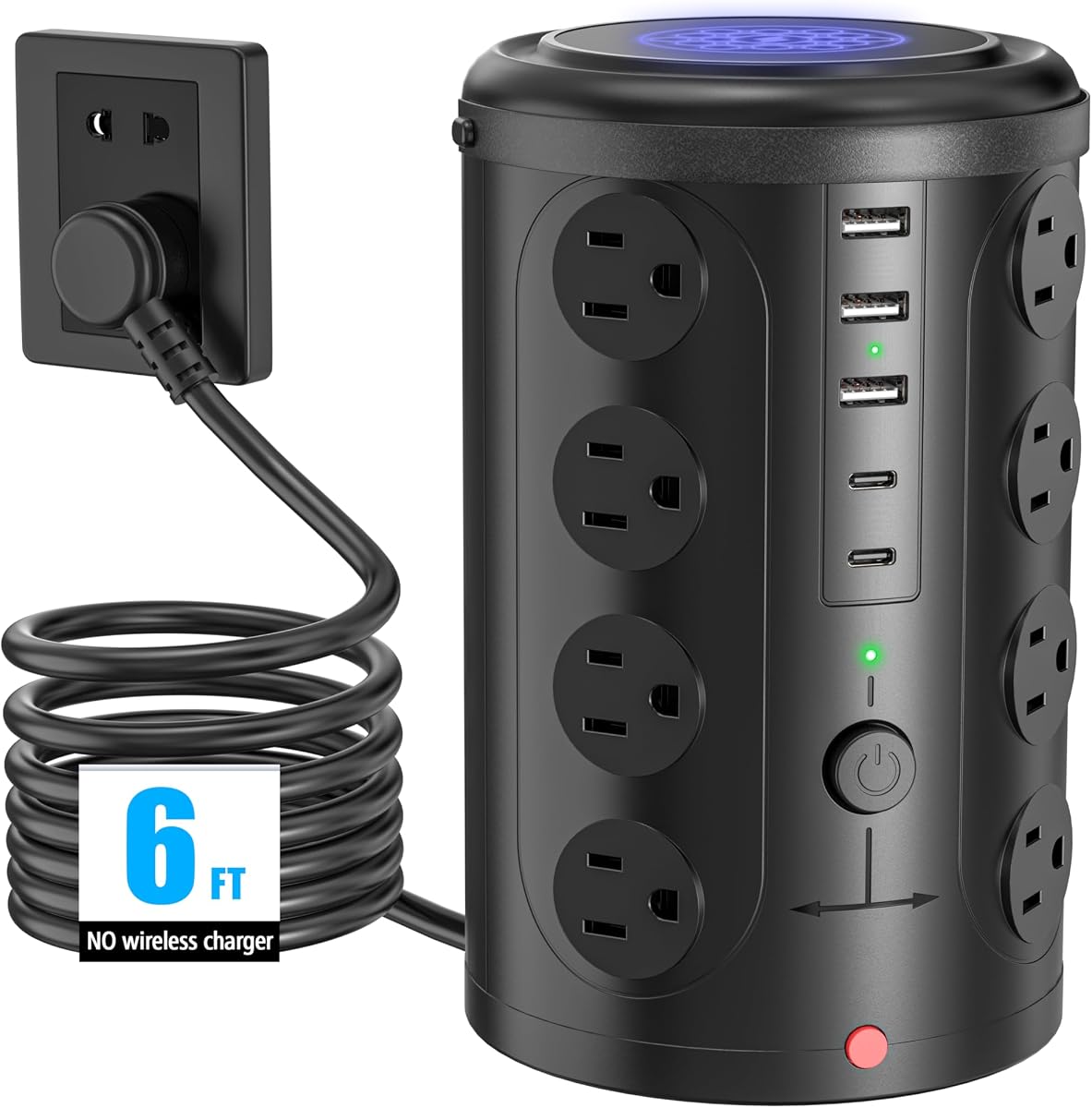
The Power Strips with Surge Protection tower offers twelve AC outlets and four smart USB ports, including two USB-C connections. Its 4.8 rating and extensive safety specification make it a strong value-focused choice for anyone who primarily needs a dependable central extension point.
We may earn a commission when you buy through this link, at no additional cost to you.
The AC side supports up to 1875W at 15A, while the smart USB system detects connected devices and adjusts output within the stated limits. Two USB-A ports provide up to 2.4A each, and the USB-C ports provide up to 3A each. This is suitable for common accessories and mobile devices, although it does not offer the power required for the most demanding USB-C laptops.
Safety is the tower’s defining area. Its surge protection rating is listed as 1080 joules in one part of the product description and 3500 joules in the comparison specification, creating an inconsistency that should be checked on the current listing. The device also includes an integrated circuit breaker and protection against overload, short circuits, overcurrent, overvoltage, and overheating.
Its 0.35-inch flat plug fits closely against a wall, while the braided fabric cord remains flexible and resists tangling. The vertical shape preserves desk depth and spaces the twelve outlets to reduce blocking. It is best for budget-conscious users who need many AC connections and basic USB charging, though anyone requiring advanced charging or a mounted configuration should choose a more specialized model.
Protection against multiple electrical faults gives the tower broad day-to-day usefulness. The integrated breaker and reset or off switch provide an easy response when the system reaches its limit.
The slim plug fits into tight locations, while the braided cable lies cleanly along a wall or desk edge. Its reduced thickness also makes it less likely to disrupt neighboring connections.
We may earn a commission when you buy through this link, at no additional cost to you.
The right desk mounted outlet tower depends on how many devices you own, the charging standards you use, the type of desk you have, and how much you value organized cable routing. Compare capacity, power ratings, mounting methods, and safety features before choosing.
Count every powered device that may need a conventional connection, including a monitor, laptop charger, speakers, printer, desk lamp, and USB-C dock. Twelve outlets provide comfortable capacity for a busy workstation, while sixteen or more are useful in dorm rooms, shared offices, conference spaces, and media areas. Outlet quantity alone is not enough, however, because a densely packed horizontal design can make it difficult to insert large power bricks. Wide-spaced outlets and a vertical tower generally offer better clearance.
USB-C output varies dramatically across this category. Basic towers often provide up to 3A, which is suitable for many phones, tablets, headphones, and small accessories. Higher-output models such as the TenTrend and Anker offer substantially greater wattage for compatible laptops and other demanding devices. Shared output also matters: if several devices charge simultaneously, the available power may be divided among them. Check the output for each port as well as the maximum for the entire charging system.
Freestanding towers offer flexibility because they can be moved, but they consume a small amount of surface area. Clamp-mounted products reclaim the desk entirely and are ideal for fixed workstations with a straight, appropriately thick edge. Retractable-cord designs reduce loose cable and can be mounted to a wall, workbench, or underside of a desk. Before choosing, measure the available space, inspect the desk edge, and consider whether the tower will be moved frequently.
Cord length should be long enough to reach the wall without leaving slack across a walkway, but not so long that it creates excess cable on the desktop. A five-foot cord works well for close wall placement, while six to six-and-a-half feet offers more flexibility. Flat plugs sit close to the wall and preserve neighboring outlet access. Right-angle plugs can be especially useful behind furniture. Braided cords tend to resist tangling, and retractable cords eliminate the need to coil excess length.
A surge protector helps divert voltage spikes, while overload protection prevents the strip from operating beyond its rated capacity. Look for an integrated circuit breaker, reset or off switch, and protection against short circuits, overcurrent, overvoltage, and overheating. Joules indicate the amount of surge energy the protection is designed to absorb, so a higher stated rating can provide greater capacity for sensitive and expensive equipment. Verify specifications directly because some listings present inconsistent figures.
Clamp models must match the desk’s edge thickness and shape. The Anker Nano fits straight edges from 0.6 to 1.8 inches thick but cannot accommodate curved or sharply sloped edges. The VILONG clamp supports desks up to 1.6 inches thick. Flat and right-angle plugs are useful in tight spaces, although they must still match the wall receptacle. A tower with widely spaced sockets and a stable base is generally more forgiving than a dense design.
Individual switches or grouped controls can make it easier to turn off equipment that is not in use. The SMALLRT 16-in-1 Tower includes four separated switches, while the VILONG and some other models provide a master or grouped control. Switches reduce the need to unplug bulky adapters every evening and can help lower standby consumption. Products with only a master switch remain simpler, but every connected device shares the same operating state.
Consider the mix of connectors already used by your devices. USB-A remains essential for older accessories, accessories without USB-C, and many existing cables. USB-C is preferable for newer phones, tablets, headphones, and laptops, but the number of USB-C ports matters less than their output. Check device charging standards and the protocols supported by the tower. A device may physically fit a USB-C port while charging more slowly if the strip lacks the appropriate power profile.
Before installation, inspect the tower, cord, and plug for visible damage. Confirm that the wall receptacle is in good condition and that the outlet’s electrical rating matches the connected equipment. For a freestanding model, place the base on a level surface and use all available rubber feet or anti-slip material. For a clamp-mounted model, check the desk thickness and edge angle before tightening the mechanism.
Arrange the cord along a wall or desk edge rather than across a walkway. For retractable models, pull only the length needed and allow the cord to rewind before moving the tower. Connect high-wattage laptop chargers and monitors to appropriate AC outlets, while using USB-C ports for devices that support their stated output. Avoid exceeding the tower’s total capacity, and do not assume that every USB port provides its maximum rating when all ports are active.
Inspect the tower periodically for heat, discoloration, loose plugs, or a cord that no longer rewinds properly. Unplug it before cleaning and use a dry or lightly damp cloth rather than aggressive liquids. Do not overload the strip with additional extension cords. If the breaker trips, disconnect devices until the load is reduced, then reset the tower according to its instructions. A clamp should be retightened if the desk shifts, while flat-plug models should be pulled from the wall by the plug rather than the cord.
A well-designed outlet tower can be safer than a basic extension cord because it provides a stable vertical base, organized connections, an integrated circuit breaker, and multiple forms of surge and overload protection. Safety still depends on using an undamaged product, respecting its power ratings, and avoiding daisy-chained towers. A tower cannot protect against an overloaded wall circuit or a damaged receptacle.
Only if the USB-C port supplies enough power and supports the laptop’s charging standard. Basic towers with modest USB-C output are best for phones, tablets, and accessories, while higher-wattage models are more appropriate for many laptops. Check the device’s power requirements, the port output, and whether the tower divides combined charging capacity among connected devices.
A freestanding tower sits on the desk, nightstand, shelf, or floor and can be moved easily. A clamp-mounted strip attaches to a compatible desk edge, often freeing the entire desktop. Clamps are convenient for fixed workstations, but they require a straight edge within the stated thickness range and usually offer less outlet capacity than the largest freestanding towers.
Most single-person workstations need six to ten AC outlets when dock chargers, monitors, speakers, and other equipment are considered. Twelve or more outlets provide additional room for a second computer, printer, lamp, or multiple charging adapters. Listing the devices and counting their power bricks before shopping helps prevent both an undersized choice and unnecessary excess.
A higher surge-energy rating indicates greater capacity to absorb voltage spikes, but it is only one part of the evaluation. Overload, short-circuit, overcurrent, overvoltage, and thermal protection also matter. Buyers should verify the stated rating because product information can contain inconsistencies, and they should select a properly rated and certified product for their region.
Many flat and right-angle plugs can fit closely behind a sofa, bed, nightstand, or bookcase. The plug design must match the wall receptacle, and the furniture must leave enough clearance for the tower body and plug movement. Even a slim plug should not be forced, and any cord should be routed so it cannot become pinched or pinched behind furniture.
A protected outlet tower can support normal overnight charging, provided the device, charger, and connected load are compatible with the tower’s ratings. Users should avoid leaving a high-wattage device charging while the tower is unattended if its protection features are unclear or its condition is questionable. Periodically checking for unusual heat, discoloration, or loose connections is sensible.
Unplugging the complete tower is the simplest way to eliminate any residual standby draw from connected devices. If the tower has individual or grouped switches, turning off the appropriate sections is a convenient alternative. A master switch provides similar convenience, although it cannot selectively control individual peripherals.
The TenTrend Power Strip Tower is the strongest all-around choice because it combines 14 connections with USB-C charging that can reach 65W per suitable port and as much as 230W across the charging system. The Anker Nano Power Strip is the premium desk-integrated option, while the VILONG clamp offers a more accessible mounted design. For straightforward value, the 16-in-1 flat-plug tower provides twelve AC outlets, two USB-C ports, and extensive protections.
Prioritize the features your equipment actually requires. Choose high-wattage USB-C for a laptop, a clamp for a fixed straight-edged desk, a retractable cord for shared or mobile spaces, and a high outlet count for dorm rooms or offices with many peripherals. Outlet spacing, breaker design, and cord routing can be just as important as the headline port count.
Before purchasing, confirm the current specifications, desk compatibility, charger requirements, safety markings, and product availability. Market terms and availability can change, so the final listing should be treated as the most current source of product details. A careful comparison will produce a cleaner workspace and a more dependable central power station.