
TP-Link TL-SG108 8-Port Gigabit Ethernet Switch
4.7Editor score
Eight Gigabit Ethernet ports
Fanless metal construction
Plug-and-play operation
Energy-efficient link adjustment
Explore the best Network Switch for Xfinity in 2026, comparing port counts, speeds, PoE, management, and practical features for every home network setup.
A network switch can give an Xfinity-connected home more wired Ethernet ports without replacing the modem or gateway. The right model should match your device count, cable layout, and need for features such as Power over Ethernet, 2.5G networking, VLANs, or traffic prioritization. A good switch is simple, reliable, and appropriately sized.
We compared all ten models across port count, supported link speeds, switching capacity, management features, PoE availability, physical design, and energy-related features. The list covers straightforward Gigabit options, compact 2.5G models, PoE switches for access points and cameras, larger unmanaged units, and advanced managed hardware for demanding networks.
Each review explains where the product fits and where simpler alternatives may make more sense. The top picks demonstrate the range available for Xfinity users, from an eight-port plug-and-play switch to Multi-Gig and 10GbE options. Product listings and network conditions can change, so confirm current specifications and compatibility before purchasing.
4.7Editor score

4.7Editor score

4.0Editor score
The table below compares all ten switches by their most important distinctions: Ethernet port count, maximum link speed, PoE availability, and management level. It makes it easier to identify a straightforward Xfinity expansion switch, a Multi-Gig upgrade, or a specialized solution for access points and other powered network equipment.



The TP-Link TL-SG105 is a compact, unmanaged Gigabit switch designed to add five wired connections to an existing home or small-office network. It carries a 4.7 rating and stands out for its straightforward installation, sturdy metal enclosure, and useful combination of auto-negotiation, flow control, and traffic-prioritization features. It is especially practical when an Xfinity gateway does not provide enough Ethernet ports for computers, televisions, game consoles, and printers.
We may earn a commission when you buy through this link, at no additional cost to you.
Each of the five RJ45 ports supports 10, 100, and 1,000 Mbps connections and uses auto-negotiation and auto MDI/MDIX. That means the switch can accept different cable standards without complicated crossover-cable settings. IEEE 802.3X flow control helps maintain reliable transfers, while port-based 802.1p/DSCP QoS and IGMP Snooping provide options for prioritizing time-sensitive traffic and handling multicast data. The energy-efficient design is another practical benefit for a device that may remain powered continuously.
The main limitation is the five-port total. An upstream connection to the Xfinity gateway generally consumes one port, leaving four for devices if the switch is connected downstream in a simple arrangement. Users who already have several wired devices or expect to add more soon may be better served by the eight-port TL-SG108. This model also does not provide PoE, so an access point, wired camera, or other powered Ethernet accessory would require a separate power supply.
Despite that limitation, the TL-SG105 is a strong choice for a small network that needs a few additional Gigabit connections. Its fanless design keeps it quiet, its metal case suits a home office or media area, and its plug-and-play approach avoids unnecessary configuration. Choose it when you need a compact, reliable, non-managed expansion switch and do not require PoE or faster than Gigabit links.
The five auto-negotiating Gigabit ports make this an easy way to connect several existing Ethernet devices without replacing the Xfinity gateway. Installation generally consists of connecting the switch to the network and attaching devices to the remaining ports.
A fanless metal design reduces mechanical noise and supports heat dissipation. Desktop and wall-mounting options also make it easier to position the switch near a workstation, entertainment center, or network closet.
We may earn a commission when you buy through this link, at no additional cost to you.
The TP-Link TL-SG108 is a highly straightforward way to expand a wired network around an Xfinity connection. It provides eight Gigabit RJ45 ports, a 4.7 rating, plug-and-play operation, and a fanless metal housing with shielded ports. It is a natural fit for households that already have several Ethernet-ready devices and want one dependable central box rather than several smaller adapters.
We may earn a commission when you buy through this link, at no additional cost to you.
Every port supports 10, 100, and 1,000 Mbps speeds, making the switch suitable for typical computers, printers, game consoles, smart TVs, and other Ethernet-enabled equipment. IEEE 802.3x flow control supports efficient data transfer, while the shielded construction and metal enclosure help provide reliability and protection against electromagnetic interference. Automatic adjustment of power consumption based on link status and cable length reduces energy use when not every port is active.
As an unmanaged switch, the TL-SG108 does not offer VLAN configuration, traffic monitoring, or a browser-based management interface. That is an advantage for users who want no setup routine, but it limits its usefulness in segmented or more sophisticated networks. It also tops out at 1 Gbps per connection, so a NAS, advanced access point, or workstation capable of 2.5G would not benefit from Multi-Gig performance.
The TL-SG108 is recommended for most straightforward Xfinity network expansions. One port can connect upstream to the gateway, leaving seven available for wired devices, while the eight-port layout also gives an installer flexibility for future additions. Choose it for uncomplicated Gigabit networking, quiet operation, and minimal maintenance.
Eight ports provide room for a gateway connection and a collection of computers, consoles, printers, and televisions. The spare capacity also reduces the need to replace the switch every time another wired device is added.
The switch works without software installation or manual configuration. Link-status awareness and cable-length-based power adjustment help it remain simple for nontechnical users while still operating continuously in a home network.
We may earn a commission when you buy through this link, at no additional cost to you.
The TP-Link TL-SG105S-M2 is a compact Multi-Gig switch that gives every connected device access to 2.5 Gbps links. It holds a 4.7 rating and combines five 2.5-Gigabit ports with 25 Gbps of switching capacity. That makes it a compelling choice for an Xfinity home with a 2.5G Wi-Fi 6 access point, network storage, powerful workstation, or another device that can benefit from faster local transfers.
We may earn a commission when you buy through this link, at no additional cost to you.
Auto-negotiation detects each device's supported rate and adjusts among 100 Mbps, 1 Gbps, and 2.5 Gbps. Older Gigabit equipment can therefore share the switch without configuration, while compatible Multi-Gig devices receive the higher link rate. The product is aimed at LAN parties, home entertainment, small home offices, and fast workstation transfers, and its fanless metal case helps it remain quiet and suitable for either desktop or wall mounting.
The switch remains unmanaged, so it does not provide VLAN creation, per-port traffic policies, or graphical monitoring. It also lacks PoE, and five ports can feel restrictive if the upstream Xfinity connection consumes one of them. For a larger collection of 2.5G devices, the eight-port TL-SG108S-M2 offers more expansion capacity, but it is physically larger and provides the same unmanaged operating approach.
This is an excellent compact option when every port needs Multi-Gig capability. It balances simplicity with a meaningful speed increase over ordinary Gigabit switches, while preserving automatic compatibility with slower devices. Choose the TL-SG105S-M2 for a small but modern high-speed network, particularly when you have one or two 2.5G endpoints that would otherwise be limited by a standard Ethernet port.
Five 2.5G ports allow compatible local devices to exceed the limitations of standard Gigabit Ethernet. This is particularly valuable for network storage transfers, high-performance computers, and a Multi-Gig wireless access point.
Three-speed auto-negotiation lets 100 Mbps, 1 Gbps, and 2.5 Gbps devices connect without manual configuration. The switch can therefore serve an evolving home network without requiring every connected device to support the same speed.
We may earn a commission when you buy through this link, at no additional cost to you.
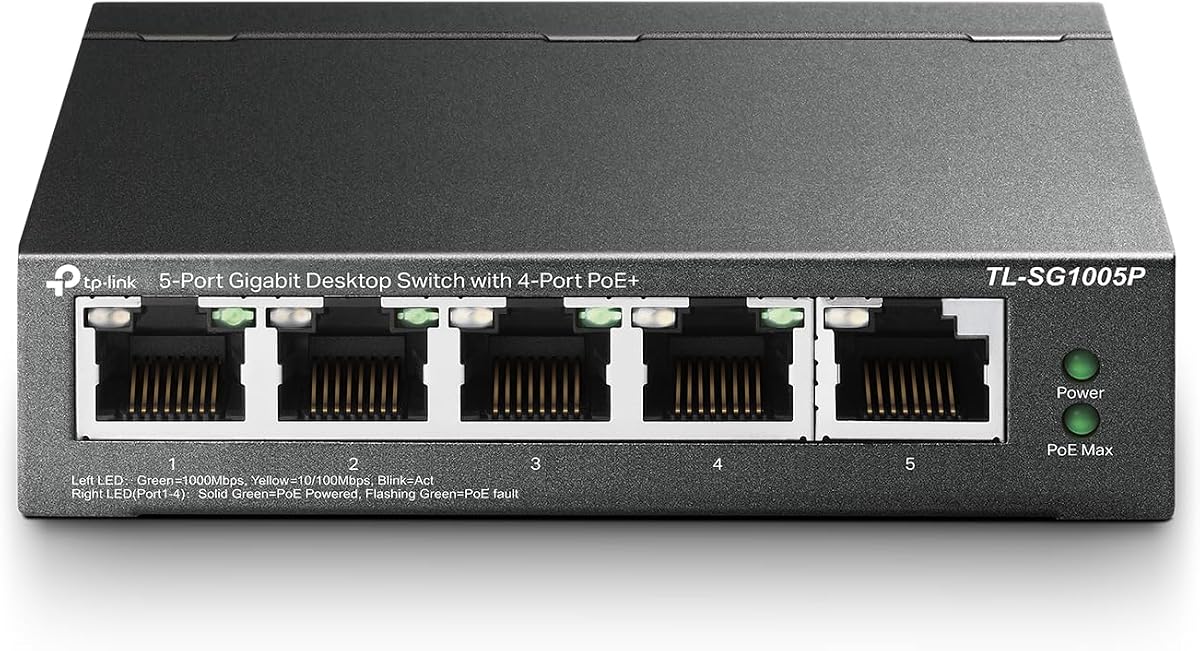
The TP-Link TL-SG1005P is built for Xfinity homes that need to power network devices through Ethernet. It includes four Gigabit PoE+ ports with up to 30 watts per port, one non-PoE Gigabit port, and a total PoE budget of 65 watts. Its 4.7 rating reflects a useful combination of straightforward setup and specialized powered-device support.
We may earn a commission when you buy through this link, at no additional cost to you.
The switch can supply power and network connectivity to compatible access points, cameras, VoIP phones, or other PoE equipment, reducing the need for local power adapters at each endpoint. IEEE 802.3at/af PoE+ support provides greater headroom than older low-power PoE, while a dedicated Gigabit uplink can connect the system to an Xfinity gateway or another switch. Port-based 802.1p/DSCP QoS and IGMP Snooping help prioritize appropriate traffic and improve multicast handling.
Its limitations are concentrated in capacity and control. Only four ports can deliver PoE, and the 65W shared budget means that many high-consumption devices could exceed what the switch can support. The model is also unmanaged, so there is no interface for configuring VLANs, adjusting individual power settings, or monitoring traffic in depth. Those limitations are acceptable when the goal is a simple powered segment for a few devices.
Choose the TL-SG1005P when a small number of PoE accessories need to connect through one compact unit. It is particularly useful for a home with a PoE-compatible wireless access point or a small camera installation. Users needing more PoE ports, flexible per-port controls, or Multi-Gig links should move up to an eight-port managed or higher-capacity model.
PoE+ reduces cable clutter around access points, cameras, and other compatible endpoints. The four powered ports can deliver up to 30 watts each, subject to the switch's shared 65W budget.
Port-based QoS prioritizes selected traffic, including time-sensitive voice or video. IGMP Snooping helps manage multicast streams, making this small PoE switch more considered than a basic Ethernet splitter.
We may earn a commission when you buy through this link, at no additional cost to you.
The TP-Link TL-SG108S-M2 extends the Multi-Gig concept to eight full-speed 2.5G ports. Its 4.8 rating is the highest among the listed products, and the switch provides up to 40 Gbps of switching capacity. It is an attractive option for a modern Xfinity network where several computers, storage devices, or access points need more than standard Gigabit Ethernet.
We may earn a commission when you buy through this link, at no additional cost to you.
Automatic negotiation across 100 Mbps, 1 Gbps, and 2.5 Gbps ensures that conventional devices can connect without manual speed settings. Compatible hardware can exploit the full 2.5 Gbps port rate, including a 2.5G Wi-Fi 6 access point, 2.5G NAS, 2.5G server, PCIe adapter, or gaming computer. The stated use cases include home entertainment, LAN parties, small offices, and rapid workstation transfers.
The switch remains unmanaged and does not offer PoE. Users who require VLANs, link aggregation, or detailed port management need a managed model. They should also consider whether all eight ports will actually operate at 2.5 Gbps, because a high-capacity switch cannot increase the speed of the Xfinity gateway or of a device limited to 1 Gbps. Nevertheless, the hardware remains well suited to fast local traffic among compatible devices.
This is the stronger choice than the five-port TL-SG105S-M2 when the number of connected endpoints matters more than compact size. Eight ports provide room for a gateway uplink and numerous Multi-Gig devices, while a fanless design keeps it quiet. It is recommended for speed-conscious users who want broad expansion without moving into fully managed, fiber-capable equipment.
Every port supports the 2.5 Gbps profile, avoiding the need to reserve separate hardware for faster devices. The 40 Gbps switching capacity comfortably supports a dense collection of local connections.
Eight ports allow the network to grow around one central switch. That makes the model suitable for a home office, shared media system, or small business environment with several modern wired endpoints.
We may earn a commission when you buy through this link, at no additional cost to you.
The TP-Link TL-SG116 is designed for networks that need many ordinary Gigabit connections in one place. It provides 16 auto-negotiating 10/100/1000 Mbps RJ45 ports and carries a 4.7 rating. For an Xfinity home office, shared workspace, or small business with a large collection of wired endpoints, its port density can eliminate the need for several smaller switches.
We may earn a commission when you buy through this link, at no additional cost to you.
IEEE 802.3X flow control supports reliable data transfer, while port-based 802.1p/DSCP QoS and IGMP Snooping offer traffic prioritization and multicast handling. The fanless metal case supports quiet operation and heat dissipation, and the listed operating range extends from 32°F to 104°F. Its desktop or wall-mount design gives administrators flexibility when the switch must sit near a larger concentration of equipment.
The trade-off is that the TL-SG116 is designed around 1 Gbps links rather than 2.5G or 10G. It also provides no PoE, so powered endpoints need another solution. Although it has useful traffic features, it remains unmanaged and does not offer VLAN configuration or detailed monitoring. A smaller or newer switch may therefore be more appropriate when future Multi-Gig equipment is likely.
Choose the TL-SG116 when port count and dependable Gigabit performance are the main requirements. It is a sensible central switch for a large wired environment, but buyers should confirm that their devices will not soon require faster links. For a typical family with only a handful of active connections, one of the five- or eight-port models will usually be more manageable.
A single 16-port device simplifies cabling in offices, studios, and technology-heavy homes. It provides substantial room for expansion while retaining standard Gigabit performance.
The fanless metal case and broad stated operating-temperature range suit installations that remain powered for long periods. Desktop and wall-mount support allow placement near the equipment it serves.
We may earn a commission when you buy through this link, at no additional cost to you.
The Ubiquiti 8-Port PoE Network Switch is designed for centralized Layer 2 switching with PoE in a compact, quiet package. It carries a 4.6 rating and provides eight PoE ports plus an included external 60W power adapter. It can simplify a home or small office that relies on Ubiquiti access points, cameras, or other compatible powered network equipment.
We may earn a commission when you buy through this link, at no additional cost to you.
Silent fanless cooling is useful in offices, bedrooms, and other noise-sensitive locations. The 52W total PoE capacity indicates that the switch is designed to power multiple endpoints while sharing its available power budget. Operating at Layer 2 makes it appropriate for local Ethernet switching and structured network segmentation within the broader capabilities of the Ubiquiti ecosystem.
The supplied information is concise, so buyers should verify detailed specifications before installation. It does not state the maximum power available to each port, the port link speeds, supported PoE standards, mounting options, or detailed management functions. It also does not specify whether the device offers the same convenient browser-based setup found in some other managed platforms. These are important details for buyers who need precise compatibility with particular access points.
This model makes the most sense for an Xfinity installation centered on Ubiquiti equipment that requires PoE and a quiet Layer 2 switch. It is less compelling for a basic home with only a few wired devices or for users who want a simple unmanaged plug-and-play box. Confirm current technical specifications and device compatibility, then choose it if its supported features align with your network ecosystem.
Eight PoE ports can reduce the need for nearby outlets when deploying compatible access points or cameras. The included power adapter and 52W total capacity define the intended power envelope for the system.
Fanless cooling supports silent placement close to living spaces or work areas. Layer 2 operation provides the foundation for structured local networking without implying that every advanced routing function is included.
We may earn a commission when you buy through this link, at no additional cost to you.
The NETGEAR GS308EP combines eight Gigabit ports, eight PoE+ connections, and a manageable software interface. Its 4.8 rating places it among the strongest products in this guide, and the 62W total PoE budget makes it a practical central device for an Xfinity-connected home or small business with several powered Ethernet endpoints.
We may earn a commission when you buy through this link, at no additional cost to you.
Auto-negotiating ports work with existing Cat5e or Cat6 cables and detect suitable connection speeds. The Easy Smart Managed interface adds VLAN configuration, QoS traffic prioritization, port monitoring, and network-security controls without moving into a fully professional managed-switch category. Uninterrupted PoE and per-port PoE controls are especially helpful when a powered device needs to remain connected during a power-related event or when administrators want more control over power delivery.
The GS308EP is limited to 1 Gbps per Ethernet connection, so it does not support the Multi-Gig performance offered by several competing models. Its management features also add complexity compared with a basic unmanaged switch, which may be unnecessary for a very simple home. Nevertheless, the benefit is flexibility: a small business can start with straightforward local switching and use VLANs or QoS if the network later requires separation or prioritization.
Choose the GS308EP when you want PoE breadth plus practical network controls without moving to a larger enterprise platform. It is an excellent fit for a home office, small retail space, or Xfinity installation supporting several access points, cameras, and business computers. Users focused only on basic internet connectivity will find a simpler eight-port switch easier to maintain.
VLANs, QoS, port monitoring, and security controls make the switch adaptable to a more structured network. The interface is designed to offer key controls without the complexity of a fully managed professional switch.
Eight PoE+ ports and a 62W budget serve multiple compatible powered devices. Uninterrupted PoE and per-port controls add resilience and administration options absent from many unmanaged alternatives.
We may earn a commission when you buy through this link, at no additional cost to you.
The D-Link 5-Port 2.5G Unmanaged Ethernet Switch offers five Multi-Gig ports with up to 25 Gbps of switching capacity. Its 4.7 rating and support for high-performance Wi-Fi 6, NAS, server, gaming, and 8K video use cases make it a strong candidate for an Xfinity home that wants more than ordinary Gigabit connectivity.
We may earn a commission when you buy through this link, at no additional cost to you.
Auto-negotiation adjusts connected devices among 100 Mbps, 1 Gbps, and 2.5 Gbps, allowing older hardware and newer Multi-Gig equipment to coexist. Unlike many basic unmanaged switches, it includes a QoS feature that classifies traffic across eight priority levels, flow control to help reduce dropped packets, and IGMP Snooping for multicast streams. These features can be helpful in homes where gaming, streaming, storage transfers, and voice traffic share the same local network.
The five-port limit is the most obvious constraint. An uplink to an Xfinity gateway leaves four available connections, which can be enough for a focused setup but restrictive for broader expansion. The switch is also unmanaged, so it does not provide user-created VLANs or a detailed monitoring interface despite including useful automatic traffic features. The stated compatibility with Cat5 and Cat6 cabling makes installation less demanding, though actual link rate still depends on the connected devices and cable quality.
This D-Link model is a good alternative to the TL-SG105S-M2 for buyers who prioritize detailed QoS and multicast handling in an unmanaged design. It suits a compact home office or media setup with several 2.5G endpoints. Choose the eight-port 2.5G TP-Link instead when greater port capacity is more important, or consider the managed GS308EP when VLAN controls and PoE are required.
Eight-level QoS, flow control, and IGMP Snooping provide useful traffic handling while preserving a simple plug-and-play setup. The model is useful for mixed media and real-time traffic without requiring a full control interface.
Automatic negotiation supports 2.5G equipment as well as 1G and 100M devices. Backward compatibility with Cat5 and Cat6 cabling helps make the upgrade less dependent on replacing an existing home's wiring.
We may earn a commission when you buy through this link, at no additional cost to you.
The QNAP QSW-L3208-2C6T-US is the most advanced switch in this guide, with six 10GbE RJ45 ports, two combo SFP+/RJ45 ports, and a 160 Gbps switching capacity. Its 4.0 rating is the lowest among the ten listed models, but the hardware is aimed at users who need considerably more bandwidth and configuration flexibility than a typical home-network expansion requires.
We may earn a commission when you buy through this link, at no additional cost to you.
The six RJ45 ports support 10G, 5G, 2.5G, 1G, and 100M connections, while the combo ports accept either fiber or copper connections. This makes the switch adaptable to a high-end Xfinity home, compact office, or creative studio where a NAS, server, workstation, or access point can benefit from 10G local links. An 80 Gbps non-blocking throughput figure and support for 12K jumbo frames further distinguish it from ordinary Gigabit and 2.5G switches.
Lite-managed controls include VLANs, QoS, LACP, IGMP Snooping, and loop detection. Those functions are useful for segmenting devices, combining compatible links, prioritizing traffic, and improving multicast behavior. The trade-off is complexity and cost relative to an unmanaged plug-and-play switch. Buyers must also supply suitable high-speed cabling, compatible endpoints, and any required transceivers for fiber connections. A 10G switch cannot accelerate the Xfinity internet connection beyond the service or gateway it is connected to.
Choose this QNAP model when the home or small business genuinely needs 10G local networking, flexible uplinks, and basic managed features. It is a premium option for users building advanced storage, server, or editing systems rather than simply adding a few wired connections. For most Xfinity households, a Gigabit or 2.5G switch offers a more proportionate mix of capacity, simplicity, and cost.
Six 10GbE ports and two flexible combo connectors offer serious bandwidth for compatible local devices. The switching fabric is designed for high-volume storage, server, workstation, and media workflows.
VLAN, QoS, LACP, IGMP Snooping, and loop detection provide useful network structuring. A compact durable enclosure and stated 36W power use help manage the physical footprint and energy demand of high-speed hardware.
We may earn a commission when you buy through this link, at no additional cost to you.
The right network switch depends first on what you need to connect, then on the speed and management features those devices support. Considering port count, Ethernet standards, PoE, cabling, and placement prevents an expensive mismatch before installation.
Begin by listing every device that needs a wired Ethernet connection, including computers, televisions, printers, game consoles, access points, and cameras. Add the port that will connect the switch to the Xfinity gateway, then leave some unused capacity for future additions. A five-port switch works well for a small focused network, while eight ports offer more flexibility in a typical family home. A 16-port model makes sense when a single location serves many endpoints or when several smaller switches would otherwise be needed.
Gigabit switches support links up to 1 Gbps and are suitable for ordinary internet access, streaming, printing, and most home-office workflows. A 2.5G switch is worthwhile when at least one endpoint supports 2.5G, such as a modern Wi-Fi 6 access point, high-performance NAS, or capable computer. A 10G switch serves advanced storage, servers, and editing environments, but the connected device, cable, and local workload must also support that rate. Faster switches cannot increase the speed provided by the Xfinity gateway or internet plan.
Power over Ethernet supplies electricity and network connectivity through one cable, making it useful for access points, surveillance cameras, VoIP phones, and other compatible devices. Compare the number of PoE ports with the number of powered endpoints, and check the total power budget against the combined requirements of those devices. A switch can have PoE on every port or reserve certain ports for ordinary data connections. If you have no powered network accessories, paying for PoE adds no practical value.
An unmanaged switch simply learns link speeds and forwards traffic, which is ideal for a basic home network. Easy Smart or lite-managed models add controls such as VLANs, QoS, port monitoring, link aggregation, or loop detection. Fully managed equipment provides more extensive configuration, but that complexity is rarely necessary for a modest Xfinity installation. VLANs can isolate guests, cameras, and work devices, while QoS can give selected voice, video, or gaming traffic priority.
The switch and device must share a compatible Ethernet standard and appropriate cabling. Gigabit equipment generally works with common installed Cat5e or Cat6 wiring, while some Multi-Gig and 10G environments benefit from higher-grade cable. The listed D-Link model is backward compatible with Cat5 and Cat6 cabling, and the NETGEAR GS308EP supports existing Cat5e or Cat6 runs. The Xfinity gateway connection remains limited by the gateway's own Ethernet ports, so a fast switch cannot make an older gateway port faster.
Think beyond today's active connections. A larger port count gives you room to add devices without replacing the switch, while 2.5G or 10G hardware provides a longer runway for local file transfers and advanced access points. However, unused high-speed capability has little effect on ordinary internet browsing. A larger unmanaged switch may be more practical than a compact premium unit, while a high-speed model makes more sense when several endpoints can genuinely operate above 1 Gbps.
A fanless switch is quieter and often preferable in bedrooms, living rooms, and home offices. Metal housings can improve durability and heat dissipation, while desktop and wall-mount support makes placement easier. Powered equipment should be installed in a dry, ventilated area with access to its power adapter and cables. High-speed or managed switches may draw more power, so the physical environment and nearby electrical outlets are worth considering before finalizing an installation.
Features such as auto-negotiation, flow control, QoS, IGMP Snooping, jumbo frames, and Energy Efficient Ethernet can improve behavior, but their value depends on your equipment. Auto-negotiation is valuable in mixed-speed networks, while jumbo frames only help when every device on the path supports them. PoE, VLANs, fiber connectors, and 10G links should be prioritized when the network clearly needs them rather than added merely for a longer specification list.
Begin by identifying the upstream Ethernet port and connecting it to an available LAN port on the Xfinity gateway or the appropriate downstream network device. Connect powered-off or newly positioned devices to the remaining switch ports, then power on the switch. Most unmanaged models begin forwarding traffic automatically, while managed or Easy Smart models may require a browser-based setup, VLAN assignment, and PoE configuration.
Keep the switch in a dry, ventilated location with clearance around its housing. Do not stack equipment in a way that blocks heat dissipation, and avoid placing the unit near excessive heat, moisture, or direct sunlight. Secure Ethernet cables so they are not bent sharply or pulled from their connectors. If a powered device is connected through PoE, verify that its power requirement fits the switch's per-port and total budgets.
Use the link or status LEDs to confirm that connected devices are active. If a link is missing, test the cable, reseat the connector, and check whether the endpoint supports the selected speed and wiring standard. Keep the firmware and management software current for models that provide such updates. When adding a new service or changing VLAN or PoE settings, document the change and test the affected device before removing the old connection.
A switch is useful whenever your Xfinity gateway does not have enough Ethernet ports for the devices you want to connect. It provides additional wired connections and creates a central point for your home LAN. If all devices use Wi-Fi or the gateway already has sufficient LAN ports, a switch may not be necessary. Even when the internet service is the same, a wired local network can improve reliability for computers, televisions, printers, and game consoles.
Usually not. A switch does not increase the download or upload speed delivered by your Xfinity service. It can improve local network performance when it removes bottlenecks, provides faster ports, or connects Ethernet devices at their supported speed. The Xfinity gateway remains part of the connection, so its Ethernet port capabilities and the subscribed service may limit internet throughput even when the switch is faster.
Yes, an unmanaged switch is often the simplest and most appropriate choice for a basic home. It automatically learns connection speeds and forwards traffic without requiring a management password or software setup. Managed or Easy Smart models become valuable when you need VLANs, traffic prioritization, port monitoring, or detailed power control. More advanced features do not necessarily improve ordinary browsing or streaming.
Choose 1G for standard Gigabit devices and typical home-office or entertainment use. A 2.5G switch is useful when you have compatible Wi-Fi 6 access points, NAS systems, servers, or high-performance computers. A 10G switch targets advanced storage, editing, server, and professional workflows where multiple endpoints can exchange large files locally. The fastest option is useful only when the connected devices, cables, and traffic pattern support it.
Only if you are connecting devices that accept power over Ethernet. Common examples include compatible wireless access points, network cameras, and VoIP phones. PoE can simplify cabling by eliminating separate local power adapters, but the switch must provide enough total and per-port power for the connected equipment. A standard non-PoE switch is sufficient when every endpoint has its own power connection.
Yes, a typical Ethernet switch can connect to a LAN port on the Xfinity gateway. The switch then provides additional LAN connections for computers, printers, televisions, consoles, and access points. The gateway's LAN port remains the upstream connection for that switch, so avoid using a LAN-to-LAN connection that your gateway does not support or that duplicates another active network segment.
Often you do not. Many Cat5e installations can support 2.5G links, and Cat6 provides additional headroom and is a common choice for newer wiring. A 10G network may benefit more from high-quality installation practices and appropriate cable categories, especially over longer runs. Test existing cables and replace any that show damage, poor connections, or inconsistent performance rather than assuming every existing cable is suitable.
Count one port for the connection to the Xfinity gateway, one for each Ethernet device, and additional ports for planned expansion. A five-port switch is often sufficient for a small network, while eight ports suit more active homes. Choose 16 ports or more for a home office, shared workspace, or small business with many endpoints. Keeping one or two spare ports can prevent a replacement soon after installation.
The TP-Link TL-SG108 stands out as a balanced, uncomplicated choice for adding several Gigabit connections, while the TL-SG105S-M2 provides a more compact route to 2.5G networking. The QNAP QSW-L3208-2C6T-US represents the premium end of the range with 10GbE, combo fiber connectors, and lite-managed controls. Each suits a different level of network complexity rather than a single universal Xfinity household.
Prioritize the slowest important endpoint and the devices that will share the switch. A five- or eight-port Gigabit model is sufficient for standard wired use, while 2.5G becomes useful when a Wi-Fi 6 access point, NAS, or modern workstation supports it. PoE matters for powered accessories, and VLANs or other management features matter when the network must be segmented or monitored. Match the hardware to real needs rather than buying speed the rest of the system cannot use.
Before ordering, verify the current product listing, port count, supported speeds, PoE requirements, dimensions, and management capabilities. Also inspect the existing cables and confirm what Ethernet ports your Xfinity gateway provides. These checks reduce incompatibility, ensure the switch can be placed where intended, and make the installation much smoother.
