
Rocketbook Core Reusable Smart Notebook
4.4Editor score
Compact executive format
Reusable grid pages
Smart cloud organization
Included Frixion pen
Explore the best smart notebooks with cloud sync, comparing reusable pages, real-time digitization, OCR, audio, organization, compatibility, and portability
Smart notebooks with cloud sync combine the familiar feel of writing on paper with the convenience of searchable digital records. Depending on the system, they can capture strokes automatically, digitize pages through an app, convert handwriting into editable text, link audio to notes, and send finished work to familiar cloud services. A good model balances capture quality, writing comfort, organization, and dependable connectivity.
This guide compares ten smart notebook systems spanning pen-based real-time capture, app-assisted scanning, reusable paper, planners, OCR, audio recording, and cloud exports. The evaluation considers page format, writing experience, app workflow, offline handling, supported destinations, search, export options, portability, and included accessories. It also distinguishes products that digitize continuously from those that use a phone to scan completed pages.
Each numbered review explains the product's strongest use case, practical limitations, and ideal buyer. The shortlist highlights the strongest all-around option, a budget-friendly choice, and a premium writing set, while the comparison table makes core differences easier to scan. Product specifications and availability can change, so readers should verify current features, device compatibility, and seller information before purchasing.
4.4Editor score

4.5Editor score

3.3Editor score
This side-by-side overview compares capture method, paper format, organization tools, and connected-device support, helping readers distinguish continuously recorded smart pens from app-based reusable notebooks.



The Noteorius Smart Pen and Reusable Digital Notebook with Folio offers an unusually direct interpretation of the smart notebook idea. Rather than requiring a camera scan after writing, the smartpen captures each stroke as the user writes. Its 3.5 rating reflects a less proven customer history than some alternatives, but the underlying workflow is compelling for anyone who wants a continuous bridge between handwritten pages and app-based notes.
We may earn a commission when you buy through this link, at no additional cost to you.
Uncapping the pen activates it automatically, while the technology records strokes in the background and stores them until they synchronize with the Noteorius app. The writing surface is designed for fluid, familiar pen movement, and the notepad itself does not require charging or replacement after each page. Users can move to a fresh page, sync the completed one, and then clear the surface for the next session.
The main strength is its combination of automatic capture, a reusable surface, and integration with established platforms. Notes can remain in the Noteorius library or be sent to Google Drive, OneNote, Evernote, and Dropbox. The product description states that everything is included without a subscription, although buyers should still confirm the current app terms and regional availability. Its folio format also gives the digital workflow a more traditional notebook-like presentation.
This is a compelling choice for meetings, classroom notes, and brainstorming sessions where taking a photograph of each page would interrupt the flow. It may be less suitable for buyers who want extensive, transparent specifications, broader export formats, or a proven rating history. The automatic capture concept is the central attraction, and buyers should validate app quality and compatibility before committing.
Overall, the Noteorius system is one of the most interesting options here for users who prioritize natural writing over manual scanning. Its reusable folio and automatic synchronization simplify the transition to digital storage, while the lack of a stated subscription makes the ownership proposition attractive. Check the current app, device support, and included accessories before purchase.
Recording strokes as they are written eliminates the separate scanning step. That makes the system especially suitable for fast-moving meetings, lectures, and creative sessions where users want pages available without stopping to photograph them.
The folio notepad can be cleared and reused rather than filled page by page. Completed notes remain in the app, giving users a tidy digital archive while preserving the sensations of writing on a dedicated surface.
We may earn a commission when you buy through this link, at no additional cost to you.
The Ophaya Smart Digital Notebook and Smart Pen is a well-rounded smart pen system with a 4.3 rating and a broad collection of digital tools. It captures handwriting and drawings on paper, digitizes them through the free Ophaya Pro+ app for iOS and Android, and synchronizes the result to a smartphone or iPad. That combination makes it suitable for users who want both authentic handwriting and immediate access to searchable records.
We may earn a commission when you buy through this link, at no additional cost to you.
Its search functions can locate notes by keyword, tag, or timestamp, while integrated OCR converts handwriting into editable Word text. Notes can be exported as PDF, Word, PNG, GIF, or MP4, and several pages can be combined before sharing. Audio-linked recording adds another layer: users can record synchronized sound and replay context-specific recordings by tapping the related note.
Offline reliability is one of its more practical advantages. The system can save notes without connectivity and upload them automatically after the connection returns, reducing the risk of losing an idea in a basement, meeting room, or travel setting. The package also includes a smart pen, five A5 notebooks with 124 pages, four ballpoint refills, a USB cable, and a user manual, making it a particularly complete starting kit.
The trade-off is dependence on the app and a compatible phone or tablet. Users who need live page-level handwriting on a tablet display may find a camera-scanned reusable notebook more familiar. Conversely, those who dislike photographing pages will appreciate the automated workflow. The free app and broad export support make this a strong all-around pick for students, professionals, and collaborative teams.
For buyers seeking a smart notebook with cloud sync, real-time capture, OCR, audio, and offline support in one package, Ophaya offers an unusually complete set. Its app-based organization and flexible exports go beyond basic note storage. Confirm current device compatibility and app availability before ordering, particularly if you depend on a particular cloud service or file format.
OCR turns captured writing into editable text, while keyword, tag, and timestamp search reduce the need to browse manually. Synchronized audio is especially useful for lectures, interviews, and meetings where spoken explanation adds meaning to the written notes.
Five A5 notebooks provide multiple books for separate subjects or projects. This paper-first format can be easier to organize than placing every topic into a single electronic document and still supports remote collaboration.
We may earn a commission when you buy through this link, at no additional cost to you.
The black Rocketbook Core Reusable Smart Notebook is the strongest all-around selection in this guide, combining a 4.5 rating with a mature scan-and-organize workflow. Its letter-size format offers an 8.5-by-11-inch writing area, large enough for lecture notes, meeting outlines, diagrams, and detailed problem solving without forcing users to work in a small pocket-sized book.
We may earn a commission when you buy through this link, at no additional cost to you.
The upgraded Core includes premium reusable paper, an improved pen-to-paper feel, spiral binding, and a scratch-resistant cover. College-ruled pages contain Smart Titles and Smart Tags, which help users name and classify files efficiently. Through the Rocketbook app, completed pages can be scanned and uploaded to services such as Google Drive, Dropbox, OneNote, and other preferred destinations.
Its appeal lies in a low-friction balance between familiar paper and flexible digital storage. Users write with the included Pilot Frixion pen, scan the desired page, send it to the appropriate cloud destination, and wipe the page clean with a damp cloth. This reusable process can reduce accumulating paper notes while preserving the freedom to write naturally. It also avoids tying the notebook to a proprietary smart pen or a specific phone model.
The main limitation is that it is not a continuously recorded digital notebook. Users must photograph each page, and they need a compatible device and the app. Some erasable-paper systems can also leave traces or show wear over repeated use, meaning the page should be fully cleaned. Nevertheless, the simplicity, strong rating, generous format, and broad organization tools make the Core a balanced recommendation.
This is the smart notebook to choose for a student, professional, or project manager who values large paper pages, dependable reuse, and flexible cloud organization. It works particularly well for lecture notes and structured meetings. Buyers seeking automatic stroke capture should look instead to a pen-based model, but for a general-purpose digital paper system, the Rocketbook Core remains the most versatile option here.
The letter-size surface creates room for diagrams, annotations, and tightly packed writing. It is a meaningful advantage over compact formats when notes must remain readable after a camera scan or digital zoom.
Smart Titles and Tags make saved pages easier to locate later. Combined with several cloud destinations, these features let users build a digital filing system without surrendering control of where their notes are stored.
We may earn a commission when you buy through this link, at no additional cost to you.
The Rocketbook Flex Reusable Planner is designed specifically for people who want a connected planning system rather than a general-purpose notebook. Its 4.3 rating reflects a well-regarded product with a clear advantage: 48 reusable pages cover daily, weekly, monthly, and annual planning, as well as lined and dotted layouts for goals, reminders, and unplanned ideas.
We may earn a commission when you buy through this link, at no additional cost to you.
The QuickTracking Key is a particularly useful addition. It allows recurring events to be logged each month without rewriting the same information, which can reduce clutter in calendars and make shifting priorities easier to handle. Smart Title Bars and Tags provide digital organization, while the app can digitize and save plans to Google Drive, Dropbox, OneNote, or another preferred cloud destination.
Like the Core, this notebook keeps the user experience grounded in paper. Users can plan with the included Pilot Frixion pen, scan relevant pages, upload them, and then wipe the surface clean for another cycle. The 8.5-by-11-inch size provides room for monthly and annual overviews, while the green cover and strong coil binding give it a distinct, professional appearance.
Its limitation is specialization. Buyers wanting a completely blank notebook may find the predefined templates less versatile, and the system still depends on a device and app for digitization. A damp cloth or towel with water may also be necessary for a thorough clean. Even with those caveats, the Flex is a stronger choice than a generic notebook for someone who wants a reusable paper planner that can be mirrored digitally.
The Flex is best for students managing assignments, professionals coordinating schedules, or anyone who wants a single planning method across daily, weekly, monthly, and annual views. It is less compelling as a free-form idea notebook, but its combination of recurring-event tracking, reusable pages, and cloud organization serves busy users particularly well.
Daily and weekly pages support immediate scheduling, while monthly and annual templates help users connect short-term actions to longer goals. This range makes the notebook useful across lectures, projects, and recurring personal routines.
Updating priorities does not require discarding a used book. Scanning the current plan and cleaning the page creates a cycle that keeps both the physical workspace and digital archive current.
We may earn a commission when you buy through this link, at no additional cost to you.
The YUAN Smart Digital Pen with A4 Paper Cuaderno combines a 4.5 rating with one of the most privacy-conscious approaches in the guide. The pen captures handwriting in real time and synchronizes it to a mobile app without scanning or photographing pages. Unlike products that send every capture directly to a remote service, the Business app supports a server-free local-storage mode that saves digital tablet data on the user's own phone or tablet.
We may earn a commission when you buy through this link, at no additional cost to you.
The package is generous, including one smart pen, three A4 notebooks with 63 pages each, four ballpoint refills, a USB cable, and a manual. The notebooks measure approximately 8.3 by 11.2 inches and use calibrated college ruling designed to reduce ink bleed-through. Their soft covers come in black, navy, and brown, offering separate books for projects, work, or personal notes.
Connectivity is handled thoughtfully. Notes can be written offline and are automatically uploaded after reconnection, while the app provides import, export, sharing, printing, stroke replay, and file classification on iOS and Android. The local-first mode may appeal to people handling confidential meeting notes, study material, or client information because it gives them a direct route for retaining digital files on a personal device.
There are important boundaries. The specialized coded paper is necessary for the pen to recognize the writing, and the pages cannot be erased. Users must also fully charge the pen before first use, with the manufacturer recommending an overnight initial charge because it may take several hours. These constraints make the set less flexible than reusable paper, but they preserve a more conventional permanent-notebook model.
The YUAN system is a strong recommendation for privacy-conscious users who want automatic capture, A4 pages, and offline-first note storage. It is less suitable for buyers who want a freely writable notebook or a simple app-scanning workflow. Confirm that the coded paper and replacement supplies meet your needs, and verify current app compatibility before purchasing.
A server-free mode stores digital tablet data directly on a personal phone or tablet. For sensitive material, that local-first approach can reduce reliance on a remote server and gives the user more visible control over file storage.
The specialized notebook allows the pen to interpret strokes while users retain the experience of writing on generous A4 paper. Offline capture and deferred uploads prevent connectivity from interrupting the note-taking process.
We may earn a commission when you buy through this link, at no additional cost to you.
The Rocketbook Pro Smart Reusable Notebook in executive size is aimed at professionals and students who want a polished, portable notebook with more flexibility than a standard Core model. Its 4.3 rating and blue vegan-leather cover give it a premium appearance, while the 7-by-9-inch format offers a useful middle ground between pocket-sized notes and full letter paper.
We may earn a commission when you buy through this link, at no additional cost to you.
The included 40-page pack combines lined and dot-grid layouts, which supports both conventional writing and visual planning. Additional packs, including planners and goal trackers, are sold separately, allowing the notebook to change with the user's tasks. This is one of the most versatile aspects of the Pro design: the cover and binding remain in place while the internal organization changes.
An embedded NFC chip helps launch the Rocketbook app, making it easier to move from writing to scanning. Once inside the app, pages can be saved to destinations such as Google Drive, Dropbox, OneNote, and other supported services. The included FriXion pen, towel, and water support the familiar write-scan-upload-wipe cycle, while the scratch-resistant cover is intended to withstand regular carrying and use.
As with other app-scanned systems, the notebook does not capture strokes automatically, and the optional page packs add another purchasing consideration. The executive format may still be too large for some bags and too small for users who want full-size diagrams. Even so, the polished construction, NFC shortcut, and interchangeable structure make the Pro more specialized and adaptable than the Core.
This notebook is ideal for consultants, students, and creative professionals who want a refined everyday carry item with cloud organization. Choose it when appearance, portability, and future page-pack options matter more than having the largest writing surface. It is less appropriate for buyers expecting a continuous digital display or a complete planner bundle in the box.
A notebook designed only for lined notes can become less useful as projects change. The Pro's separate page packs make it easier to move between daily writing, dot-grid creativity, goal tracking, and planning without replacing the entire cover.
The 7-by-9-inch size is compact enough for a briefcase or everyday bag, while the vegan-leather cover and reinforced construction create a more polished appearance. An embedded NFC chip provides a faster route into the app for scanning and uploading.
We may earn a commission when you buy through this link, at no additional cost to you.
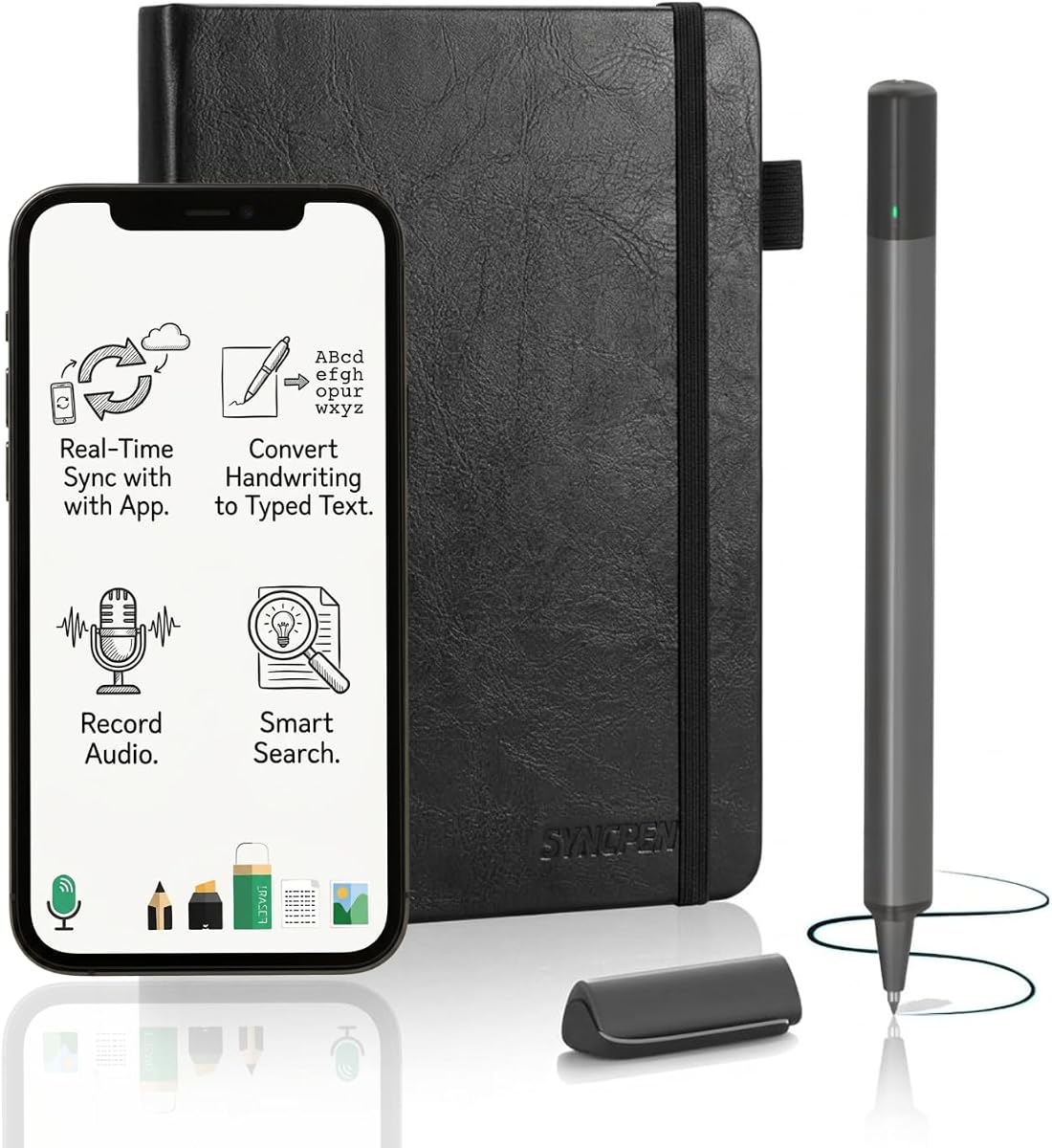
The SyncPen Digital Notebook Smart Pen Set is built for users who want their handwriting transformed into sophisticated, editable digital content. The pen records strokes on a refined A5 notebook measuring 8.5 by 6 inches and syncs them to the app in real time. Its 3.7 rating places it behind several alternatives, but the stated feature set is especially ambitious for students, creators, and professionals.
We may earn a commission when you buy through this link, at no additional cost to you.
Its handwriting recognition reportedly handles more than 71 languages, including complex mathematical equations and music notation. That could make it valuable for technical lectures, advanced study sessions, and creative work where a plain text transcription would lose important meaning. The app also offers keyword and tag search, allowing users to locate notes by recognized content rather than flipping through physical pages.
Audio synchronization adds a different kind of utility. Users can record speech while writing, then replay the audio alongside the corresponding handwritten moments. This is especially useful for meetings, interviews, brainstorming sessions, and lectures where verbal explanation may be more nuanced than the notes themselves. The system remains usable offline, storing notes locally before automatically syncing after reconnection.
The cloud proposition is generous, with unlimited storage and AES 256 encryption stated in the product description. Exports are available as PDF, DOCX, JPEG, and MP4, while lifetime app access is advertised without recurring fees. These benefits come with a requirement to set up and trust the app ecosystem, and buyers should verify current storage, privacy, and compatibility terms. The 3.7 rating also warrants checking recent customer feedback.
SyncPen is a compelling match for people who need more than simple page scans. Its combination of multilingual OCR, mathematical interpretation, audio, real-time capture, and rich export formats can significantly reduce the work involved in converting handwritten material into usable documents. It is best for a technically confident buyer who values a broad digital toolkit and will organize notes carefully within the app.
Support for many languages, mathematical equations, and music notation distinguishes SyncPen from basic digitizers. These capabilities are particularly relevant for technical students, educators, and creative professionals whose notes contain symbols that ordinary transcription can miss.
Synchronized recordings allow a note to be replayed with the conversation or explanation that shaped it. The feature turns a page into a more complete record, which can reduce ambiguity during later review and collaboration.
We may earn a commission when you buy through this link, at no additional cost to you.
The teal Rocketbook Core offers the same well-rounded feature set as the black version, wrapped in a distinctive color that may appeal to buyers who want a reusable notebook to stand apart from a stack of conventional notebooks. It carries a 4.5 rating and provides a large 8.5-by-11-inch format with college-ruled reusable paper.
We may earn a commission when you buy through this link, at no additional cost to you.
The Core's key workflow is easy to understand: write with the included Pilot Frixion pen, scan the page in the Rocketbook app, upload it to a supported cloud destination, and wipe the page clean. Smart Titles and Tags help organize the digital archive, while services including Google Drive, Dropbox, and OneNote provide flexible storage choices. The spiral binding allows the notebook to lie flat, and the scratch-resistant cover is designed for regular transport.
Compared with smart-pen systems, the Core offers fewer automatic features but does not require specialized coded paper or a pen that must be charged. It also works with a broader range of devices through the app-based scan process. Reusability supports a more sustainable routine than filling and discarding one notebook after another, provided pages are cleaned thoroughly and stored away from excessive heat.
The primary drawback is that the teal model is functionally very close to the black Core. Buyers should compare the colors and current availability rather than expect different capabilities. The teal finish, however, can make a personal system easier to identify in a shared office or classroom. As with the black version, users must photograph pages and clean the erasable surface after use.
The teal Core is a solid choice for students and professionals who want a large, colorful, reusable notebook with dependable cloud organization. It is especially useful for lecture notes, shared meeting materials, and daily planning that later needs to be searchable. For automatic handwriting capture, choose a smart-pen system; for straightforward app-based digitization, this Core delivers a clean and proven experience.
Keeping a limited number of active notebooks in circulation can reduce unused paper and the clutter created by discarded pages. The reusable format is especially useful for a single ongoing subject or project.
Smart Titles and Tags give scanned pages a consistent digital structure. Users can capture the page during a meeting and still send the finished file to the cloud service already used by their school or workplace.
We may earn a commission when you buy through this link, at no additional cost to you.
The executive blue Rocketbook Core is the most compact member of this guide's Rocketbook lineup and a budget-friendly option for buyers who want reusable paper with cloud organization. It measures 6 by 8.8 inches, making it suitable for small bags, purses, and briefcases. Its 4.4 rating indicates a strong level of customer satisfaction despite the reduced writing area.
We may earn a commission when you buy through this link, at no additional cost to you.
This version uses grid pages, which are especially useful for calculations, diagrams, mind maps, and structured problem solving. Like the larger Core models, it includes improved reusable paper, an enhanced pen-to-paper feel, spiral binding, a scratch-resistant cover, and Smart Titles and Tags. The included Pilot Frixion pen supports the familiar erase-and-reuse cycle.
Users scan pages through the Rocketbook app and send them to a preferred cloud destination, including Google Drive, Dropbox, or OneNote. The workflow is less futuristic than a continuously recording smart pen, but it is also easier to understand and does not require special paper recognition. Because the grid format remains visible during scanning, users can preserve the structure of sketches and notes in their digital files.
Its trade-off is space. A 6-by-8.8-inch page is excellent for daily carry, but it may feel restrictive for full lecture notes, dense paragraphs, or large technical diagrams. It also depends on a compatible device and app, and pages need to be wiped with a damp cloth after use. These are acceptable compromises for buyers who prioritize portability over maximum writing room.
The executive Core is a smart choice for students, commuters, and anyone building a lightweight note system around reusable pages. It is a particularly good fit for sketching, daily journaling, brief meeting notes, and organized lists. Those needing larger pages can consider the letter-size Core, while those wanting live stroke capture should explore a pen-based alternative.
The square grid supports charts, diagrams, calculations, and neatly aligned bullet points without the restrictions of a conventional lined page. It also scans cleanly because the underlying structure remains visible in the saved image.
The executive format fits comfortably into spaces where a full letter-size notebook would be inconvenient. Users can keep a reusable notebook close at hand without planning around its physical size.
We may earn a commission when you buy through this link, at no additional cost to you.
The Moleskine Smart Writing Set is the premium-styled option in this guide, combining a notebook, smart pen, real-time digitization, and multimedia capture. It carries a 3.3 rating, the lowest among the ten products, so buyers should examine recent customer feedback carefully. Its appeal lies in the familiar Moleskine format and a straightforward Ncoded technology that transfers handwriting to a device screen as it is written.
We may earn a commission when you buy through this link, at no additional cost to you.
The smart pen captures handwriting in real time, allowing the resulting notes to be edited, searched, organized, and shared. It works with both Android and Apple devices, which is important for users who do not want to be locked into one mobile platform. A USB charging cable, one ink refill, and a user manual are included to support initial setup and continued use.
Its multimedia function records audio in sync with the writing. That combination can preserve the spoken reasoning behind a sketch, lecture, or meeting note, giving the digital record context that a page image alone cannot provide. Finished work can be saved as a PDF and uploaded to Google Drive or Evernote, covering two widely used organization destinations.
The Moleskine name and notebook format provide a premium writing ritual, but the 3.3 rating indicates that the software or overall experience may not satisfy every user. The stated export options are narrower than those offered by SyncPen and Ophaya, and buyers should verify compatibility, app availability, and account requirements. Premium construction does not remove the need to evaluate the digital workflow carefully.
The set is best for a buyer who values a refined paper notebook, real-time handwriting transfer, and synchronized audio more than a broad menu of export formats. It may also suit users already invested in the Moleskine ecosystem. Because its rating is notably lower than the leading products, the recommendation depends on a preference for brand, writing feel, and app features over customer-rating strength.
Ncoded technology captures the writing as it occurs and transfers it to the connected device. Users retain a conventional pen-and-paper experience while gaining digital editing, search, and organization tools.
Synchronized recording can preserve the explanation behind a page as well as the marks themselves. This is particularly useful for students and professionals who need a faithful record of a lecture, conversation, or creative session.
We may earn a commission when you buy through this link, at no additional cost to you.
The right smart notebook depends on how you write, where your notes need to go, and how much automation you want. Consider capture method, app control, page format, organization, offline behavior, and accessory costs before choosing.
Automatic capture systems use a specialized pen to record strokes as you write, while app-scanning systems use a camera to capture finished paper pages. Automatic capture offers a more continuous workflow and can make notes available while a meeting is still underway. App scanning is generally simpler, does not require a rechargeable or proprietary pen, and allows any ordinary writing to be digitized.
Choose automatic capture for real-time availability, audio-linked recording, and less interruption. Choose scanning for flexibility, lower technical commitment, and a straightforward reusable-paper routine.
Cloud sync is only useful if notes reach destinations the user already relies on. Rocketbook models list Google Drive, Dropbox, and OneNote among their supported destinations, while the Noteorius system also highlights Evernote. Pen-based products may emphasize their own apps and export tools rather than direct uploads to every named service.
Check whether the app allows direct cloud export, file import, and long-term organization. Buyers should also consider account requirements, sharing permissions, and whether local storage can serve as an alternative.
OCR can transform handwriting into editable text, making notes easier to edit, copy, and share. The depth of recognition varies considerably. Ophaya provides keyword and tag search, Word conversion, and text recognition, while SyncPen claims support for more than 71 languages as well as mathematics and music notation. Scanned image notebooks may preserve handwriting without converting it into editable text.
Prioritize OCR when editing and search are important. If faithful visual appearance matters more, a page image may be sufficient. Buyers should test the handwriting style and subject matter most likely to cause recognition errors.
Letter-size books such as 8.5-by-11-inch Rocketbook Core models support dense notes, diagrams, and worksheets. The Moleskine set uses a traditional notebook format, Ophaya supplies A5 books, and YUAN uses spacious A4-style pages. Compact executive models are easier to carry but offer less room for expansive work. Smart-pen systems also vary in how they balance the paper, pen, and app experience.
Choose a larger format for lectures, architecture, mathematics, and brainstorming. Choose a compact format for commuting and brief appointments. Consider ink flow, line spacing, page ruling, and whether the surface feels natural during long sessions.
Reusable notebooks can reduce paper waste and create a reusable filing routine, but they require careful cleaning and may show wear over time. Erasable ink is also a poor choice for records that must remain permanently legible. Permanent-paper smart-pen systems preserve conventional notes but rely on consumable notebooks or specialized coded pages.
Choose reusable pages for iterative planning, temporary records, and environmentally conscious routines. Choose permanent paper for contracts, archival notes, and pages that must resist fading or accidental erasure.
A notebook used in meetings, classrooms, and during travel should not lose work when a signal disappears. Ophaya, SyncPen, and YUAN all describe offline capture with later automatic synchronization. App-scanned Rocketbook pages can be captured locally and uploaded later, although the workflow still depends on the phone and app for scanning.
Look for automatic deferred upload, visible sync status, and local storage. Offline support is particularly valuable for confidential work, remote locations, and busy sessions where joining a network may not be practical.
A high-quality capture is only the beginning of a useful digital system. Smart Titles and Tags help organize scanned pages, while pen-based apps may offer keyword search, timestamps, file classification, and handwritten-to-text conversion. Export options also influence collaboration, with products supporting formats such as PDF, Word, DOCX, PNG, JPEG, GIF, and MP4.
Consider how you will retrieve notes three months later. Search and metadata are valuable for large collections, while multiple export formats help when collaborating with people using different devices. Avoid choosing a product whose app cannot fit your preferred workflow.
Audio recording can add valuable context, but it increases the need for battery management, storage planning, and clear consent when other people are present. Accessories also vary: some sets include multiple notebooks and refills, while others offer only a single book, a pen, and a cable. Rocketbook Pro page packs are sold separately, and YUAN notebooks must use its special coded paper.
Inventory the included components and estimate refill costs. For frequent travelers, prioritize a reliable charging cable, sufficient storage, and a pen that remains comfortable through long sessions. Treat the complete system cost, not just the initial notebook, as the relevant budget.
Begin by installing the manufacturer's app on the device you intend to use, creating an account where required, and checking Bluetooth, microphone, camera, and cloud permissions. Smart-pen systems should be fully charged before the first session, while scanned systems work best with a steady, well-lit surface. Test a short page before committing to a lengthy meeting, and confirm that a sample scan or captured page appears correctly in the chosen destination.
Use each product as intended. With smart-pen systems, write only on compatible coded or specialized paper, keep the pen charged, and avoid writing in areas the system cannot recognize. With scanned notebooks, photograph pages squarely, improve lighting when needed, and use Smart Titles and Tags immediately. Apply the included erasing pen only to pages designed for it, and erase with a damp cloth or the recommended towel-and-water method.
For long-term care, keep reusable pages free of ink residue, store the notebook away from excessive heat and moisture, and use the protective cover when carrying it. Organize digital files with meaningful names, review shared permissions, and back up especially important notes beyond a single cloud destination. Periodically check battery health, app updates, and whether replacement paper, refills, or page packs remain available.
A smart notebook may record handwriting automatically with a specialized pen, whereas an app-based reusable notebook records a page image when the user scans it. Both can send notes to cloud services, but automatic systems may also provide live stroke replay, OCR, and audio synchronization. App-based models are usually less dependent on a proprietary pen and offer more freedom in how pages are written.
Several products can save notes locally and upload them after connectivity returns. Ophaya, SyncPen, and YUAN explicitly describe offline capture or deferred synchronization. App-scanned notebooks can also create page images locally, although scanning, OCR, and cloud upload may require a connection. Buyers should verify the exact offline behavior of the current app version.
Search quality depends on the product. Systems with OCR can recognize text and locate notes by keyword, tag, or timestamp, while basic scan-only products may organize pages by titles and tags without turning handwriting into editable text. More advanced systems may also recognize mathematical notation. Recognition can vary with handwriting, lighting, page alignment, and language.
Reusable pages are better suited to notes that can be recopied and cleaned, because erasing ink is not designed for permanent retention. Smart-pen systems using conventional permanent paper are generally more appropriate for contracts, legal notes, and archival material. If a record must remain exactly as written, verify ink permanence and avoid erasable stationery.
Google Drive, Dropbox, OneNote, and Evernote appear repeatedly across the products in this guide. Support may work through direct upload, an app integration, or an export-and-import process. Buyers who depend on a particular platform should check whether it supports direct linking, what file format is used, and whether the destination is available in their country or subscription tier.
Not necessarily. Most products are designed to work with a smartphone, and several also support tablets. The primary display is commonly a phone app, while the notebook remains the writing surface. If you want a larger review area, stylus support, or direct tablet presentation, verify the exact device and operating-system requirements before purchase.
Follow the manufacturer's instructions and use a damp cloth or the supplied towel with water for the relevant paper system. Wipe away residue fully and allow the page to dry before writing again. Avoid harsh chemicals, excessive moisture, and pens not designed for the erasable surface, because these can leave stains or damage the page.
Automatic capture is better for fast-moving sessions because pages become digital without a separate camera step and may include stroke-level detail. Scanning is better for traditional note-taking, mixed media, and buyers who do not want to depend on a proprietary rechargeable pen. The best choice depends on whether convenience and automation outweigh the need for a completely ordinary writing surface.
The Rocketbook Core Black is the strongest all-around option because it combines a strong customer rating, a large letter-size format, reusable pages, and straightforward organization through Smart Titles, Tags, and familiar cloud destinations. The compact executive Core is the budget-minded choice for users who prioritize portability, while the Moleskine Smart Writing Set stands out as the premium option for its refined notebook format, real-time Ncoded capture, and synchronized audio.
Before choosing, decide whether you value immediate stroke capture, editable OCR, flexible exports, audio context, or the simplicity of scanning ordinary paper. Also consider page size, offline behavior, local storage, device compatibility, and the availability of replacement paper or refills. The best smart notebook is the one that makes recording and retrieving notes feel like a natural extension of your existing routine.
Finally, check current prices, seller details, app availability, and included accessories before buying. Product bundles, ratings, and features can change, and cloud or subscription terms may also evolve. Comparing the current listing with the workflow described in this guide will help ensure that the selected notebook remains suitable for your specific note-taking, organization, and sharing needs.