
StarTech HSB100SATBK
4.4Editor score
Single 3.5-inch drive
Tool-free trayless design
Lockable shock-absorbing bay
A hot swap SATA mobile rack turns an internal computer bay into a convenient front-accessible storage area where compatible drives can be installed or removed quickly. The right model depends on drive size, bay layout, cooling, security, and whether your system uses SATA, SAS, or both.
We compared the ten featured racks by examining their stated capacity, supported interfaces, mounting method, indicators, cooling provisions, locking features, and intended applications. The guide covers single 3.5-inch models as well as multi-bay cages for 2.5-inch HDDs and SSDs.
Each pick highlights a different practical advantage, from compact two-drive installation to high-density 3.5-inch storage. Ratings and specifications reflect the supplied product information, while retailer listings, included accessories, host compatibility, and operating conditions should be confirmed before installation.
4.4Editor score

5.0Editor score
4.2Editor score
As an Amazon Associate we earn from qualifying purchases.
The table below compares all ten racks by drive capacity, physical footprint, interface support, and the maintenance features that distinguish them.



The StarTech HSB100SATBK is a straightforward one-drive mobile rack for builders who want quick access to a 3.5-inch SATA hard drive. Its 4.4 rating reflects a generally positive reception, while the strongest qualities are the trayless format, front-accessible 5.25-inch installation, and focus on mechanical durability rather than unnecessary complexity.
We may earn a commission when you buy through this link, at no additional cost to you.
Instead of mounting a disk inside a removable carrier, the rack accepts a bare 3.5-inch drive. That simplifies installation and removal because the operator does not need to loosen screws or manage a separate enclosure. A lockable drive bay adds physical security, while internal rubber shock absorbers help protect the installed drive from movement and vibration. The stated insertion rating of more than 50,000 cycles points to a design intended for repeated maintenance cycles.
The main limitation is its single-bay format. It cannot expand storage density, provide per-drive indicators, or cool several disks independently. It also focuses exclusively on 3.5-inch SATA drives, so users with 2.5-inch SSDs or SAS equipment should look elsewhere. Even so, those constraints are understandable for a compact rack designed to convert one optical-drive position into one accessible hard-drive position.
This is the most balanced choice for a desktop or workstation that needs one frequently serviced 3.5-inch drive without a complex multi-bay controller. It is especially suitable for storage that is added, removed, or inspected through the front panel. Buyers wanting density, cooling fans, or detailed status lights should choose a higher-capacity alternative, but the HSB100SATBK delivers a clean and durable solution for the simpler job.
The trayless design eliminates the separate carrier normally used to secure a desktop hard drive. Operators can access the disk from the front, making the rack well suited to maintenance-friendly workstations and systems where a drive may be replaced or inspected regularly.
Internal rubber shock absorbers add protection in systems that may experience vibration. Combined with the aluminum construction and stated 50,000-plus insertion rating, these features support the rack's role as a frequently accessed mobile-storage solution.
We may earn a commission when you buy through this link, at no additional cost to you.
The ICY DOCK MB522SP-B converts a 3.5-inch or floppy-bay position into a two-drive hot-swap enclosure for 2.5-inch SATA or SAS hard drives and SSDs. It holds drives between 5 mm and 9.5 mm thick and supports SATA 3.0 at 6 Gbps or SAS 3.0 at 12 Gbps through a single channel.
We may earn a commission when you buy through this link, at no additional cost to you.
Its defining convenience is the completely trayless, doorless approach. Each bay accepts a bare drive, while a large eject button and an integrated activity light simplify front-panel operation. Active Power Technology means the indicator only powers when a drive is present, helping avoid unnecessary powered operation in an empty slot. The product also carries a stated three-year manufacturer warranty.
Heat management is not as developed as it is in racks with built-in fans, and its two-bay capacity is modest. Users who routinely operate several high-performance SSDs or sustained workloads may prefer a model with more substantial cooling. Compatibility also has limits: a SAS-capable mobile rack does not mean every SATA host or controller can use a SAS drive, so the complete system configuration must support the chosen interface.
The MB522SP-B is a good match for compact servers, industrial computers, and workstations that need two quickly accessible 2.5-inch drives without occupying a full 5.25-inch bay. It offers more interface flexibility than a basic SATA-only carrier while remaining simpler than larger multi-bay cages. It is especially useful when drive thickness and front access matter more than maximum density.
Support for both SATA and SAS gives the rack broader relevance across legacy and modern storage configurations. The host controller, backplane, connector wiring, and operating system must all be compatible with the selected drive before hot swapping is attempted.
Large individual eject buttons make the bays easy to operate, while built-in indicators show drive activity. Active Power Technology limits powered operation to populated bays, and the doorless construction removes another physical barrier from routine servicing.
We may earn a commission when you buy through this link, at no additional cost to you.
The StarTech HSB220SAT25B turns one 3.5-inch bay into a front-accessible interface for two 2.5-inch SATA III hard drives or SSDs. With a 4.1 rating, it presents a practical middle ground between a single-drive adapter and a large server-style cage, particularly for technicians who value straightforward compatibility.
We may earn a commission when you buy through this link, at no additional cost to you.
The backplane supports SATA I, II, and III devices and does not require additional drivers or software according to the supplied details. Dedicated front eject buttons and separate power and activity indicators give users clear feedback for each bay. An open-top aluminum body and a vented divider encourage passive heat dissipation, while the stated 50,000-plus insertion rating reflects the rack's intended durability.
The supplied accessories include a screw kit, an LP4-to-SATA connection, seven-pin SATA data cables, and 15-pin SATA power cables. It also includes protective film sheets for the bottom of each hard drive. This is a more complete installation package than some competitors, although exact cable requirements can vary with the host system. The lack of a stated key lock leaves physical security less prominent than on racks built specifically for shared or exposed systems.
Choose the HSB220SAT25B when you need two 2.5-inch SATA devices in a 3.5-inch opening and want clear per-drive feedback without extra management software. It is well suited to technical workstations, storage servers, and service-oriented desktops. Buyers needing SAS support, powered cooling, or front security should compare one of the more specialized multi-bay options instead.
Independent power and activity LEDs make it easier to identify the state of each installed drive. Dedicated eject buttons also improve workflow when an operator needs to replace or inspect one bay without disturbing the other.
The open-top aluminum backplane and vented slot divider encourage airflow around the drives without a powered fan. This simple design can be useful in compact systems where continuous fan noise or additional power connections are undesirable.
We may earn a commission when you buy through this link, at no additional cost to you.
The Kingwin dual 2.5-inch rack combines a 4.5 rating with broad interface support and a practical front-panel locking feature. It fits two bare 2.5-inch SATA or SAS HDDs or SSDs into one 3.5-inch floppy-bay position, making it useful where a full 5.25-inch enclosure would be excessive.
We may earn a commission when you buy through this link, at no additional cost to you.
Its connector is described as a non-scratch SATA design with a 50,000-insertion rating, while the supported interface list includes SATA I, II, and III as well as SAS I and II. Power and drive-activity indicators provide status feedback, and the trayless format allows bare drives to be installed or removed without tools or screws. A key lock adds a level of physical security that is not explicitly offered by several alternatives.
The enclosure combines ABS and metal materials, with a design intended to support heat dissipation. It does not specify a built-in cooling fan, however, so buyers expecting to run two high-wattage drives continuously in a poorly ventilated enclosure should consider a model with active cooling. As with any SAS-capable unit, the host must support the exact interface and connector arrangement; the rack alone does not create that compatibility.
This Kingwin model is a strong choice for a compact server, security-oriented workstation, or desktop that uses 2.5-inch storage and values security alongside tool-free service. Its 4.5 rating is the strongest among the non-premium selections here. If your need extends beyond two drives or includes intensive cooling requirements, a four- or six-bay rack will provide more room and flexibility.
The integrated key lock helps prevent casual access to the installed drives. This is a meaningful distinction for shared workstations, rack systems, and installations where the front panel may be reachable by people who should not remove a drive.
The trayless design accepts bare 2.5-inch SATA or SAS hard drives and SSDs. That flexibility can simplify inventory management while avoiding the need for separate removable trays during routine service.
We may earn a commission when you buy through this link, at no additional cost to you.
The ICY DOCK MB326SP-1B is the strongest overall choice for users who need many 2.5-inch hot-swappable drives in one standard bay. Its perfect 5.0 listed rating, six-bay capacity, active cooling, and tool-less ExpressTray system make it the most feature-dense conventional 5.25-inch mobile rack in this guide.
We may earn a commission when you buy through this link, at no additional cost to you.
The enclosure supports up to six SATA or SAS hard drives and SSDs, accommodating drive heights of 5 mm, 7 mm, and 9.5 mm. It lists SATA 6 Gbps and SAS 3.0 at 12 Gbps through a single channel. Two user-upgradeable 40 mm fans provide active cooling, while a three-speed control lets the operator choose high, low, or off settings. Individual blue LEDs clearly identify each populated bay.
Its ExpressTray system combines tool-less removal with optional bottom screw holes for users who want extra drive stability. Two 15-pin SATA power connectors supply all six drives, so adequate host power and correct cable routing are essential. Active Power Technology prevents a bay from powering when no drive is installed. Compared with a small dual-bay rack, this model consumes more space and power but handles substantially greater storage density and thermal demand.
The MB326SP-1B is best for compact servers, storage workstations, media systems, and professional builds where frequent drive replacement is routine. It is also appealing for administrators who want simple tool-free maintenance without giving up active cooling. Choose it when density and thermal management are priorities; a smaller model is usually more sensible for a system that only needs one or two drives.
Two upgradeable 40 mm fans provide more deliberate thermal management than passive designs. The high, low, and off settings allow the user to balance cooling, noise, and energy use according to the system's operating environment.
The ExpressTray system lets six drives be removed without dedicated tools while preserving optional screw-based stability. Individual indicators make it easier to identify occupied or active bays during installation and routine operation.
We may earn a commission when you buy through this link, at no additional cost to you.
The ICY DOCK MB324SP-1B offers a balanced middle ground between compact dual-drive racks and higher-density six-bay cages. It holds four 2.5-inch SATA or SAS hard drives and SSDs in a single 5.25-inch bay and carries a strong 4.6 rating.
We may earn a commission when you buy through this link, at no additional cost to you.
Drive compatibility extends to thicknesses of 5 mm, 7 mm, 9.5 mm, and 12.5 mm, making it suitable for an unusually broad range of 2.5-inch devices. The ExpressTray design uses removable, tool-less trays, while the enclosure combines a durable metal body with heavy-duty ABS trays and door latches. Individual blue LEDs identify each bay, and one 15-pin SATA power connector supplies the entire unit.
A notable feature is the locking latch arrangement for the seven-pin SATA data connectors and 15-pin power connectors. That additional connection security is useful in mobile or frequently serviced systems. The product also provides three-speed fan control with high, low, and off settings, allowing operators to tune its cooling behavior. Users still need to verify that the host supplies all required power and that the configured fan setting matches the thermal load.
This is an excellent choice for a compact server or professional workstation that regularly uses four 2.5-inch drives. It offers more capacity and drive-thickness flexibility than the smaller dual-bay models, while remaining less demanding than a six-drive system. If storage density is the overriding priority, the MB326SP-1B adds two more bays; otherwise, the four-bay MB324SP-1B provides a versatile and well-balanced design.
Support for 5 mm, 7 mm, 9.5 mm, and 12.5 mm devices allows the rack to accommodate thin SSDs as well as thicker 2.5-inch drives. This makes it easier to standardize a maintenance-friendly system without limiting drive selection.
Dedicated latches help keep SATA data and power connectors firmly seated. Combined with the metal enclosure, robust trays, and door latches, the design is well oriented toward systems that see frequent physical servicing.
We may earn a commission when you buy through this link, at no additional cost to you.
The ORICO 1106SS is a compact adapter that places a 3.5-inch SATA hard drive in a front-accessible 5.25-inch bay. Its 4.1 rating reflects a straightforward product aimed at users who prioritize simple mounting and immediate access over multi-drive capacity.
We may earn a commission when you buy through this link, at no additional cost to you.
The rack accepts 3.5-inch SATA drives without a stated capacity limitation and supports SATA III transfer rates up to 6 Gbps. Installation is tool-free: the drive locks into the adapter, the assembly mounts in an optical-drive position, and the SATA interface connects the storage to the host. The product is described as automatically detected under several versions of Windows and supports hot swapping while the computer is running.
A front on/off control lets the user switch between connected and sleep modes. Its stainless steel construction is intended to aid heat dissipation, although the single-drive format means thermal demand is lower than in multi-bay cages. As with any hot-swap device, the operating system, host controller, and application should all support the safe removal and replacement workflow before a live swap is attempted.
The ORICO 1106SS is a practical choice for a desktop that needs one frequently accessed 3.5-inch disk in an otherwise unused optical bay. It is straightforward and economical in concept, without separate trays or a complicated multi-bay structure. It does not offer the status indicators, security locks, or density of higher-capacity models, so buyers should choose it specifically for a simple one-drive requirement.
The drive locks directly into the adapter without requiring a separate tray. After the assembly is fitted into the 5.25-inch bay and connected through SATA, maintenance staff can reach the storage directly from the front.
The front on/off button provides a convenient way to place the connected drive into sleep mode. This simple control can be helpful in a workstation where the drive is not needed continuously.
We may earn a commission when you buy through this link, at no additional cost to you.
The Rosewill RSV-SATA-Cage-34 is built for users who want a meaningful expansion of 3.5-inch drive capacity inside a desktop or supported workstation. It replaces three 5.25-inch optical-drive positions with four hot-swappable hard-drive positions and carries a 4.3 rating.
We may earn a commission when you buy through this link, at no additional cost to you.
The cage can accommodate four 3.5-inch SATA HDDs, four 2.5-inch SATA HDDs, or four SAS HDDs according to the supplied details. SATA I, II, and III hot swapping is supported, while SAS compatibility is specifically listed at 6 Gbps. This distinction matters: a host configured for a newer SAS standard may not work correctly with the cage, so system-level compatibility should be confirmed.
Cooling is handled by a single rear 120 mm exhaust fan, making this model more appropriate than a passive cage for sustained multi-disk operation. The body combines steel and ABS materials for a rugged construction. It is also listed as compatible with Rosewill L4000U, L4500U, and R4000U models, giving a buyer with one of those systems a more clearly defined option.
This rack is best for a larger workstation or server chassis with several adjacent optical-drive bays. It provides much greater capacity than a one- or two-bay mobile rack and supports full-size hard drives, which remain useful for bulk storage. The trade-off is footprint: three 5.25-inch positions are required, making installation less flexible than a standard single-bay enclosure.
The cage transforms three optical-drive spaces into four hot-swappable positions, offering useful storage density without the bulk of a separate external enclosure. It is particularly relevant to systems that still use 3.5-inch hard drives for capacity-oriented workloads.
A rear 120 mm exhaust fan moves air through the multi-drive cage more effectively than a completely passive enclosure. Placement near the case's exhaust path can help maintain airflow and reduce the thermal burden on four installed disks.
We may earn a commission when you buy through this link, at no additional cost to you.
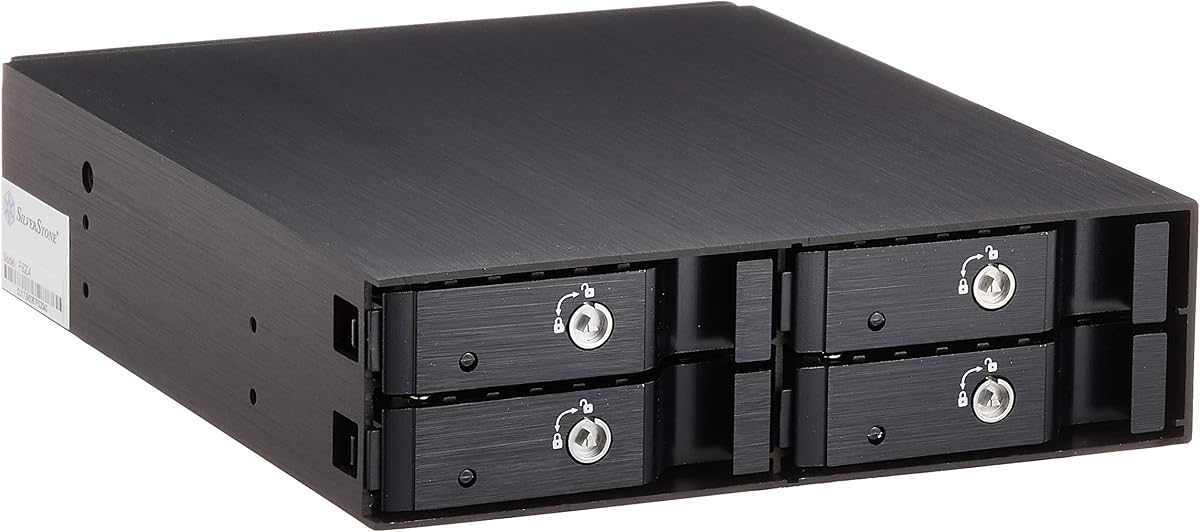
The SilverStone SST-FS204B stands out as a premium four-drive mobile rack with an all-aluminum body, individual key locks, and a built-in cooling fan. Its 4.2 rating is solid, and its strongest appeal comes from the combination of physical security, refined construction, and active thermal management.
We may earn a commission when you buy through this link, at no additional cost to you.
The rack fits four 2.5-inch SAS or SATA hard drives or SSDs into one 5.25-inch device bay. Each drive position has its own metal key lock, providing a more granular security approach than a single enclosure lock. Independent drive-status LEDs help technicians identify the state of individual disks, while the built-in fan assists with heat dissipation in a relatively compact four-drive package.
The hairline-brushed aluminum body gives the enclosure a durable and professional appearance, but it also means buyers must maintain keys for each populated bay. The product description does not mention a tool-less tray system, three-speed fan control, Active Power Technology, or a broad range of supported drive thicknesses. As a result, it is not as feature-dense in every operational area as some newer multi-bay racks.
The SST-FS204B is an excellent choice for a premium workstation, compact server, or shared system where individual drive security is important. It is particularly attractive when the enclosure's aluminum construction and integrated fan are priorities. If precise fan control, high drive density, or tool-free access outweigh per-drive locking, one of the newer ICY DOCK ExpressCage models may offer a better fit.
Individual metal key locks prevent casual removal of each drive without necessarily locking every position together. This is useful in shared equipment where different bays may contain storage with different access requirements.
The all-aluminum enclosure combines a refined finish with structural rigidity, and the integrated fan supports heat dissipation around four 2.5-inch devices. Together, these features give the rack a strong fit for professional and performance-oriented systems.
We may earn a commission when you buy through this link, at no additional cost to you.
The LYNICESHOP five-bay mobile rack combines a perfect 5.0 rating with an unusual density proposition: five hard-drive positions within the space normally occupied by three 5.25-inch optical drives. It is designed for SATA and SAS storage, including 3.5-inch and 2.5-inch drive formats as stated in the supplied information.
We may earn a commission when you buy through this link, at no additional cost to you.
Its space-saving design is the central advantage. Rather than requiring a dedicated five-bay chassis opening, the cage uses three contiguous optical-drive positions to create five hot-swap drive locations. The aluminum-alloy and plastic construction is described as resistant to corrosion and wear, while an integrated fan provides active heat dissipation. Dual power supplies are intended to make operation more stable and secure.
The cage can be used for hot-swap operation, drawer-style bays, or a stand-alone hard-drive box, according to its description. However, the information does not state a tool-less loading system, individual status LEDs, a physical lock, or a three-speed fan controller. The trayless format can also leave bare drives more exposed than a rigid carrier system, so protective handling and careful installation are important.
This five-bay cage is best for a desktop or workstation that needs substantial full-size storage without dedicating a large enclosure solely to drives. It suits builders who value capacity density and the broad SATA/SAS support more than fine-grained controls. Those wanting a four- or six-bay 2.5-inch rack should choose the corresponding ICY DOCK option, while those needing four full-size drives in a slightly smaller footprint may prefer the Rosewill cage.
The cage converts three contiguous optical-drive positions into five storage positions. That space efficiency is valuable in compact desktops and workstations where every available bay must contribute meaningful storage capacity.
Dual power supplies add resilience to the power arrangement, while an integrated fan helps remove heat from the densely packed drives. Both features are especially relevant when the cage is used for sustained storage workloads.
We may earn a commission when you buy through this link, at no additional cost to you.
Start with the drive format, number of bays, host bay space, and interface, then evaluate cooling, security, indicators, and the practical details of loading or replacing disks.
A mobile rack's drive format determines how much storage it can accommodate and which systems can use it. Single-bay models commonly accept one 3.5-inch SATA hard drive, while compact 2.5-inch designs can place two or four drives in a smaller footprint. Larger cages may support three, four, or five 3.5-inch positions and often occupy multiple 5.25-inch bays. Count the available optical or floppy positions in the chassis before choosing a multi-bay model, and check whether the cage needs contiguous space.
Choose capacity that leaves room for future expansion, but avoid buying a large cage for a system that will only ever use one drive. Match the rack's stated thickness range with the HDDs or SSDs you intend to install.
SATA is the most straightforward choice for mainstream desktop storage, while SAS may be necessary in servers and professional systems. Several featured racks support both interfaces, but the host controller, backplane wiring, operating system, and selected drive must all agree. Also pay attention to the stated generation and transfer rate because listing shorthand can obscure meaningful differences between units.
A rack labeled for both SATA and SAS does not guarantee that every SAS drive or host configuration will work. Verify the connector arrangement and full system specifications before purchasing.
The rack must physically match the computer's available drive opening. Many 2.5-inch designs fit one 5.25-inch bay, while some dual-bay versions fit a 3.5-inch floppy position. The Rosewill and LYNICESHOP cages consume three 5.25-inch positions to provide greater 3.5-inch drive density. Users should also allow clearance for cables, airflow, and the front bezel or access panel.
Measure the chassis rather than estimating from drive dimensions. A rack that fits physically may still be difficult to operate if front clearance is inadequate.
Cooling requirements increase with the number and type of drives. Passive aluminum designs can work well for one or two lightly loaded disks, while dense multi-bay cages benefit from active fans. Look for open-top structures, vented dividers, replaceable or upgradeable fans, and adjustable fan speeds. Consider the system's case airflow as well as the rack's own fan because a mobile rack cannot compensate for a poorly ventilated chassis.
Match cooling to the workload rather than simply choosing the model with the most fans. Also consider noise in offices and available power headers.
Tool-free loading speeds up routine maintenance, but the mounting method must still hold the drive securely. Trayless racks accept bare disks and reduce the number of parts, while removable tray systems make it easier to protect a drive after removal. Some designs offer optional screw holes for extra stability. A good hot-swap rack should permit smooth insertion and removal without requiring the user to remove the entire enclosure from the case.
Decide whether quick access or maximum physical restraint is more important for the installation environment. Confirm the stated loading method before ordering.
A front lock can discourage accidental or unauthorized removal in shared systems. The SilverStone SST-FS204B goes further with a separate key lock for every drive, while the Kingwin rack uses a general key-lock feature. Status LEDs, eject buttons, and front sleep controls make day-to-day operation clearer by showing whether a bay is occupied, active, or disconnected. These features are particularly useful in repairable systems where quick visual diagnostics save time.
For a personal desktop, a simple trayless design may be sufficient. For shared servers or public installations, prioritize locking and independent indicators.
Check the number and type of power connectors, data cables, and rear connections included with the rack. Dense models may need two SATA power connectors, while a single-drive adapter often uses one. A three-bay cage also needs sufficient internal power capacity and a case with appropriate airflow and connector reach. Missing adapters or different data-cable arrangements can complicate an otherwise straightforward installation.
Review the full accessory list and host connections before buying. Do not assume every required cable is included simply because a basic power lead is present.
A rack intended for frequent replacement should emphasize quick loading, visible indicators, and tool-free access. A permanently populated archive may benefit more from locking, passive efficiency, or a larger number of conventional drive positions. Servers and industrial systems benefit from interface flexibility and active cooling, whereas a home desktop may need only a simple one-drive front-accessible carrier. The best model is the one whose controls and construction match how often the storage will actually be touched.
Write down your expected drive count, replacement frequency, security requirements, and operating environment before narrowing the field.
Before installing the rack, shut down the host if the operating system or controller does not explicitly support live insertion, and confirm that the chassis has the correct bay space, power, and data connections. Verify that the drive format, thickness, interface, and connector arrangement are supported. Follow the manufacturer's mounting instructions, attach the required cables, and secure the cage so that it cannot shift during drive insertion or removal.
For a live replacement, first identify the intended bay and use the appropriate software to unmount or take the drive offline. Wait for all file activity to stop, confirm that the host and backplane support hot swap, and then press the release or eject control. Never pull a bare drive directly from the connector. After the new disk is inserted, confirm that its power and activity indicators illuminate and that the host detects it before restoring any application workload.
To maintain the rack, keep the front and rear vents free of dust, check that active fans still spin, and inspect data and power cables for looseness. Use gentle, even pressure when loading or removing drives, and avoid operating the enclosure with an unsecured or partially inserted disk. Confirm operating-system support, create an appropriate backup strategy, and schedule regular checks so that a failed drive is identified before critical data is affected.
It is an internal enclosure that converts an existing computer drive bay into a front-accessible storage position. Depending on the model, it accepts one or more 3.5-inch HDDs or 2.5-inch HDDs and SSDs, allowing drives to be removed and replaced more easily than with a conventional hard-drive bracket. Actual live swapping also depends on the host controller, operating system, backplane, and application.
No. The drive must be physically supported by the rack and compatible with its interface and thickness specifications. The computer's SATA or SAS controller must also support hot swap, and the operating system must be able to unmount the volume before removal. Always follow the instructions supplied with both the rack and host system.
A 3.5-inch rack is appropriate for full-size hard drives and larger-capacity storage. A 2.5-inch rack is better for SSDs, compact servers, and systems with less front-bay space, and it may fit a 3.5-inch bay or a 5.25-inch bay depending on the model. Choose based on your existing drives and available chassis openings rather than capacity alone.
SATA is common in desktops and many entry-level servers, while SAS is frequently used in enterprise and workstation storage. Racks that support both can offer more flexibility, but the host must also support the selected interface and connector arrangement. Check the full platform specifications, especially the stated SAS generation and transfer rate.
Active cooling is strongly preferable when several drives operate continuously in a compact enclosure. Models with built-in fans and adjustable fan speeds provide more heat management than passive designs, but the surrounding chassis must also circulate air. For one or two lightly loaded drives, a passive aluminum backplane may be sufficient depending on the workload and ambient conditions.
Not always. Multi-bay racks may require multiple SATA power connections, specific data cables, or an adapter, and some designs include LP4-to-SATA wiring. Review the accessory list and the connectors available in the host case before ordering. Having a compatible backplane is only one part of a complete and safe installation.
Useful server features include active cooling, individual indicators, durable construction, locking access, broad interface support, and a high stated insertion rating. The host must also provide compatible power, data connections, and hot-swap support. For business-critical systems, a documented backup and monitoring plan remains essential even with a durable rack.
You can often use the rack as a normal internal drive holder, but live removal will not be safe or supported without appropriate controller and operating-system support. The enclosure may still provide convenient front access for maintenance performed while the computer is shut down. Confirm compatibility before relying on hot-swap behavior.
The StarTech HSB100SATBK is the most straightforward recommendation for one 3.5-inch drive, combining front access, a trayless design, shock absorbers, and a lock. The ICY DOCK MB326SP-1B leads the guide for high-density 2.5-inch storage, while the SilverStone SST-FS204B stands out for its aluminum construction, active fan, and individual drive locks.
Prioritize the requirements that cannot be changed after installation: physical bay fit, drive dimensions, interface generation, and power availability. Once those are settled, choose the level of cooling, locking, indicator detail, and tool-free convenience that matches the system. Compact dual-bay racks suit lighter storage needs, while four- and six-bay designs make more sense for frequent maintenance and denser configurations.
Before purchasing, verify the complete host and drive specifications, the included cables, and the manufacturer's installation requirements. Retailer listings and included accessories can change over time, so check the current product page and support documentation before completing the order.
