
ARCTIC P12 Pro A-RGB
4.7Editor score
3000 RPM maximum speed
Wide 4-pin PWM range
Static-pressure radiator support
Fluid Dynamic Bearing design
Our Addressable RGB Fans guide compares ten 120mm PWM options for airflow, noise, lighting, bearing design, radiator support, and easier PC installation.
Addressable RGB fans combine individually controllable lighting with the airflow needed to keep a PC cool and comfortable. A worthwhile model should balance cooling performance, low-noise operation, reliable bearings, PWM control, and synchronization with a compatible motherboard while fitting cleanly into a modern chassis.
This guide compares ten 120mm ARGB options using their supplied specifications, including maximum speed, airflow, static pressure, bearing construction, lighting features, daisy-chain support, and installation hardware. The list covers practical choices for case ventilation, air coolers, and liquid-cooling radiators rather than relying on unsupported testing claims.
Each review explains the product's strongest benefits and honest limitations, helping readers identify whether it suits a quiet daily system, a visually coordinated gaming build, or a radiator-focused installation. Ratings and specifications reflect the listed product information, while current prices and availability can change at any time.
4.7Editor score

4.7Editor score
4.8Editor score
The comparison below places all ten 120mm addressable RGB fans side by side, emphasizing the factors that most affect real builds: maximum RPM, airflow, static-pressure capability, PWM control, lighting integration, and multi-fan convenience.




The Thermalright TL-C12C-S X5 earns the Editor's Choice position because it combines a substantial five-fan package with practical cooling specifications and extensive lighting support. Its listed rating is 4.7, while the fans operate at up to 1550 RPM and deliver 66.17 CFM of airflow with 1.53 mm-H2O of static pressure. The result is a versatile package for filling several case positions without sourcing each fan separately.
We may earn a commission when you buy through this link, at no additional cost to you.
The most valuable feature is its combination of a four-pin PWM connection, long cables, and motherboard-based control. Once connected to a compatible motherboard header, the fans can respond to temperature rather than requiring manual adjustment for every use case. Each 120 x 120 x 25 mm fan includes an S-FDB bearing intended to reduce vibration and blade movement, helping preserve smooth operation at lower speeds.
Lighting is handled through a 5V three-pin ARGB interface, with color management and synchronization through a compatible motherboard. The blades use high-brightness atomized ARGB lighting, and the listed control supports up to 17 lighting effects. The tradeoff is that this is a more conventional RGB appearance than the infinity-mirror design offered by some premium alternatives, and its 1550 RPM ceiling is lower than several competitors.
This is a strong choice for builders who want many fans, organized PWM wiring, and synchronized lighting without relying on an additional proprietary lighting system. It can serve as a case fan, support an air cooler, or contribute to radiator cooling. For most balanced builds, the five-fan count, noise-conscious bearing, and broad compatibility make it the most complete option in this guide.
The fan pairs 66.17 CFM airflow with soft, addressable blade lighting and up to 17 effects. That balance suits builders who want visible color coordination without sacrificing practical case ventilation.
Four-pin PWM control and cables extending up to 55 cm make the fans practical for multiple mounting positions. Compatible motherboards can manage speed automatically according to system temperature.
We may earn a commission when you buy through this link, at no additional cost to you.
The CORSAIR RS120 ARGB triple pack is built for builders who prioritize cooling headroom and neat multi-fan wiring. Its 4.6 rating is supported by a specification sheet that reaches up to 2100 RPM and 72.8 CFM of airflow. It also has the highest listed static pressure in this group at 2.8 mm-H2O, making it especially relevant to radiator, heatsink, and obstructed-airflow installations.
We may earn a commission when you buy through this link, at no additional cost to you.
Daisy-chaining is the standout practical advantage. Multiple fans can be linked and controlled through one four-pin PWM connector and one +5V ARGB connector, reducing the number of available headers required on a motherboard. Eight LEDs per fan provide individually addressable lighting through a compatible motherboard controller, so the lighting can become part of a larger coordinated system.
The fans also use CORSAIR AirGuide Technology. Anti-vortex vanes are designed to direct air toward components that need concentrated cooling when the fan is mounted on a radiator or heatsink. Magnetic dome bearings are specified for the bearing system, while the listing also identifies the product as a low-noise option. These details make the RS120 more performance-oriented than a typical decorative case fan.
The main limitation is dependency on compatible hardware for synchronized ARGB control. It also does not offer the broader pack configurations found among the Thermalright options. Nevertheless, the combination of 2100 RPM, 72.8 CFM, and 2.8 mm-H2O makes this an attractive choice for radiator cooling, high-heat builds, and users who want fewer separate fan connections.
At 2.8 mm-H2O static pressure and 2100 RPM, the RS120 is the strongest listed option for moving air through radiators and heatsinks. AirGuide vanes help direct that airflow toward targeted components.
A shared PWM and ARGB connection simplifies a three-fan arrangement. It is especially helpful in cases where each individual fan header would otherwise occupy valuable motherboard connections.
We may earn a commission when you buy through this link, at no additional cost to you.
The ARCTIC P12 Pro A-RGB stands out as the best budget choice in this guide, combining a 4.7 rating with the highest listed maximum speed among the selections. Its four-pin PWM connection supports progressive adjustment up to 3000 RPM, and the fan can stop completely when PWM output falls below five percent. That range gives users considerable control over noise and cooling.
We may earn a commission when you buy through this link, at no additional cost to you.
The fan is designed to handle resistance rather than only move air through an open case panel. Its high-static-pressure configuration is intended to push airflow through dense radiators, narrow perforated panels, and mesh structures. That makes it more versatile than a model optimized only for decorative case ventilation. The redesigned rotor blades are balanced to retain performance at lower speeds, where many PC fans spend much of their operating time.
Vibration control is another strength. The listed manufacturing process emphasizes minimal gaps, automatic balancing, and high-precision measurement, while a self-lubricating Fluid Dynamic Bearing is designed to minimize noise and support a long service life. In practical terms, these are useful attributes for builders who do not want every high-speed fan to become an audible part of the system.
The main tradeoff is packaging: this is a single fan rather than a multi-fan bundle, so completing a larger case may require additional purchases. The listed specifications also do not explicitly mention a PWM splitter, lighting controller, or included radiator screws. Even so, the broad speed range, static-pressure capability, and ARGB function make the P12 Pro a cost-conscious option for either a single upgrade or a full case.
PWM output from below five percent to 3000 RPM provides exceptional control. Users can reduce fan speed for quiet desktop work and raise it when processor or system heat increases.
High static pressure helps the fan preserve useful airflow behind mesh panels and across radiator fins. The redesigned blades are also intended to remain effective at lower rotational speeds.
We may earn a commission when you buy through this link, at no additional cost to you.
The Thermaltake CT120 EX ARGB Sync triple pack focuses on a refined installation experience. Its listed rating is 4.6, and its defining feature is the MagForce 2.0 magnetic connection design, which allows multiple fans to be linked with one cable. The approach reduces visible and internal cable clutter while making a coordinated set of case or radiator fans easier to arrange.
We may earn a commission when you buy through this link, at no additional cost to you.
Each fan carries nine addressable LEDs controlled through compatible 5V motherboard synchronization software. The listing references 16.8 million colors and 120 mm sizing, making the set suitable for builders who want lighting to coordinate with other connected devices. The streamlined wiring is particularly useful in chassis with limited room behind the motherboard tray or above the radiator.
Thermaltake uses an optimized hydraulic bearing and an embedded anti-vibration mounting system. Those features focus on stable, quieter operation and reduce unwanted vibration transfer into the case frame. The fans are positioned as both case and radiator options, giving users flexibility when constructing intake and exhaust arrangements.
One limitation is that the supplied information does not state a specific maximum RPM, airflow figure, or static-pressure value. Buyers focused on precise thermal calculations may prefer a model with more explicit performance numbers. Nevertheless, magnetic daisy chaining, nine addressable LEDs, and anti-vibration mounting make the CT120 EX a polished choice for clean, synchronized multi-fan installations.
MagForce 2.0 lets the three fans connect with one cable. This reduces header consumption and keeps the interior more orderly than separately wired fan groups.
Nine individually addressable LEDs support motherboard synchronization, while the hydraulic bearing and anti-vibration system target smooth operation and reduced case vibration.
We may earn a commission when you buy through this link, at no additional cost to you.
This six-pack is the most comprehensive installation-focused set in the guide. It combines four forward-facing fans with two reverse fans, allowing builders to create a coordinated intake and exhaust arrangement. Reverse blades are particularly useful at bottom or side intake positions, where their illuminated faces can remain visible while still moving air in the intended direction.
We may earn a commission when you buy through this link, at no additional cost to you.
The fans use nine high-pressure blades, an HDB bearing, and a maximum speed of 1550 RPM. PWM intelligent temperature control is listed as responding to CPU or motherboard case temperature feedback, allowing higher activity under load and quieter operation at idle. Each standard 120 mm fan can also replace a compatible CPU cooler fan or support a 120, 240, or 360 mm liquid-cooling radiator.
Lighting is one of the kit's most visible strengths. Every fan contains 28 high-brightness ARGB LEDs across the hub and outer ring. The bundled combined ARGB and PWM hub connects case fans and other illuminated devices, manages lighting modes, and centralizes speed control. That controller is useful for a complete build, particularly one where motherboard headers are limited.
The 4.4 rating is the lowest among these selections, and the 1550 RPM ceiling is not as high as several alternatives. Buyers may also need to plan cable routing carefully around the controller and multiple fan leads. Even so, no other option combines six fans, mixed orientations, a controller, and radiator support in one clearly described package.
Four forward and two reverse fans support a deliberate airflow path. The reverse pair is especially useful for bottom or side intake locations where the lighting face should remain visible.
The combined ARGB and PWM hub handles lighting modes and fan speed. It can also connect additional illuminated devices, reducing the need for separate control hardware.
We may earn a commission when you buy through this link, at no additional cost to you.
The Thermalright TL-C12C-S X3 offers a smaller alternative to the five-fan version while retaining the same core fan design. The three-fan set has a 4.6 rating and uses 120 x 120 x 25 mm dimensions, making it suitable for standard case positions, compatible CPU coolers, and radiator installations.
We may earn a commission when you buy through this link, at no additional cost to you.
Cooling specifications are consistent across the set: up to 1550 RPM, 66.17 CFM airflow, and 1.53 mm-H2O static pressure. The four-pin PWM connection enables automatic motherboard control based on temperature, and cables extending up to 55 cm provide flexibility for larger cases. This gives users a practical balance between audible output and meaningful airflow.
The S-FDB bearing is intended to minimize blade shaking and noise while maintaining cooling performance. On the lighting side, high-brightness atomized ARGB blades reflect light more softly, and the listed system offers up to 17 effects with motherboard synchronization. That creates a restrained, coordinated appearance without requiring a separate controller.
Its limits are mostly those of the design's moderate speed and stated static-pressure figure compared with high-speed or radiator-oriented alternatives. The listing repeats the same specifications within its description, but those details remain consistent. For builders filling a modest number of positions, the X3 is a straightforward way to obtain matching PWM and ARGB fans without buying a larger pack.
The X3 provides enough matched fans for a compact intake-and-exhaust arrangement. Users avoid mixing unrelated lighting or PWM models within the same visible section.
After connection to a four-pin motherboard header, the fans can vary speed according to temperature. This reduces the need for constant manual adjustment during normal use.
We may earn a commission when you buy through this link, at no additional cost to you.
This five-pack version of the TL-C12C-S X5 shares the core specifications of the higher-ranked Thermalright set. It has a 4.7 rating, reaches up to 1550 RPM, delivers 66.17 CFM, and produces 1.53 mm-H2O of static pressure. The primary distinction in the supplied listing is the more explicit description of operating in DC mode when a fixed speed is preferred.
We may earn a commission when you buy through this link, at no additional cost to you.
That control flexibility is useful for builders whose motherboard or fan controller behaves differently depending on PWM or DC mode. In PWM mode, the listed temperature-control function automatically varies speed according to the motherboard temperature reading. In DC mode, users can choose and maintain a fixed level, which may be helpful for predictable noise or visual consistency.
The fans support 5V three-pin ARGB lighting and synchronization through a compatible motherboard. Their lighting uses a high-brightness atomized effect designed to look softer and integrate with a case or cooler. The listing also specifies up to 17 effects, long cables of up to 55 cm, and an S-FDB bearing intended to minimize movement and noise.
Its specifications closely overlap with another Thermalright five-fan option in this guide, so shoppers should compare the current listing details carefully before choosing between them. The X5 listing itself does not claim exceptional static pressure or a very high maximum speed. Its appeal lies in a generous fan count, flexible speed behavior, and familiar thermal and lighting performance in one coordinated package.
Temperature-responsive PWM operation is convenient for everyday builds, while DC mode offers a stable alternative when a fixed fan speed is preferred.
The 120 mm dimensions and specified airflow make the fans suitable as case ventilation, CPU cooler support, or radiator cooling. Long cables help accommodate different chassis layouts.
We may earn a commission when you buy through this link, at no additional cost to you.
The Thermaltake CT120 ARGB Sync is a compact two-fan set for builders who want coordinated lighting without installing a larger group. Its listed rating is 4.6, and each fan uses a redefined seven-blade design intended to optimize airflow and air pressure. PWM control permits speeds of up to 2000 RPM.
We may earn a commission when you buy through this link, at no additional cost to you.
Nine addressable LEDs per fan are powered through the standard 5V synchronization path. Compatible motherboard software can control the color and effects, with the product title identifying support for 16.8 million colors. The daisy-chain cable design reduces the number of cables and ports needed, which is especially convenient when the two fans occupy separated intake or exhaust positions.
A hydraulic bearing and solid anti-vibration frame form the core of its support structure. These features are aimed at smoother operation and reduced vibration, while the 120 mm format allows use in cases, radiators, and compatible CPU coolers. The result is a versatile two-fan option for smaller builds or targeted upgrades rather than a complete case refresh.
The main drawback is its two-fan quantity, which is the smallest bundle in the guide. A specific CFM or mm-H2O figure is also not supplied, making direct thermal comparisons less precise than with the ARCTIC, CORSAIR, or AsiaHorse options. Nevertheless, the 2000 RPM ceiling, daisy-chain arrangement, and motherboard lighting control make this a tidy, flexible choice.
The two-fan bundle works well for replacing a pair of existing case fans or adding a matched intake and exhaust pair without purchasing a larger set.
Linking the fans reduces the number of cables and ports required. The result is easier routing in compact cases and cleaner installations behind the motherboard tray.
We may earn a commission when you buy through this link, at no additional cost to you.
The Thermaltake LE120 ARGB three-pack receives the highest listed rating in the guide at 4.8. Its specifications are notably balanced, with up to 66.1 CFM of airflow and a controlled operating range from 500 to 1500 RPM. The nine-blade design aims to deliver useful cooling while keeping maximum speed more moderate than several high-performance competitors.
We may earn a commission when you buy through this link, at no additional cost to you.
Each fan includes nine addressable LEDs controlled by a three-pin 5V ARGB connector. Daisy-chain ARGB cables simplify the lighting connection, while the package includes a three-way PWM splitter for installation. Together, these details make the set straightforward to deploy across three case positions without requiring separate PWM leads for every fan.
Static pressure is listed at 1.41 mm-H2O, the lowest figure among these selections. The product is described primarily as a case fan, so its strongest use is ordinary chassis circulation rather than forcing air through a dense radiator. A hydraulic bearing provides the bearing system and supports the set's balanced positioning for daily desktop and gaming systems.
The limited static pressure and 1500 RPM ceiling mean it may not be the first choice for a high-density radiator or especially restrictive filter. Its strengths are instead the 4.8 rating, clearly stated airflow, controlled speed range, included splitter, and straightforward synchronization. For typical case cooling with full motherboard lighting coordination, the LE120 is a highly balanced option.
A 500–1500 RPM range supports both restrained desktop operation and stronger cooling under load. The stated 66.1 CFM output provides a clear basis for comparison with other 120 mm models.
A three-way PWM splitter and daisy-chain ARGB cables reduce setup complexity. These accessories are useful for building a matched three-fan arrangement with fewer separate connections.
We may earn a commission when you buy through this link, at no additional cost to you.
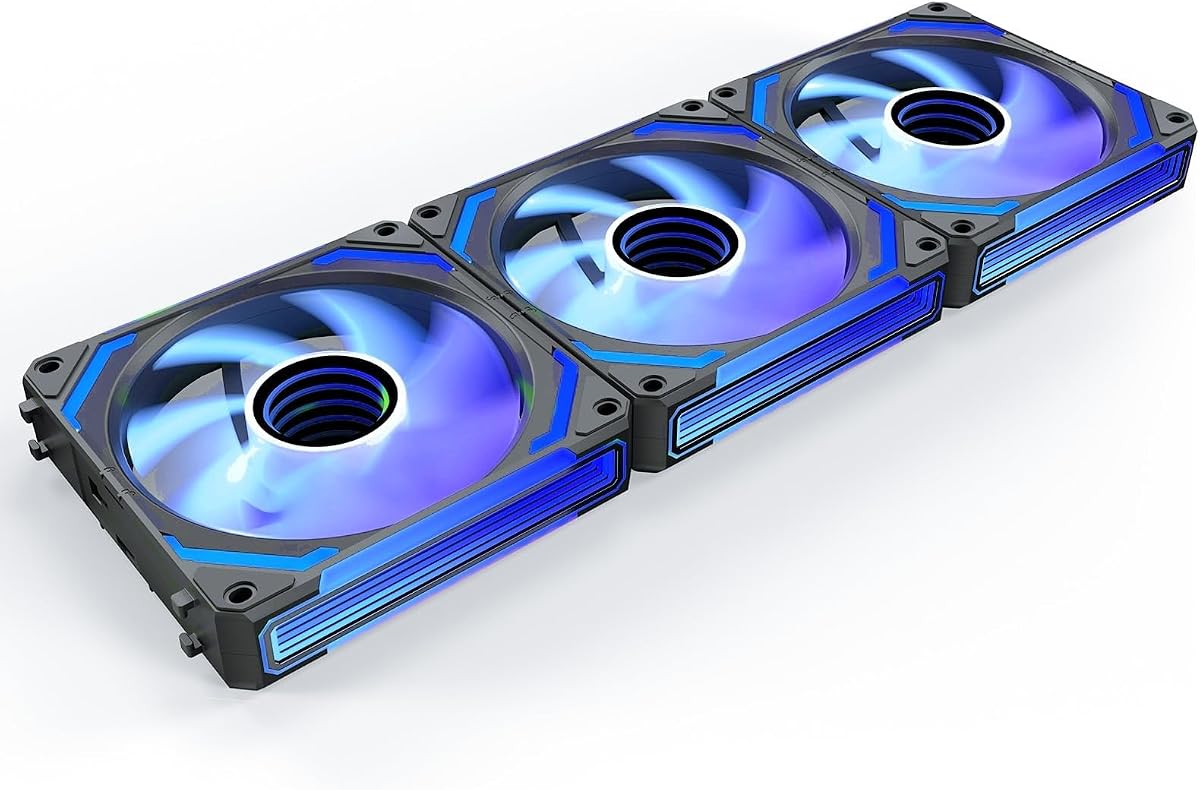
The AsiaHorse COSMIQ 120mm triple pack earns the Best Premium distinction through its combination of distinctive infinity-mirror lighting and substantial cooling specifications. It carries a 4.8 rating, reaches up to 2000 RPM, delivers 68.5 CFM of airflow, and produces 2.05 mm-H2O of static pressure. Those figures place it comfortably among the stronger performers in the guide.
We may earn a commission when you buy through this link, at no additional cost to you.
Its visual design goes beyond a conventional translucent frame. Layered infinity-mirror illumination creates a deeper appearance, while the reverse fan format and listed use cases cover ATX and MATX gaming cases, desktop upgrades, and AIO liquid-cooler installations. The design is aimed particularly at builders who want the case interior to function as a visible part of the overall system.
Lighting can respond to sound through a high-sensitivity pickup module. Eight music rhythm modes are listed, allowing illumination to change with game sounds, music, or ambient noise. The fans also support 5V three-pin motherboard ARGB synchronization and include a small dedicated controller for independent lighting control. An interlocking daisy-chain design helps reduce redundant wiring.
The premium experience does require thoughtful configuration. Users need to set up the sound-reactive modes if desired and account for the separate controller in their cable plan. The FDB bearing and stated maximum noise of 29.2 dB(A) indicate attention to acoustic behavior, but speed control from 800 to 2000 RPM allows a quieter balance. This is the most visually ambitious set in the guide and a strong option for showcase systems.
The built-in sound pickup supports eight rhythm modes for music and game audio. Motherboard ARGB synchronization remains available for users who prefer a coordinated static or animated color scheme.
Up to 68.5 CFM and 2.05 mm-H2O of static pressure support use in cases, CPU coolers, and liquid-cooling setups. The 800–2000 RPM PWM range offers flexibility between quiet operation and stronger cooling.
We may earn a commission when you buy through this link, at no additional cost to you.
The right addressable RGB fan depends on more than appearance. Consider airflow, static pressure, noise behavior, bearing type, speed control, connector standards, lighting synchronization, and the number and orientation of fans your case requires.
Airflow tells you how much volume a fan can move, while static pressure indicates how well it can push air through restrictive areas. General case ventilation usually benefits from strong airflow, but radiator, heatsink, mesh-panel, and filtered-intake positions demand higher static pressure. Among the listed products, the CORSAIR RS120 provides 72.8 CFM and 2.8 mm-H2O, while the AsiaHorse COSMIQ combines 68.5 CFM with 2.05 mm-H2O. These values make both particularly compelling when air must pass through an obstruction rather than simply circulate through an open section of the chassis.
Prioritize both figures, but match them to the installation. A model with excellent open-panel airflow may not move enough air through dense radiator fins. Conversely, a high-pressure fan may be unnecessary for a simple rear exhaust position. Matching the fan to the resistance it will encounter is more useful than selecting solely by the largest headline number.
A four-pin PWM connector allows the motherboard or fan controller to vary fan speed according to a duty cycle. This is valuable because a fan rarely needs to run at its maximum setting during browsing or light office tasks. Maximum speed tells you how much headroom is available under load: the ARCTIC P12 Pro reaches 3000 RPM, the CORSAIR RS120 reaches 2100 RPM, and several Thermalright models top out at 1500 or 1550 RPM. Lower ceilings can still be effective in conventional cases, but they offer less adjustment range for unusually high heat loads.
Choose a model with a broad PWM range and a stop function if quiet operation is important. The ARCTIC fan can stop completely below five percent PWM, while the AsiaHorse supports adjustment from 800 to 2000 RPM. A useful build also needs a compatible PWM header or controller capable of handling the total fan load.
Fan noise depends on more than the maximum RPM. Blade design, balance, vibration isolation, bearing quality, and operating speed all influence sound. The Thermalright TL-C12C-S models use S-FDB bearings and list noise at or below 25.6 dBA. Thermaltake options use hydraulic bearings, while the CORSAIR RS120 uses magnetic dome bearings and the AsiaHorse uses an FDB bearing with maximum noise stated at 29.2 dB(A). These are useful product specifications, but actual system noise also depends on case resonance and the selected speed curve.
For a quiet build, favor a wide control range, a smooth bearing, and anti-vibration mounting. Avoid running high-RPM fans at maximum unless sustained cooling demands it. A balanced fan curve that increases speed only when temperatures rise will usually deliver a more comfortable result than a fixed, aggressive configuration.
Addressable RGB lighting requires a compatible control path, and the most common standard in these products is a three-pin 5V ARGB connection. Motherboard sync lets lighting join a broader system-wide effect, but software and header availability vary. Never assume that a legacy three-pin RGB header is interchangeable with 5V ARGB; the pin arrangement and signaling requirements differ. Products with a bundled controller, such as the six-pack or AsiaHorse set, can still function when the motherboard offers no convenient ARGB header.
Confirm that your motherboard has a 5V ARGB header and supports the necessary software before relying on synchronization. Also check that the lighting cable and fan PWM connector can both reach their intended headers without crowding the case.
Daisy chaining reduces the number of separate fan cables and motherboard headers needed for a group. CORSAIR links its RS120 fans through one PWM and one ARGB connection, Thermaltake uses magnetic or conventional daisy-chain arrangements, and the AsiaHorse COSMIQ uses interlocking connectors. This is especially valuable in compact builds or systems with several fans mounted at the front, top, and rear.
Although daisy chaining simplifies the header count, each fan still requires enough power from the selected header or controller. Confirm the rated current of the motherboard header and avoid exceeding its intended capacity. For unusually large groups, a dedicated PWM controller or powered hub can provide a safer and more flexible installation.
Choose a pack that matches the number of useful mounting positions in your case. The Thermalright five-packs cover larger installations, the Thermaltake LE120 and CT120 EX provide three-fan groups, the CT120 provides two, and the ARCTIC P12 Pro is sold as a single fan. The six-pack forward-and-reverse kit is unique because it includes four forward and two reverse fans, allowing builders to design a deliberate intake and exhaust path.
Reverse fans can improve visual orientation at bottom or side intake locations, but they are not automatically better at moving air. Confirm mounting clearance, grille alignment, and the direction in which air should enter. Buying a slightly smaller matched set can also prevent unused fans from crowding a compact chassis.
Addressable RGB fans vary from subtle diffused blade illumination to layered infinity mirrors and sound-reactive effects. The Thermalright models advertise softer atomized lighting and multiple effects, while Thermaltake fans emphasize nine LEDs and motherboard synchronization. The AsiaHorse COSMIQ offers a more decorative infinity-mirror design with eight sound-responsive modes and a dedicated controller. A simple RGB strip may provide sufficient visual impact for some builds, but fans with addressable LEDs can create synchronized transitions around a complete chassis.
Consider how the lighting will be seen after installation. Front intake fans may be mostly hidden by a filter or mesh panel, while top and rear exhaust fans often remain visible. A premium visual design is most worthwhile where the illuminated face has a clear line of sight.
All ten selections use the standard 120 mm format, but mounting requirements still vary. Radiator positions may require different screws than standard case mounting positions, and some CPU coolers accept 120 mm fans directly while others require an adapter. The ARCTIC P12 Pro emphasizes high static pressure for radiators and restrictive panels, while the CORSAIR RS120 and AsiaHorse COSMIQ also list radiator or liquid-cooler use. The six-pack explicitly supports 120, 240, and 360 mm liquid-cooling radiators.
Check the case manual, radiator mounting pattern, CPU cooler bracket, and available screws before ordering. Also verify that the fan's specified connector and cable thickness can fit through the intended route. A 25 mm-thick fan is standard for many radiators, but a thick radiator plus adjacent hardware can still create clearance conflicts.
Before installation, plan the airflow path and identify the correct positive and negative airflow direction. A balanced common arrangement uses front or bottom fans as intake and rear or top fans as exhaust, although the correct layout depends on the case design, intake filters, and the position of the CPU cooler. Mount each fan securely, route cables behind the motherboard tray where possible, and confirm that the fan frame does not obstruct a radiator, drive cage, or memory module.
Connect the four-pin PWM leads to an appropriate motherboard header or fan controller, and connect the 5V three-pin ARGB lighting cables to a compatible header. If the fans include a separate controller, follow its supplied connection sequence and connect the controller to a usable power source and synchronization header. Set the speed and lighting profiles in the motherboard or controller software, then begin with a moderate curve and increase speed only if temperatures or noise measurements indicate that it is necessary.
Routine care is mostly visual and preventative. Check that every fan spins freely, that mounting screws remain tight, and that cables do not rub against blades or hot components. Keep intake filters and mesh panels clean so the fans do not work harder than necessary. Adjust the PWM curve during seasonal temperature changes, avoid running the fans at maximum without a clear thermal reason, and update lighting software only when doing so will not disrupt the configured synchronization.
Usually not directly. Three-pin 5V ARGB and three-pin 12V RGB use different pin arrangements and signaling standards, so connecting one to the wrong header can damage the header or fan. Use a correctly designed ARGB-to-RGB adapter only when you accept that it will lose independent addressable lighting effects.
Not necessarily. Some products include a dedicated controller, while others can be synchronized through compatible motherboard software using a 5V ARGB header. The six-pack and AsiaHorse COSMIQ are explicitly described as including controllers, which can make them useful in systems with limited or unusual motherboard lighting support.
No. Higher maximum RPM provides more potential airflow, but actual cooling depends on fan size, blade design, static pressure, mounting position, and case restrictions. A quieter fan operating on an effective temperature-responsive curve may produce a better daily experience than a high-speed fan running constantly at maximum.
Several products are explicitly suitable for radiators, including the CORSAIR RS120, Thermalright TL-C12C-S models, the six-pack forward-and-reverse kit, and the AsiaHorse COSMIQ. Confirm that the radiator's mounting pattern accepts standard 120mm screws and that the case provides enough clearance around the radiator and adjacent components.
Airflow describes the volume of air a fan can move, while static pressure describes its ability to push air against resistance. Fans behind mesh, filters, radiators, and dense heatsinks need good static pressure, whereas open exhaust positions depend more heavily on airflow. Comparing both figures gives a more complete picture than looking at either measurement alone.
Yes. Daisy chaining links several fans so they can use fewer PWM and ARGB connections, which can make a multi-fan installation easier to route. The motherboard header or controller still needs to support the combined current, so large groups may require a powered hub or dedicated controller.
Most of these fans support 5V motherboard synchronization, allowing compatible lighting software to coordinate them with other addressable devices. The exact effects and control options depend on the motherboard software. Sound-reactive modes, such as those listed for the AsiaHorse COSMIQ, add a separate layer of lighting behavior.
Use the motherboard's PWM curve to keep fan speed low during light workloads and raise it gradually as temperature increases. Select a model with a wide control range and efficient low-speed blades, check that the case is not resonating, and make sure fan frames are firmly mounted without excessive vibration. Avoid unnecessary maximum-speed operation.
The Thermalright TL-C12C-S X5 is the strongest all-around pick because its five-fan package combines PWM temperature control, 66.17 CFM airflow, an S-FDB bearing, and up to 17 ARGB effects. The ARCTIC P12 Pro A-RGB is the best budget route, offering an exceptional 3000 RPM maximum and a broad PWM range, while the AsiaHorse COSMIQ leads the premium category with infinity-mirror lighting, music-responsive effects, 68.5 CFM airflow, and 2.05 mm-H2O of static pressure.
For radiator and heatsink installations, prioritize static pressure rather than choosing solely by lighting or pack size. The CORSAIR RS120 leads the listed figures with 2.8 mm-H2O, and the AsiaHorse also performs strongly in that area. For compact builds, the Thermaltake CT120 ARGB two-pack and its included daisy-chain design can keep wiring manageable. For large cases, the six-pack forward-and-reverse set or Thermalright five-packs reduce the need to source many individual fans.
Finally, verify connector standards, mounting hardware, case clearance, and motherboard control support before purchasing. Ratings can change as customer feedback accumulates, and prices and availability vary over time, so check the current product listing and live retailer information when you are ready to buy. The right choice is the one whose cooling profile, lighting design, and installation requirements align with your specific PC build.