
Logitech G X52 Flight Control System
4.3Editor score
Five-position ergonomic grip
282 programmable commands
Multifunction LCD display
Rudder lock for pedal setups
Our guide compares the best Controller for Star Wars Squadrons, including licensed gamepads, HOTAS flight controls, and customizable PC controllers.
Finding a good controller for Star Wars Squadrons depends on the kind of cockpit experience you want. A conventional gamepad offers a familiar and accessible way to fly, while a HOTAS system provides separate throttle and stick control for players who want greater precision, realism, and customization.
The products in this guide were compared by examining their stated compatibility, control layouts, axes, buttons, sensors, connectivity, programmability, and platform support. The list includes an officially licensed Xbox controller, premium flight systems, HOTAS models, and versatile PC controllers designed for different play styles.
Each review explains the strongest features, practical limitations, and ideal user for all ten products, while the comparison table makes their main differences easier to scan. Product availability, software compatibility, and prices can change, so confirm current details before purchasing.
4.3Editor score

4.5Editor score

4.0Editor score
This side-by-side comparison covers licensed gamepads, premium flight controls, modular HOTAS systems, and customizable PC controllers, with each product's platform support and most important control features summarized for easier comparison.




The Controller Gear Star Wars: Squadrons bundle is the most directly themed controller in this guide, carrying official licensing from Disney, Lucasfilm, and Microsoft Xbox. It combines a limited-edition wireless Xbox controller with a matching pro charging stand. Its 4.0 rating reflects a recognizable licensed package, but it remains a conventional gamepad rather than a dedicated flight-control system.
We may earn a commission when you buy through this link, at no additional cost to you.
Its strongest attraction is the combination of themed hardware and useful platform support. The controller works with Xbox One, One S, One X, Series X, Series S, Windows 10 PCs, and compatible tablets through Bluetooth. A textured grip helps prevent slipping during long sessions, while a 3.5 mm headphone jack offers another way to connect a headset. The stated battery life is up to 12 hours of continuous gaming, and the stand can charge the controller in under three hours.
The tradeoff is that a standard Xbox gamepad does not provide the separate throttle, rudder, or joystick behavior associated with a HOTAS. Players who want an authentic cockpit feel may need to rely on the game's supported control options and adjust their expectations. The product is also designed around Xbox hardware rather than the wider multiplatform compatibility offered by some PC-focused alternatives.
This bundle is an excellent choice for Star Wars Squadrons players who want officially licensed hardware, a coordinated charging solution, and a familiar control scheme. It is particularly appealing as an everyday console controller that also fits the game's space-combat theme. For those wanting granular flight controls rather than a traditional gamepad, one of the dedicated HOTAS options may be a better match.
The limited-edition appearance and official Disney, Lucasfilm, and Microsoft Xbox licensing give this bundle immediate appeal for Star Wars fans. It feels purpose-built for a themed gaming setup rather than resembling a generic third-party controller.
The included pro charging stand helps keep the controller ready for play, while the 3.5 mm headphone jack supports wired headset options. Headset compatibility varies, so players should consult Xbox support before buying a specific model.
We may earn a commission when you buy through this link, at no additional cost to you.
The FLYDIGI Direwolf 4 is a 4.5-rated PC controller built for players who want to tune the feel of their controls. It supports PC, Nintendo Switch, TV, Android, and laptop use, but it explicitly does not support Xbox or PlayStation systems. That makes it a natural fit for PC gaming rather than a direct substitute for an Xbox controller.
We may earn a commission when you buy through this link, at no additional cost to you.
The FORCEFLEX stick system allows tension to be adjusted from 40 gf to 80 gf, giving players a way to choose between lighter, faster movements and more controlled steering. FORCESWITCH Triggers 2.0 can move between a rapid micro mode and a hall-effect linear mode. A six-axis gyro, 1,000 Hz polling rate, upgraded vibration, a rotary eight-way D-pad, and silent ABXY buttons broaden its feature set for flying, racing, and action games.
Connectivity is flexible, with wired, Bluetooth, and 2.4 GHz dongle options. The controller can also charge through its wired connection, although the proprietary direwolf 4 dock is sold separately. Although it can be used without FLYDIGI software, installing it unlocks remapping, profiles, and deeper customization. The lack of direct Xbox or PlayStation support is the main reason it cannot be recommended as a universal console option.
For PC players seeking a modern gamepad with adjustable sticks, selectable trigger behavior, and broad connection options, the Direwolf 4 is a strong candidate. Its 4.5 rating and extensive control features make it particularly compelling for Star Wars Squadrons players who use a PC and want fine control over their gamepad experience.
The standout attraction is physical control customization. FORCEFLEX sticks vary from 40 gf to 80 gf, while FORCESWITCH triggers offer distinct rapid and linear behaviors, letting the controller adapt to different flight and racing preferences.
Wired, Bluetooth, and 2.4 GHz connections cover different desktop and mobile setups. The 1,000 Hz polling rate is designed to support responsive input, while the optional software can store tailored profiles and remapped controls.
We may earn a commission when you buy through this link, at no additional cost to you.
The Thrustmaster ESWAP X2 Pro is a wired Xbox and PC gamepad aimed at players who value immediate, mechanical input. It has a 3.4 rating, the lowest numerical score among the rated products in this list, but its feature set is focused rather than general-purpose. Mechanical face buttons activate 64 percent faster than standard membrane buttons according to the supplied product information.
We may earn a commission when you buy through this link, at no additional cost to you.
The controller includes two S5 NXG mini-stick modules, a mechanical directional pad developed with fighting game experts, and four rear buttons that can be remapped through the controller or THRUSTMAPPERX software. Its 3-meter USB-C cable is designed for stable data transmission and minimal latency, making the wired connection a consistent rather than optional part of the design.
The main drawback is that this is not a dedicated flight system. There is no separate throttle, stick tension adjustment, gyro specification, or multi-axis HOTAS layout among the stated features. It also lacks the wireless flexibility offered by several other products, and its lower rating suggests that some customers may not have been as satisfied with the overall experience.
The ESWAP X2 Pro is best for a player who wants a responsive, fully wired gamepad with mechanical controls and extra remappable inputs on Xbox Series X|S or PC. It may support a more precise conventional control approach, but those seeking a true throttle-and-stick flight rig should prioritize one of the dedicated HOTAS products instead.
Fast-activating mechanical face buttons and a specialized directional pad serve quick inputs, while four rear buttons add room for additional commands. Remapping can be handled through THRUSTMAPPERX or directly from the gamepad.
The included 3-meter USB-C cable prioritizes a stable connection and fast data transfer. This makes the controller appealing for players who value consistency and do not need wireless freedom.
We may earn a commission when you buy through this link, at no additional cost to you.
The Logitech G X52 Flight Control System is a premium PC flight-control option with a 4.3 rating and an unusually deep command set. Its defining feature is 282 programmable commands spread across three modes, allowing important actions to remain accessible without repeatedly moving between the stick and a keyboard. The multifunction LCD can display programmed commands and includes a clock for timing flight plans.
We may earn a commission when you buy through this link, at no additional cost to you.
Magnetic, non-contact X and Y axis sensors are intended to provide accurate control and long service life. A five-position grip system changes the angle of the control handle to improve reach and comfort. The 3D twist axis can be locked when separate rudder pedals are in use, reducing accidental input and allowing a more traditional pedal-based control arrangement.
The X52 occupies more desk space than a conventional gamepad and centers on PC flight simulation rather than console use. Its programming depth can also require a learning period, especially for players new to HOTAS systems. Even so, the combination of a multifunction display, extensive programmability, adjustable grip, and rudder lock gives it a mature feature set for dedicated flight-simulator use.
This is the pick for a player willing to build a more permanent cockpit-style setup and invest time in configuration. Compared with simpler HOTAS models, the X52 offers more visible control information and a broader command library. If Star Wars Squadrons recognizes the relevant inputs, it can provide a more immersive and efficient way to manage the game's flight functions.
With 282 programmable commands across three modes, the X52 can place a wide range of functions under the pilot's fingers. The LCD provides a clear reference for active commands, reducing the need to memorize every assignment.
The five-position grip can be adjusted to suit different seating arrangements and hand positions. This makes long sessions more comfortable and allows the control angle to change when the player's setup changes.
We may earn a commission when you buy through this link, at no additional cost to you.
The Thrustmaster T-Flight Hotas One is a 4.5-rated modular flight stick and throttle designed for Xbox Series X|S and Windows PC. It combines separate pitch, roll, and throttle-style control with an adjustable-resistance stick, a trigger, a hat switch, and multiple programmable buttons. That balance of platform reach, physical controls, and setup flexibility makes it a strong overall HOTAS recommendation.
We may earn a commission when you buy through this link, at no additional cost to you.
The detachable throttle is one of its most useful qualities. The stick and throttle can remain together on a desk or be separated so the throttle sits elsewhere, including on the player's lap. Adjustable resistance supports a broad range of aircraft, while the ergonomically placed buttons give the pilot access to common flight commands without removing a hand from the main controls.
Its limitations are typical of a dedicated flight system. New players may face a learning curve, and the product requires room beyond that occupied by a standard gamepad. Separate rudder pedals are also sold separately, so complete pedal control is not included. Players must also verify the game's current support for their chosen flight hardware and button assignments.
The T-Flight Hotas One is ideal for a player moving between console and PC or for anyone who wants a dedicated flight experience without moving to a much larger premium cockpit system. Its detachable construction, adjustable resistance, and strong 4.5 rating make it one of the most approachable choices for dedicated Star Wars Squadrons flight control.
Separating the stick from the throttle lets players arrange their controls around a desk, lap, or larger flight station. This flexibility is valuable when desk space is limited or when comfort changes between sessions.
Adjustable stick resistance can be adjusted to match different aircraft and handling preferences. The programmable buttons, hat switch, and trigger provide a practical mix of flight and general command inputs.
We may earn a commission when you buy through this link, at no additional cost to you.
The Turtle Beach VelocityOne H.O.T.A.S. is a broad flight-control system for Xbox Series X|S, Xbox One, and Windows PC. It combines a Flightstick II with a swappable dual throttle, 15 axes, 73 programmable inputs, and a full-color flight management display. The number of features makes it especially appealing to players building a detailed, expandable cockpit.
We may earn a commission when you buy through this link, at no additional cost to you.
High-resolution 16-bit hall-effect sensors are used for the flightstick, while the throttle includes interchangeable detents that create tactile thrust reference points. Throttle resistance and stick tension are adjustable, and customizable RGB lighting can visually coordinate the unit with a gaming setup. The grip can be configured for left- or right-handed use, improving its flexibility for different players.
The product also supports twist rudder control that can be enabled or locked when pedals are installed, along with an ecosystem for mounting solutions and additional flight hardware. The VelocityOne Flight Hangar app supports customization and personalized settings. That flexibility comes with complexity, and the absence of a supplied rating means prospective buyers cannot compare a numerical customer score with the other products here.
Choose the VelocityOne H.O.T.A.S. if you want a highly configurable flight platform that can grow into a larger cockpit. It offers more axes, commands, display information, and expansion options than most conventional gamepads. A player wanting something simpler may find the setup and broad feature set more than necessary.
Pedal support, interchangeable throttle detents, adjustable tension, and mounting options make the system adaptable to a growing setup. The app-based configuration process helps manage the extensive control options.
The full-color display can present real-time flight data and support quick performance tuning. This gives the pilot immediate visual information without depending entirely on remembered button assignments.
We may earn a commission when you buy through this link, at no additional cost to you.
The GameSir Tarantula 8K has a 4.7 rating, making it the highest-rated product with a numerical customer score in this guide. It is a wired Windows PC controller designed around competitive responsiveness, advanced trigger behavior, extensive button customization, and precise magnetic stick technology.
We may earn a commission when you buy through this link, at no additional cost to you.
Its Gen-2 TMR sticks use magnetic sensing to avoid physical contact, with the stated goal of stable recentering, anti-stick drift, smoother linear movement, and low power consumption. The 8,000 Hz wired polling rate is the headline responsiveness feature. A built-in six-axis gyroscope adds another layer of control, while the dual-mode trigger stops let players choose between smooth hall-effect analog input and clicky micro-switch response.
Customization extends to two lockable back buttons, two mini bumpers, and five extra front buttons, each supporting up to 32-step macro recording. GameSir Connect handles button mapping, macros, and performance settings. The trade-offs are platform limitation and dependence on software for advanced configuration. Its racing-inspired precision and esports focus also differ from the ergonomics of a dedicated HOTAS.
The Tarantula 8K is a compelling choice for Windows players who want exceptionally fast polling and extensive remapping in a conventional gamepad. Star Wars Squadrons players can benefit from the precise stick behavior and selectable trigger response, although they should verify game support and map controls carefully.
The Gen-2 TMR design is intended to provide stable recentering and long-lasting anti-drift performance. Its magnetic sensing approach removes physical contact from the stick mechanism while supporting smooth, linear control.
Two trigger modes accommodate different preferences, from linear analog control to immediate clicks. Multiple auxiliary buttons and 32-step macro recording give advanced users considerable control over repeatable actions.
We may earn a commission when you buy through this link, at no additional cost to you.
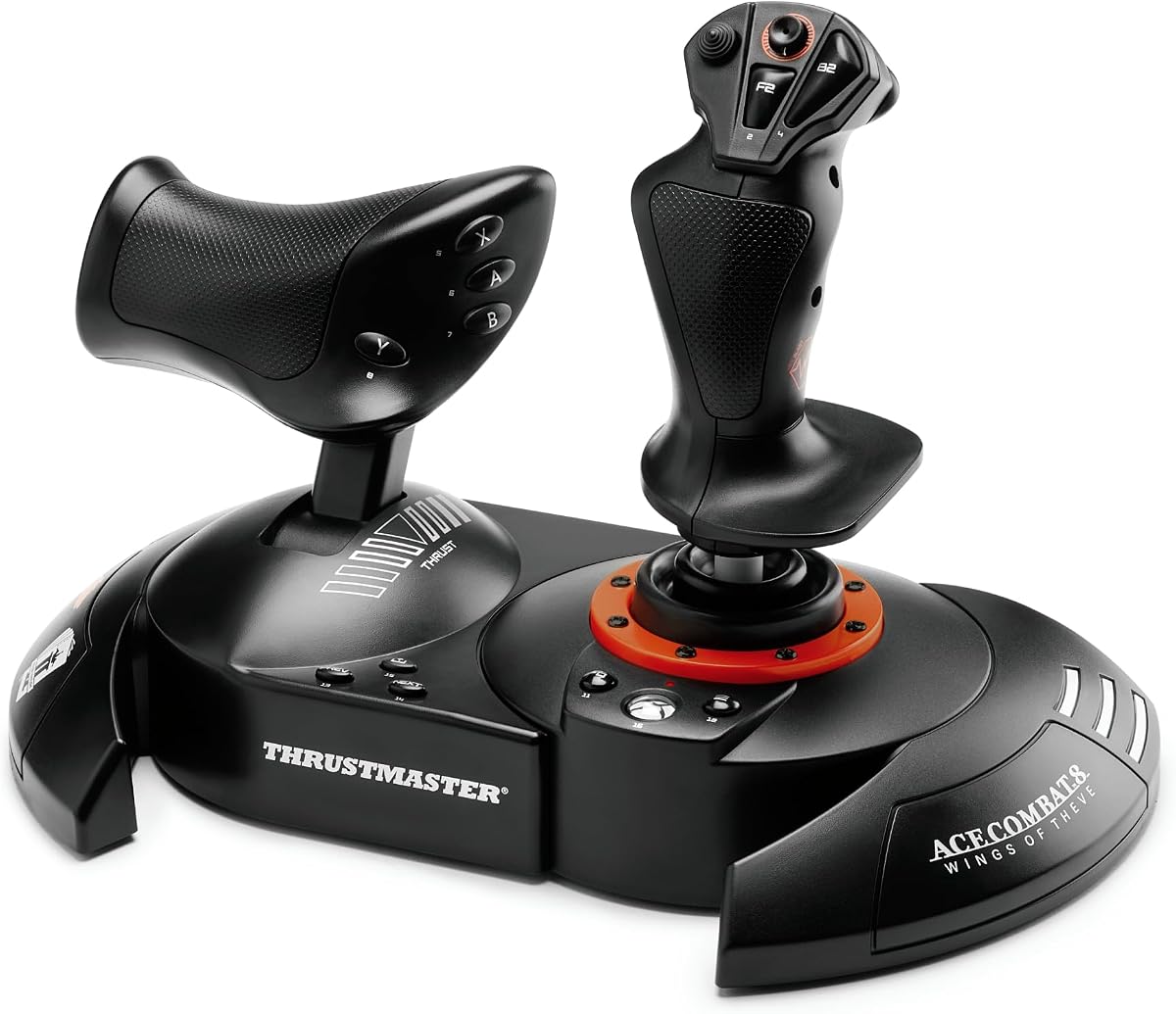
The Thrustmaster T.FLIGHT HOTAS NEO in the Ace Combat 8: Wings of Theve edition is an officially licensed flight controller for Xbox Series X|S, Xbox One, and PC. It is designed for players who want a dedicated combat-flight setup and may appreciate the themed edition even when the main game on the shopping list is Star Wars Squadrons.
We may earn a commission when you buy through this link, at no additional cost to you.
The control system uses seven axes, including a Z-axis, and provides 16 action buttons, a rapid-fire trigger, and a multidirectional hat switch. A vibration motor in the grip supplies physical feedback, while a detachable throttle allows the player to place the stick and throttle separately. The dual rudder system offers two approaches: the joystick's Z-axis or the tilting lever on the throttle.
Thrustmaster's H.E.A.R.T. hall-effect technology is used for precise input, and joystick resistance can be customized. The trade-off is thematic rather than functional: the product is explicitly licensed for Ace Combat, and no numerical customer rating was supplied. Its sizeable flight-control layout is also less convenient than a gamepad for players who do not already favor HOTAS systems.
This model is a strong option for combat-flight enthusiasts who like a complete and adaptable physical control scheme. It offers more axes and action buttons than most conventional controllers and provides both joystick and throttle-based rudder methods. Verify current game compatibility before relying on any particular axis or button.
The official Ace Combat 8: Wings of Theve license gives the product a distinctive presentation for flight-game fans. Its hardware remains a general Xbox and PC flight controller rather than an accessory limited to one title.
The Z-axis and the detachable throttle's tilting lever give the player two ways to manage rotation. Adjustable resistance and hall-effect sensing support a more tailored control feel.
We may earn a commission when you buy through this link, at no additional cost to you.
The Logitech G X56 H.O.T.A.S. is a PC flight simulator controller with a 3.8 rating and more than 189 programmable controls. It includes a joystick, twin throttles, RGB lighting, and two USB connections. Its four-spring system and adjustable throttle friction are especially notable for players who want to fine-tune resistance and movement.
We may earn a commission when you buy through this link, at no additional cost to you.
The stick uses 16-bit hall-effect sensors for aileron and elevator axes, while a new mini analog stick provides additional directional and weapons control. The throttle section includes a friction adjuster and throttle lock. Software is used to manage the programmable controls and lighting, and the product is also positioned as useful for virtual-reality flight setups because its controls sit beneath the player's fingers.
The renewed status should be considered carefully, as it may affect cosmetic condition, packaging, or warranty considerations depending on the seller. The system is PC-only and requires more desk space than a gamepad. It also overlaps with the Logitech G X52, which carries a higher rating and a 282-command configuration, giving buyers a direct reason to compare the two.
The X56 is worth considering for a PC flight rig that prioritizes adjustable mechanical resistance, twin throttles, and extensive programmability. It is a strong fit for players building a persistent cockpit or using VR, provided they are comfortable with a renewed product and a more involved setup.
The Advanced 4-Spring System lets the pilot choose from multiple resistance profiles. This is useful for adapting handling preferences between different aircraft or simulation styles without replacing the entire controller.
Two throttle controls can support more complex aircraft configurations, while the friction adjuster and lock add direct control over movement. RGB lighting and configurable inputs help integrate the system with a PC gaming setup.
We may earn a commission when you buy through this link, at no additional cost to you.
The FLYDIGI Vader 5 Pro is a 4.1-rated gamepad that combines broad platform support with unusually deep physical customization. It works with PC, Nintendo Switch, TV, Android, and laptops, but it is not compatible with Xbox or PlayStation. The controller is aimed at players who want low-latency input, adjustable stick tension, selectable triggers, and extensive remapping.
We may earn a commission when you buy through this link, at no additional cost to you.
Its hall-effect joysticks are designed around stable recentering, no-drift performance, and long-term durability. FORCEFLEX tension can be adjusted from 40 gf to 100 gf, covering light aiming, steering, and precise control preferences. FORCESWITCH triggers alternate between fast micro response and hall-effect linear behavior. The stated latency is 3 ms over a wired connection and 4 ms over wireless.
Customization includes C+Z buttons, two mini shoulder buttons, four detachable rear buttons, and fixed rear buttons. Four motors produce vibration in both the triggers and grips. FLYDIGI Space adds remapping and game-specific profiles, while wired, Bluetooth, and 2.4 GHz modes offer different connection paths. The exclusive charging dock is sold separately.
The Vader 5 Pro is an excellent PC-focused choice for a player who values control tuning and a huge selection of remappable commands. It is less suitable for Xbox console use because of the stated platform exclusions, and its broad feature set may take time to configure. For conventional Star Wars Squadrons play, its adaptable inputs are more useful than a fixed themed design.
The 40 gf to 100 gf tension range is the standout physical feature. A player can use light settings for quick camera movement and firmer settings for controlled steering, aiming, or action-game inputs.
Wired, Bluetooth, and 2.4 GHz options support different setups, with particularly low stated latency over USB. Compatibility with PC, Switch, TV, and Android broadens its use beyond a single gaming platform.
We may earn a commission when you buy through this link, at no additional cost to you.
The right controller depends on your platform, desired realism, available space, and willingness to learn a more complex control system. Compatibility should be checked first, followed by the type of flight controls, customization options, and comfort features that matter most to you.
Choose a controller whose stated platforms overlap with where you actually play. PC players have the widest selection, while Xbox users can consider the licensed Controller Gear gamepad, the T-Flight Hotas One, the ESWAP X2 Pro, the VelocityOne H.O.T.A.S., and the Ace Combat edition HOTAS.
Start with a gamepad for simplicity or accessibility. Choose a HOTAS if precise throttle control, extensive remapping, and a permanent cockpit-style layout are central to your experience.
Favor useful depth over an enormous specification list. Confirm that the product offers the particular axes and command capacity required by your preferred control scheme.
Prioritize stable recentering, clear adjustment ranges, and controls you can configure without constant interruption. Avoid a complex system if ease of use matters more than fine-tuning.
Choose wired operation for the simplest, most consistent desktop setup. Choose wireless or 2.4 GHz when movement and cable management matter more, and confirm how the controller is charged.
Try to hold or position the controls before buying whenever possible. Check hand fit, thumb movement, trigger reach, and the distance required to reach the throttle.
Frequent tinkerers may prefer extensive remapping and profiles. Players who want straightforward plug-and-play use should choose a device with useful defaults and a simpler setup process.
Start by connecting the controller using the method specified in its instructions, then open Star Wars Squadrons and review the current control options before assigning buttons. For a gamepad, test steering, throttle input, targeting, boost, and view controls. For a HOTAS, assign the most frequently used commands to accessible buttons and confirm that each axis moves in the intended direction. Take time to adjust stick tension, throttle resistance, or trigger behavior gradually rather than changing several settings at once.
Create a dedicated configuration profile and save it only after flying a short test mission. Learn the locations of the throttle, rudder, hat switch, and programmable buttons without looking down, and keep nearby items clear so they cannot interfere with a moving control arm. If the product includes software, update it, verify the assigned profile, and test macro or remapping functions separately. Confirm that any changes remain active when the game is launched again.
For maintenance, unplug wired components before cleaning and follow the manufacturer's guidance for surface materials. Remove dust around sticks, triggers, and control surfaces with a soft dry cloth, and avoid liquids that could damage the electronics. Protect the stick from impact and avoid forcing unusual angles. Wireless controllers and HOTAS devices should be charged according to their instructions, while a thumbstick should be moved through its range periodically to reduce the chance of an unresponsive axis. Always check current game and software compatibility after major updates.
A HOTAS can provide a more realistic and configurable flight experience because it separates the stick and throttle and often includes rudder and additional axes. A gamepad is easier to learn, takes less space, and is better for casual or shorter sessions. The best choice depends on how much cockpit realism and customization you value.
A regular Xbox controller is the simplest option for players who want a familiar layout and compact setup. The Controller Gear bundle in this guide is an officially licensed wireless Xbox controller that supports modern Xbox systems and Windows PCs. Check the game's current control settings and headset compatibility before making a final choice.
Not every specialized flight device is guaranteed to be supported, and compatibility can change with game updates. Check the current in-game control options and the manufacturer's support notes for the specific model. The most useful models will map the required axes and provide a practical way to assign essential commands.
Prioritize accurate axes, a comfortable stick, a smooth throttle, rudder control, and enough programmable inputs for your preferred commands. Also consider desk space, grip position, software support, and whether separate pedals are needed. A large command count is useful only if you are comfortable configuring and remembering it.
A licensed controller is primarily appealing for its themed design and coordinated accessories rather than inherently superior control performance. It may include a matching charging stand and provide a more cohesive gaming setup. If ergonomics, wireless features, or custom inputs are your main priorities, compare those factors before deciding.
PC controllers can work when the game and controller are both supported, with the correct connection method and any required software. The FLYDIGI products support PC but not Xbox or PlayStation, while the Thrustmaster and GameSir choices have different platform restrictions. Verify compatibility and use the assigned profile after launching the game.
Wireless flight controls can be convenient, but stability depends on the connection technology, battery level, and interference in the room. Wired systems often emphasize consistent data transmission, while 2.4 GHz wireless options are designed for responsive play. Keep the controller charged and test the connection before a long session.
They are not automatically required, but pedals can add a more natural way to manage yaw or rotation for players whose supported control scheme calls for them. Several flight controllers support separately sold pedals and can lock or adjust related axes when pedals are present. Check game support and your controller's setup instructions before purchasing an add-on.
The Thrustmaster T-Flight Hotas One is the most balanced overall recommendation for a dedicated flight setup, combining Xbox and PC support, a detachable throttle, adjustable resistance, and a strong 4.5 rating. The Logitech G X52 takes the premium route with 282 programmable commands, a multifunction display, and a highly adaptable grip. The Controller Gear Squadrons bundle is the best themed choice, pairing an officially licensed wireless gamepad with a matching pro charging stand.
Your priority should determine the rest of the field. Choose the GameSir Tarantula 8K for an 8,000 Hz wired polling rate and deep PC customization, the FLYDIGI Direwolf 4 for adjustable sticks and broad PC-platform support, or the FLYDIGI Vader 5 Pro for extensive remapping and low-latency multiplatform play. For a more configurable cockpit, the Turtle Beach VelocityOne H.O.T.A.S. offers the broadest stated input and expansion system, while the renewed Logitech X56 emphasizes adjustable springs and twin throttles.
Before purchasing, confirm current game support, the exact platform you use, the control features you need, and the amount of space available for a flight stick and throttle. Product configurations, software behavior, and prices can change over time, so reviewing the current listing and latest game documentation will help you choose confidently.